

In the world of DIY PC building, the direction of case fans is the "soul of the cooling system." Proper fan placement not only lowers hardware temperatures but also extends component lifespan, while incorrect orientation can cause airflow chaos, heat buildup, and even hardware failure. This article combines the latest 2025 cooling technology trends to decode the logic and practical skills of optimizing PC case fan directions.

Intake Fans (IN): Pull cool air into the case to cool components, typically installed at the front, bottom, or side of the case.
Exhaust Fans (OUT): Push hot air out, commonly placed at the rear, top, or above the power supply.
Golden Rule: Intake airflow should be ≥ exhaust airflow to create a positive pressure environment, preventing dust from entering the case.
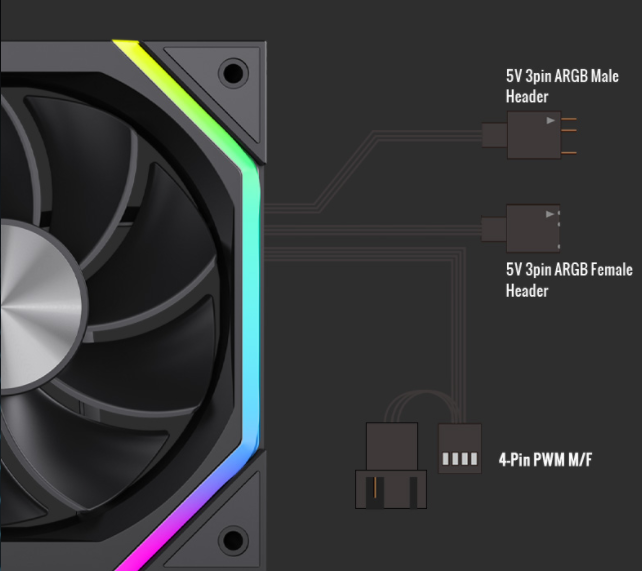
Adjustable-Angle Fans: Patented designs like those from Guangpu Industrial allow motors to tilt fan blades, directing airflow precisely to hotspots like the CPU and GPU.
Smart Thermostatic Fans: Models like the Jonsbo GF124 automatically adjust speed, running quietly under low load and at full speed during high-performance tasks.
Ideal for: Standard ATX cases with air coolers.
Layout Details:
Front fans (120-140mm): Draw cool air to directly cool the GPU and motherboard.
Rear fan (120mm): Expel heat from the CPU cooler and power supply.
Case Study: The Jonsbo LYRA7 case uses bottom/side intake and top/rear exhaust for a 30% boost in cooling efficiency.
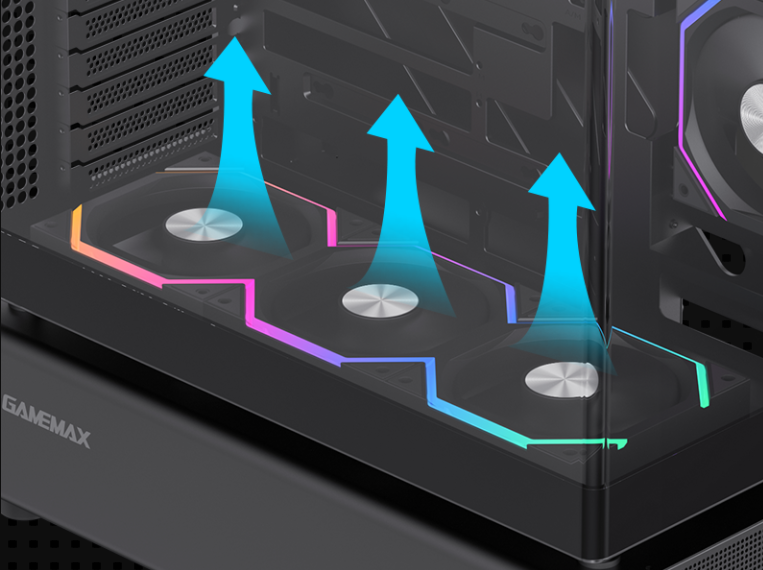
Ideal for: High-end builds with 360mm liquid coolers.
Layout Details:
Top fans (3×120mm): Accelerate radiator heat dissipation to avoid trapped hot air.
Bottom fans (120mm): Assist the CPU cooler in drawing in cool air.
Common Mistake: Never reverse top fans, as this recirculates hot air onto components.
Ideal for: Users balancing aesthetics and cooling.
Tips:
Side fan (120mm): Direct intake toward the GPU to lower GPU temperatures.
Cable Management: Use zip ties to organize wires and prevent airflow blockages.
Challenge: Limited space prone to heat buildup.
Solution:
Bottom fan (92mm): Pull cool air to cool motherboard VRM modules.
Top fan (92mm): Exhaust CPU heat, paired with a low-profile low-profile cooler.
Positive Pressure (Recommended): More intake fans than exhaust to reduce dust accumulation.
Negative Pressure: Suitable for dusty environments but requires regular filter cleaning.
Static Pressure Fans (e.g., Noctua NF-A12x25): High pressure for pushing air through dense heatsink fins.
Airflow Fans (e.g., Cooler Master MF120 Halo): High volume for overall case ventilation.
Error: Setting all fans to intake or exhaust uniformly.
Consequence: Chaotic airflow, leading to 10-15℃ higher CPU temps.
Fix: Adjust dynamically based on hardware; add exhaust fans above the GPU.
Error: Dismissing bottom fans as unnecessary.
Consequence: Overheating power supply and storage drives.
Fix: Set bottom fans to intake, directing air toward the PSU.
Error: Installing AIO fans opposite the radiator airflow.
Consequence: 50% drop in radiator efficiency.
Fix: Align fan and radiator direction for a "pull-push" or "push-pull" cycle.
Error: Running all fans at full speed.
Consequence: Loud noise and reduced fan lifespan.
Fix: Use motherboard BIOS or software (e.g., NZXT CAM) for temperature-based speed curves.
Error: Overcrowding components and blocking airflow paths.
Consequence: CPU temps spiking by 20℃ or more.
Fix: Leave at least 2cm of clearance and avoid cable tangles.
Setup: Pair a 360mm AIO with top exhaust fans for an 8-12℃ CPU temp reduction.
Example: The Jonsbo GAII360 AIO with a 2.8-inch display monitors cooling in real time.
Tech: AI algorithms auto-adjust fan speeds, reducing noise by 30%.
Tools: Asus Aura Sync, MSI Mystic Light.
Advantage: Centralize control for multiple fans, solving motherboard header shortages.
Recommended: Phanteks Fan Hub, Corsair Commander Pro.
Tip: Add magnetic dust filters to intake fans and clean them monthly.
Tool: Cooler Master Magnetically Attachable Dust Filters.
Diagnose Heat Sources: Use HWMonitor to identify CPU/GPU hotspots.
Plan Layout: Choose "front-to-rear" or "bottom-to-top" airflow based on your case design.
Test and Optimize: Adjust fan speeds and directions to balance temperature and noise.

