

AIO (All-in-One) liquid coolers have become a popular choice for gamers and PC enthusiasts, thanks to their efficient heat dissipation—critical for keeping CPUs cool during intense gaming sessions or heavy workloads. Yet one question looms large for many users: Can AIO liquid coolers leak, and if they do, will they damage the CPU? This article breaks down leak probabilities, risks of damage, and essential maintenance steps to keep your system safe.

First, the key question: Yes, AIO liquid coolers can leak, but leaks are extremely rare with quality products and proper use.
Modern AIO coolers are pre-sealed at the factory with rigorous testing. Reputable brands like Corsair, NZXT, and Lian Li subject their coolers to pressure tests, leak checks, and long-term durability trials before shipping. For these brands, the leak rate is estimated to be less than 0.1% over the typical 5–7 year lifespan of an AIO.
Leaks are most likely to occur due to:
Physical damage: Dropping the cooler, bending tubes excessively, or puncturing the radiator (e.g., from sharp case edges).
Manufacturing defects: Faulty seals or welds (very rare with top brands, but possible in budget or counterfeit products).
Aging components: Over time, seals may degrade, especially if the cooler is exposed to extreme temperatures or vibrations for years.
In most cases, a small leak is unlikely to destroy your CPU immediately—but delay can make it worse. Here’s why:
AIO coolers use non-conductive coolant (propylene glycol-based) to minimize electrical risks. If a leak starts, the liquid won’t short-circuit your motherboard or CPU right away. However:
Heat buildup is the bigger threat. If the leak reduces cooling efficiency, the CPU may overheat. Without proper cooling, it could hit 95°C+ and throttle performance; prolonged overheating (105°C+) can damage internal components.
Prolonged exposure matters. If coolant pools on the CPU or motherboard over time, it may corrode metal contacts or seep into crevices, leading to long-term hardware failure.
Worst-case scenarios (e.g., a major leak from a burst tube) are rare but possible—especially with damaged or low-quality coolers.
Prevention is far better than dealing with a leak. Follow these steps to minimize risks:
Choose Reputable Brands
Stick to trusted manufacturers with strong warranties (many offer 5–10 year coverage for leaks). Avoid cheap, unbranded AIOs—saving a few dollars isn’t worth the risk of damage.
Handle and Install Carefully
Never bend or twist the tubes sharply (keep bends gradual to avoid stress on seals).
Ensure the radiator and pump are securely mounted to prevent vibrations (loose parts can wear down seals over time).
Check for sharp edges inside your PC case (cover them with tape if needed to avoid puncturing tubes).
Monitor for Early Warning Signs
Watch for these red flags that a leak may be starting:
Visible moisture: Tiny droplets around the pump, tubes, or radiator.
Reduced cooling performance: Sudden spikes in CPU temperature during gaming (e.g., from 75°C to 90°C+).
Unusual noises: Gurgling or hissing from the pump (may indicate air in the loop, which can strain seals).
Perform Regular Maintenance
Clean dust from the radiator: Clogged fins force the pump to work harder, increasing wear. Use compressed air to clear dust every 3–6 months.
Check mounting tightness: Over time, screws may loosen—tighten them gently (don’t over-tighten) to prevent vibrations.
Replace old coolers: If your AIO is 6+ years old, consider replacing it. Seals degrade with age, and newer models offer better efficiency.
If you spot moisture or suspect a leak:
Shut down your PC immediately to avoid overheating and limit liquid exposure.
Unplug the power and move the PC to a dry, flat surface.
Inspect the cooler to identify the leak source (tube connections, pump, or radiator).
Contact the manufacturer if under warranty—many will replace the cooler and may cover damaged parts.
Clean affected components with isopropyl alcohol and let them dry completely before restarting (if no major damage is visible).
AIO liquid coolers are safe for CPUs when chosen and maintained properly. Leaks are rare (less than 0.1% for quality brands), and non-conductive coolant reduces immediate electrical risks. However, even small leaks can lead to overheating or corrosion if ignored.
By choosing reputable brands, installing carefully, and checking for early signs of wear, you can enjoy the cooling benefits of AIOs without worry. And if a leak does occur, acting fast will protect your CPU and system from lasting damage.
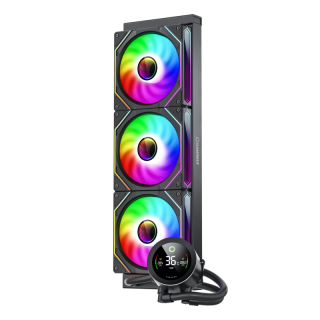
GameMax IceBurg 360V Digital BK, Liquid CPU Cooler 360mm Addressable ARGB Pump Fans 290W TDP AIO Water Cooler
• All-White Aesthetic Design: Sleek one-piece design for a clean and modern look.
• ARGB Sync Capability: Customizable ARGB lighting syncs seamlessly with your motherboard.
• Intelligent PWM Fan Control: Automatically adjusts fan speed for optimal cooling and low noise.
• Enhanced Cooling Performance: Features an efficient cold plate, copper base, and optimized fans for superior heat dissipation.
• Wide Compatibility: Compatible with various Intel and AMD CPU sockets for versatility.
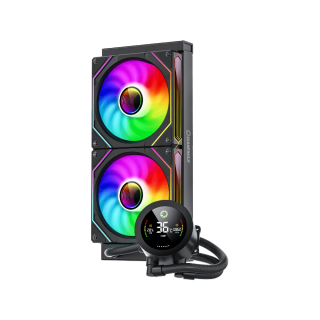
GameMax IceBurg 240V Digital BK, Liquid CPU Cooler 240mm Addressable ARGB Pump Fans 245W TDP AIO Water Cooler
• Stylish Design: All-white, sleek aesthetics.
• ARGB Sync: Customizable lighting syncs with motherboard.
• Intelligent Cooling: Auto-adjusts fan speed for optimal performance.
• Enhanced Heat Transfer: Efficient cold plate and fans.
• Wide Compatibility & Durability: Fits multiple sockets, long-lasting materials.

