

If you’ve ever shopped for a gaming mouse or tinkered with your mouse settings, you’ve likely come across the term “DPI.” But what exactly does DPI mean in a mouse, and why does it matter—especially for gaming? In this guide, we’ll break down the science behind DPI, how it differs from other mouse metrics, and most importantly, how it can make or break your gaming performance.
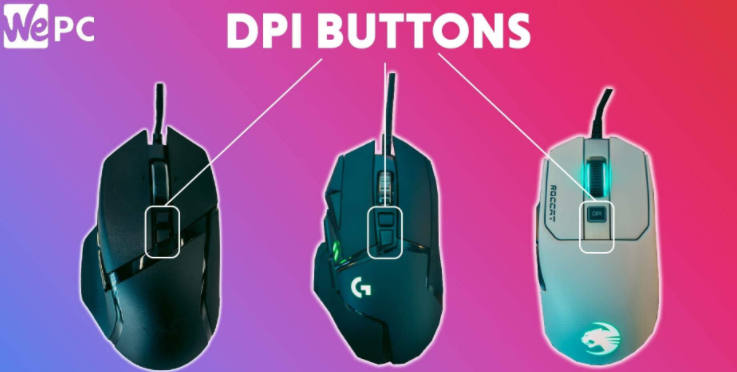
DPI stands for Dots Per Inch, a measurement that refers to how many pixels your mouse cursor moves on the screen for every inch you physically move the mouse. For example, a mouse set to 800 DPI means that moving the mouse one inch across your mousepad will result in the cursor moving 800 pixels across your monitor.
Think of it as a ratio between physical movement and on-screen movement: the higher the DPI, the more sensitive the mouse is to small movements. A low DPI, conversely, requires more physical movement to achieve the same cursor distance.
It’s important to note that DPI is often confused with CPI (Counts Per Inch), a term used by some manufacturers to describe the same concept. While technically different in measurement methodology, they function identically in practice—both quantify how responsive your mouse is to movement.
In gaming, precision and control are everything, and DPI plays a pivotal role in both. Here’s how it impacts your gameplay:
High DPI settings make your cursor move faster with less physical effort. This can be advantageous in fast-paced games like Apex Legends or Call of Duty, where quick 180-degree turns or tracking enemies across large screens are essential. A high DPI allows you to react swiftly without sweeping your arm across the desk.
On the flip side, low DPI requires larger hand movements, which can feel sluggish in fast games but offers finer control for precise actions—like lining up a headshot in Counter-Strike: Global Offensive or placing a pixel-perfect building in Fortnite.
While high DPI boosts speed, it can reduce accuracy if not paired with proper sensitivity settings. A mouse set to 16,000 DPI might zip across the screen with a tiny flick of your wrist, making it hard to land precise shots or navigate menus. This is why many professional gamers opt for moderate DPI levels (often between 400–800) and adjust in-game sensitivity to balance speed and control.
Low DPI, combined with higher in-game sensitivity, can create a “smoother” feel for actions that require steady hands, such as sniping in Battlefield or aiming with a scope in PUBG.
DPI doesn’t exist in a vacuum—it interacts with your monitor’s resolution. A 1080p screen (1920x1080 pixels) requires less DPI to cover the entire display than a 4K screen (3840x2160 pixels). For example, moving a mouse 1 inch at 800 DPI on a 1080p monitor will cover about half the screen width, but on a 4K monitor, it might only cover a quarter. This means gamers with high-resolution displays may need slightly higher DPI settings to avoid excessive arm movement.
Not all mice are created equal. Entry-level mice often max out at 2000–4000 DPI, while premium gaming mice can reach 20,000+ DPI. However, beyond a certain point (around 8000 DPI for most players), higher DPI doesn’t improve performance—it becomes a marketing gimmick. Most gamers find that even 16,000 DPI is overkill, as the human hand can’t physically move the mouse with enough precision to utilize such extreme sensitivity.
The “best” DPI is subjective and depends on your gaming style, mousepad size, and the type of game you play. Here are some general guidelines:
FPS Games (e.g., CS:GO, Valorant): Precision is key. Most pros use 400–800 DPI with low in-game sensitivity to ensure steady aim.
-** Battle Royales (e.g., Fortnite, Apex Legends): A mix of speed and accuracy. 800–1600 DPI works well for quick looting and sudden encounters.
- MOBAs/RPGs (e.g., League of Legends, World of Warcraft): Navigation and clicking small icons matter. 800–1200 DPI balances cursor speed for menus and map movement.
- Racing/Simulation Games**: Lower DPI (400–800) helps with smooth steering controls, mimicking the feel of a physical wheel.
To find your sweet spot, start with a moderate DPI (800 is a good baseline) and adjust your in-game sensitivity. Practice in training modes, focusing on how quickly you can turn and how accurately you can aim. Over time, you’ll develop muscle memory for your ideal settings.
-** Myth: Higher DPI equals better performance.False. High DPI can hinder accuracy if you can’t control it. Pros often use low DPI for a reason.
- Myth: DPI and in-game sensitivity are the same.False. DPI is a hardware setting, while in-game sensitivity is a software multiplier. Together, they determine your “effective sensitivity.”
- Myth: You need to match DPI to your screen size.**Not exactly. Screen resolution (pixels per inch) is more relevant than physical size. A 27-inch 1080p monitor and a 24-inch 1080p monitor have the same pixel density, so DPI needs won’t differ.
DPI is a critical metric that bridges your physical mouse movements with on-screen action. Understanding what DPI means in a mouse—and how it affects gaming—empowers you to fine-tune your setup for better performance, whether you’re a casual player or aspiring pro. Remember: there’s no one-size-fits-all DPI. Experiment, practice, and find what feels most natural for your gaming style. After all, the best settings are the ones that let you play at your best.

