

When building or upgrading a computer, choosing the right motherboard form factor is a critical decision that impacts everything from case compatibility to expansion potential. Among the most common form factors are ATX, Micro ATX (mATX), and ITX (Mini-ITX), each designed to meet different needs. Let’s explore their key differences in size, expansion capabilities, power requirements, and ideal use cases.
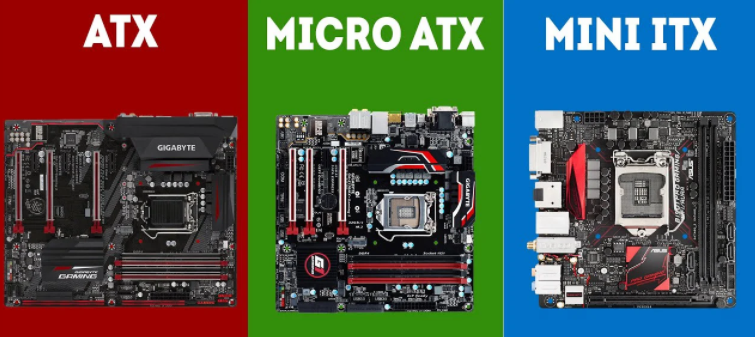
Feature | ATX | Micro ATX (mATX) | ITX (Mini - ITX) |
Dimensions | 305mm x 244mm | 244mm x 244mm | 170mm x 170mm |
Case Compatibility | ATX - compatible cases | mATX cases, most ATX cases | ITX/SFF cases |
Expansion Slots | 7 - 9 (1 - 2 PCIe x16) | 4 - 6 (1 PCIe x16) | 1 (1 PCIe x16) |
Typical PSU | ATX (600W +) | ATX (400 - 600W) | SFX/TFX or ATX (300 - 500W) |
Best For | Enthusiasts, content creators | Mainstream users, budget builds | Compact setups, HTPCs |
The most obvious distinction lies in their dimensions, which directly determine which computer cases they can fit into.
ATX: As the standard full - size form factor, it measures 305mm x 244mm (12 x 9.6 inches). Due to its larger size, it requires an ATX - compatible case. Many mid - tower and full - tower cases are designed to accommodate ATX motherboards, offering ample internal space for components and airflow.
Micro ATX (mATX): It is a compact version of ATX, with dimensions of 244mm x 244mm (9.6 x 9.6 inches). Its smaller size makes it more versatile. It can fit into mATX cases and also work in most ATX cases, as ATX cases have extra space to accommodate the smaller motherboard.
ITX (Mini - ITX): It is the smallest of the three, with a tiny size of 170mm x 170mm (6.7 x 6.7 inches). To house an ITX motherboard, you need an ITX - specific case or a small form - factor (SFF) case. These cases are often much smaller, making them perfect for building compact or portable systems.
Expansion slots are essential for adding components like graphics cards, sound cards, or additional storage controllers. The number and type of these slots vary significantly among the three form factors.
ATX: It excels in expansion. Typically, it comes with 7 - 9 expansion slots. This usually includes 1 or 2 PCIe x16 slots (for high - performance graphics cards), several PCIe x1 slots, and sometimes legacy PCI slots. This abundance of slots makes ATX motherboards ideal for users who need multiple expansion components, such as content creators using multiple GPUs or enthusiasts adding various peripherals.
Micro ATX (mATX): It offers a more limited but still practical expansion option. It generally has 4 - 6 expansion slots, with 1 PCIe x16 slot (sufficient for a single graphics card) and a few additional PCIe x1 or legacy slots. It strikes a good balance between size and expandability, suitable for most casual gamers and general - purpose users who don't need a large number of extra components.
ITX (Mini - ITX): Due to its small size, it has very limited expansion. It only has 1 expansion slot, almost always a PCIe x16 slot. This means you can add a graphics card, but there's no room for other expansion cards. If you need extra features, you'll have to rely on USB ports, M.2 slots, or external devices.
The power supply unit (PSU) needed for each motherboard is closely related to its size and the components it supports.
ATX: It typically requires an ATX PSU (24 - pin main power connector + 4/8 - pin CPU power connector). Since ATX motherboards can support more powerful components (such as multiple GPUs or high - end CPUs), they often work with higher - wattage PSUs (600W and above) to meet the increased power demand.
Micro ATX (mATX): It is compatible with standard ATX PSUs as well. However, because it usually supports fewer power - hungry components, it can function with mid - range PSUs (400 - 600W) in most cases, which can help reduce costs.
ITX (Mini - ITX): It can use smaller PSUs like SFX or TFX form factors, in addition to some ATX PSUs (depending on the case). Given that ITX systems are often built for efficiency or compactness, they are paired with low - power CPUs and GPUs, so a 300 - 500W PSU is usually enough.
Each form factor is tailored to specific user needs, from high - end performance to space - saving designs.
ATX: It is the top choice for enthusiasts, content creators, and gamers who demand maximum performance and expandability. It can support multi - GPU setups (SLI/CrossFire), large - capacity RAM (up to 128GB or more), and multiple storage drives. If you plan to upgrade your system frequently or use resource - intensive applications like video editing or 3D rendering, an ATX motherboard is a great option.
Micro ATX (mATX): It is a budget - friendly and versatile option for mainstream users. It works well for gaming PCs with a single GPU, home office computers, or media centers. It offers enough expansion for most tasks while being smaller and cheaper than ATX motherboards. It's a good compromise between performance and cost.
ITX (Mini - ITX): It is designed for space - constrained setups or minimalist builds. It's perfect for HTPCs (Home Theater PCs) that fit under a TV, portable gaming rigs, or office desktops where desk space is limited. Although it has limited expansion, modern ITX motherboards still support powerful CPUs and fast M.2 storage, making them capable of handling daily tasks and even gaming (with a single GPU).
In summary, the choice between ATX, Micro ATX, and ITX depends on your priorities:
Choose ATX if you need maximum expansion and power.
Choose Micro ATX if you want a balance of size, cost, and functionality.
Choose ITX if compactness and portability are your top concerns.
Understanding these differences will help you make an informed decision, ensuring that your motherboard works well with your case, components, and long - term usage needs.

