

In today's booming digital display technology, picture smoothness has become an important indicator to measure visual experience. Whether it's gamers pursuing silky-smooth operations or designers' demanding requirements for color transitions, they all rely on a key technology - VSync. This article will comprehensively analyze this important technology that affects visual experience from the dimensions of technical principles, core functions, advantages and disadvantages analysis, and cutting-edge development.
The Technical Essence and Working Principle of VSync
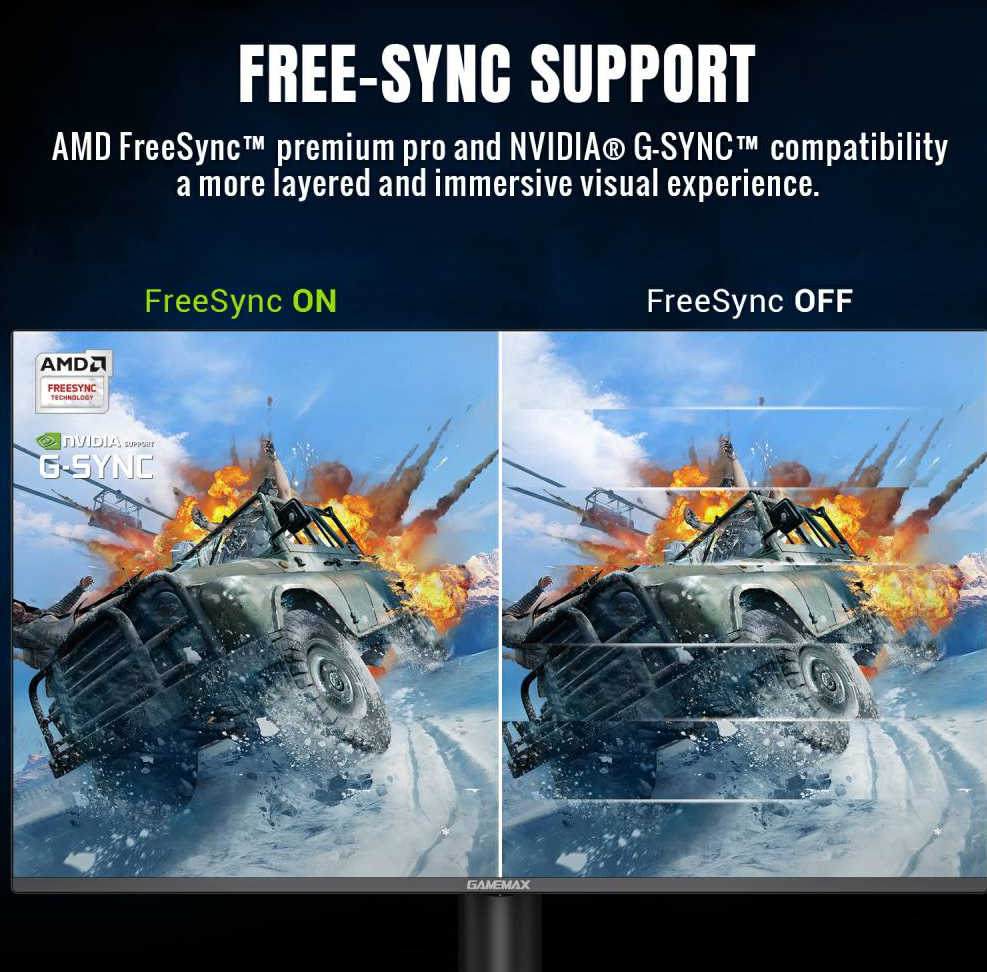
VSync (Vertical Synchronization) is a technical mechanism that coordinates the refresh rate of the display and the rendering frame rate of the graphics card. Its core goal is to solve the problem of screen tearing. To understand this technology, we need to first clarify two basic concepts:
Refresh Rate: The number of times the display updates the picture per second, in Hz. Common values include 60Hz, 144Hz, 240Hz, etc.
Frame Rate: The number of image frames generated by the graphics card per second, in FPS (Frames Per Second).
Traditional CRT monitors use a progressive scanning method. After the electron gun scans from the top of the screen to the bottom line by line, it will send a vertical synchronization signal (Vertical Retrace Signal) to inform the graphics card that it can transmit the next frame of data. VSync technology is based on this signal mechanism, forcing the graphics card to output a new frame only when it receives the vertical synchronization signal, ensuring that the display scans complete the rendering of the current frame before displaying the next frame.
When the graphics card's frame rate is higher than the display's refresh rate (such as 100FPS vs 60Hz), if VSync is turned off, a frame of picture may be split and displayed in two scanning cycles, resulting in screen tearing. When VSync is turned on, the graphics card will wait for the vertical synchronization signal to make the frame rate match the refresh rate (60FPS), completely eliminating the tearing phenomenon.
Core Functions and Application Scenarios of VSync
(1) Analysis of Core Functions
Eliminate screen tearing: By synchronizing the output of the graphics card with the scanning rhythm of the display, ensure the display of complete frames, which is particularly effective in high-speed motion scenarios (such as racing games, intense fights).
Stabilize picture output: Avoid display confusion caused by frame rate fluctuations, especially suitable for systems with unbalanced hardware configurations.
Protect hardware synchronization mechanism: Maintain the synchronous working state of display devices in scenarios such as multi-monitor output and professional graphics processing.
(2) Typical Application Scenarios
Game Entertainment: 3D games have extremely high requirements for picture continuity. Turning on VSync can significantly improve the visual experience, especially in high-speed dynamic scenarios such as "Cyberpunk 2077" and "Forza Horizon".
Video Editing: Professional designers need precise color transitions and picture connections. VSync ensures the accuracy of timeline preview.
Virtual Reality (VR): VR devices are extremely sensitive to latency. VSync technology combined with low persistence display can effectively reduce dizziness.
Technical Limitations and Optimization Schemes of VSync
(1) Analysis of Inherent Defects
Increased input latency: The graphics card needs to wait for the vertical synchronization signal, resulting in prolonged operation response time (about 16.6ms@60Hz), which may affect operation accuracy in e-sports games.
Frame rate ceiling effect: When the performance of the graphics card far exceeds the refresh rate of the display (such as RTX 4090 with a 144Hz display), excess performance is wasted, and stuttering may occur when the frame rate is lower than the refresh rate.
Compatibility issues: Early technologies had insufficient support for adaptive synchronization technologies such as G-SYNC/FreeSync, leading to functional conflicts.
(2) Technical Optimization Paths
Adaptive synchronization technology:
G-SYNC (NVIDIA): Dynamically adjust the display refresh rate through a dedicated chip, supporting 30-144Hz range synchronization, with latency reduced to below 4ms.
FreeSync (AMD): Based on the Adaptive-Sync protocol of DisplayPort, it is open and compatible with more displays, supporting 40-144Hz variable refresh rates.
Layered synchronization mechanism: Introduce "half refresh rate synchronization" (such as 30FPS@60Hz) to reduce performance loss while maintaining picture stability.
Low-latency mode: Some graphics card drivers support the collaborative work of VSync and low-latency mode, optimizing the frame buffer queue when vertical synchronization is turned on.
Technological Evolution and Future Trends
(1) Comparison of Three Generations of VSync Technology
Technical Generation | Core Features | Latency Level | Refresh Rate Range | Compatibility |
First Generation | Fixed frame rate synchronization | 16-33ms | Single refresh rate | Basic DX/OpenGL |
Second Generation | Dynamic range synchronization | 8-16ms | Multi-segment adjustable | G-SYNC/FreeSync |
Third Generation | Intelligent adaptation | 4-8ms | Full range variable | DirectX 12 Ultimate |
(2) Cutting-edge Development Directions
Popularization of Variable Refresh Rate (VRR): With the promotion of HDMI 2.1 and DisplayPort 2.0, VRR technology will become a standard feature of mid-to-high-end displays, supporting a dynamic range of 48-120Hz.
AI-assisted synchronization algorithms: Predict frame generation time through machine learning, dynamically adjust synchronization strategies, and reduce latency while maintaining picture stability.
Improvement of cross-platform compatibility: A unified VRR standard is being formulated, which will break the technical barriers between NVIDIA and AMD in the future and realize full-platform adaptive synchronization.
User Selection Guide
(1) Configuration Decision Reference
Usage Scenario | Graphics Card Performance | Display Type | VSync Setting Suggestion |
E-sports Games | High-end | 240Hz TN screen | Turn off VSync, turn on G-SYNC |
AAA Game Experience | Mid-range | 144Hz VA screen | Turn on standard VSync |
Professional Design | Professional graphics card | 60Hz IPS wide color gamut | Force turn on VSync |
Laptop Mobile Office | Integrated graphics card | 60Hz LCD | Automatic mode (system default) |
(2) Optimization Setting Suggestions
Give priority to enabling the display's native synchronization technology (such as G-SYNC requires opening the display's OSD option).
Set the "maximum frame rate limit" in the graphics card control center, which is recommended to be set within the range of ±10% of the display's refresh rate.
Use it with low-latency mode (such as NVIDIA's Ultra Low Latency) to balance picture quality and response speed.
Conclusion
VSync technology has developed from an early solution to screen tearing into a comprehensive display technology system integrating hardware synchronization, dynamic adaptation, and intelligent optimization. With the popularization of high-refresh-rate devices and the improvement of GPU performance, the connotation of VSync is constantly expanding - from simple vertical synchronization to a collaborative optimization mechanism of the entire display ecosystem. For ordinary users, understanding the core logic of this technology helps to find the best balance between picture smoothness, operation latency, and hardware performance, and fully release the potential of display devices. In the foreseeable future, with the full implementation of VRR technology and the upgrade of display interfaces, VSync will continue to improve the interactive experience between humans and the digital world in a more intelligent and efficient form.

