

In the field of computer graphics processing, VSync (Vertical Synchronization) is a crucial technology that affects the display quality of games and graphics applications. This article will delve deep into the definition and working principles of VSync, as well as when to turn it on or off in different scenarios.
I. What is VSync?
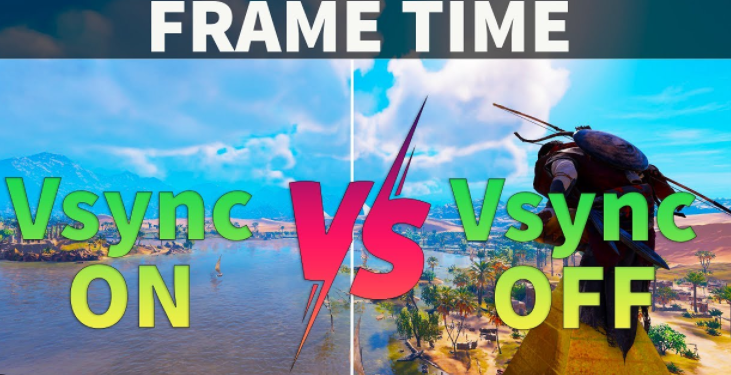
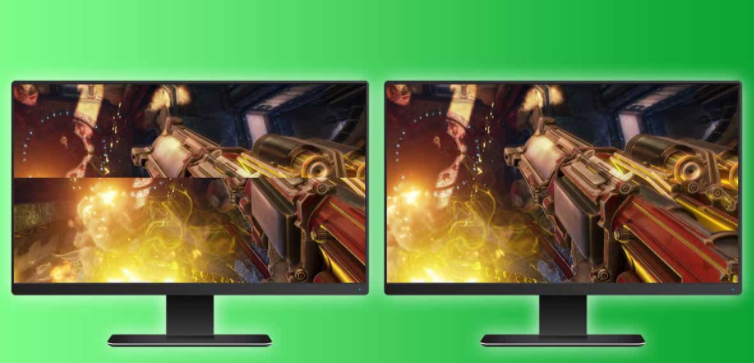
VSync, short for Vertical Synchronization, is a technology used to coordinate the refresh rate of the monitor and the rendering frame rate of the graphics card. Its main purpose is to solve the problem of screen tearing. Screen tearing occurs when the graphics card is simultaneously rendering a new image while the monitor is displaying an image. As a result, the upper part of the monitor shows the old image, and the lower part shows the new image, creating a noticeable horizontal split line that seriously impairs the visual experience.
II. How VSync Works
(I) Monitor Refresh Rate and Graphics Card Frame Rate
The monitor refresh rate refers to the number of times the monitor updates the screen image per second, measured in Hz (Hertz). Common refresh rates include 60Hz, 144Hz, 240Hz, etc. The graphics card frame rate, on the other hand, is the number of frames rendered by the graphics card per second, measured in FPS (Frames Per Second). When the graphics card frame rate is higher than the monitor refresh rate, screen tearing is likely to occur without VSync. Conversely, when the graphics card frame rate is lower than the monitor refresh rate, screen stuttering may occur.
(II) Vertical Synchronization Signal
VSync operates based on the vertical synchronization signal of the monitor. When the monitor finishes scanning one frame of an image and is ready to start scanning the next frame, it sends out a vertical synchronization signal. When VSync is enabled, the graphics card will wait for this signal and only send the rendered frame to the monitor when the signal arrives. In this way, the monitor displays a complete frame of the image each time, effectively preventing screen tearing.
(III) Two Modes
Standard VSync: The graphics card outputs frames strictly according to the monitor's refresh rate, meaning the frame rate is limited to be equal to the monitor refresh rate. For example, on a 60Hz monitor, the frame rate is capped at 60FPS. This mode completely eliminates screen tearing but may increase input latency because the graphics card has to wait for the vertical synchronization signal.
Adaptive VSync: With the development of technology, adaptive VSync technologies such as NVIDIA's G-SYNC and AMD's FreeSync have emerged. These technologies allow the monitor's refresh rate to dynamically sync with the graphics card frame rate. Within a certain range (usually from 30Hz to the maximum refresh rate of the monitor), the monitor adjusts its refresh rate according to the graphics card's frame rate. This not only avoids screen tearing but also reduces input latency, enhancing the smoothness of the game.
III. When to Turn On VSync
(I) When Pursuing Image Quality
If you are a gamer who values the integrity and visual experience of game graphics, such as when playing single-player story-driven games, screen tearing can severely disrupt the sense of immersion. Enabling VSync in this case ensures smooth and complete visuals, allowing you to better enjoy the game's stunning graphics.
(II) When the Monitor Refresh Rate is Fixed and the Graphics Card Performance is Sufficient
When using a monitor with a fixed refresh rate (e.g., 60Hz) and your graphics card is powerful enough to consistently reach or exceed the monitor refresh rate at high graphics settings, turning on VSync can limit the frame rate to the monitor refresh rate. This prevents excessive consumption of hardware resources due to an overly high frame rate while ensuring there is no screen tearing.
(III) When Reducing the Impact of Screen Tearing
For applications with high demands on image quality, such as graphic design and video editing, the accuracy and integrity of the image are of great importance. Enabling VSync can prevent screen tearing during operation, improving visual comfort and accuracy during work.
IV. When to Turn Off VSync
(I) For Competitive Games Requiring Extreme Responsiveness
In competitive games like League of Legends and Counter-Strike: Global Offensive, every millisecond of latency can affect the outcome of the game. Enabling VSync increases input latency. Although it makes the picture more stable, it may cause your actions not to be reflected on the screen in a timely manner. For e-sports players who pursue the ultimate reaction speed, turning off VSync, even if it may result in slight screen tearing, ensures the lowest possible input latency, giving them an edge in the game.
(II) When the Graphics Card Performance is Inadequate
When the graphics card performance is weak and unable to reach the monitor's refresh rate under the current settings, enabling VSync will cause the frame rate to be limited to a level lower than the monitor refresh rate, and frame rate fluctuations and stuttering may occur. In this situation, turning off VSync allows the graphics card to output a higher frame rate as much as possible. Even with some screen tearing, it can make the game run relatively more smoothly and reduce the feeling of stuttering.
(III) When Using a Variable Refresh Rate Monitor
If you are using a monitor that supports technologies like G-SYNC or FreeSync, when the corresponding technology is enabled, there is usually no need to turn on standard VSync. These technologies can already dynamically synchronize the monitor refresh rate with the graphics card frame rate, achieving better display effects while avoiding the drawbacks of standard VSync.
V. Conclusion
VSync is a technology that plays a vital role in graphics display. Whether to turn it on or off should be determined according to specific usage scenarios and requirements. Enabling VSync is a good choice when pursuing image quality and integrity, while turning it off may be more appropriate when extreme responsiveness is required or hardware performance is limited. With the continuous development of display technology, the emergence of adaptive VSync technologies provides users with better solutions, helping us strike a better balance between image quality and performance. In practical use, users can flexibly adjust the VSync settings according to their device configurations and usage needs to achieve the best visual experience and operation feel.

