

In the world of gaming, every piece of hardware matters—from the CPU that powers the action to the monitor that displays it. When it comes to monitors, the debate between curved and flat screens has become increasingly prominent. Gamers often wonder: do curved monitors truly enhance the gaming experience, or are they just a stylish alternative to flat screens? Let’s dive into the key factors that set these two display types apart and determine which one reigns supreme for gaming.
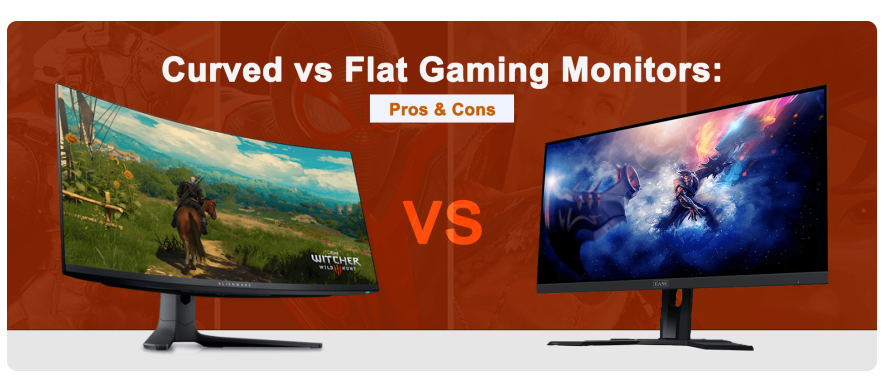
One of the most talked-about benefits of curved monitors is their ability to boost immersion. Curved screens are designed to mimic the natural curvature of the human eye, which has a field of view that’s slightly curved rather than perfectly flat. This design creates a more “wrapped-around” feel, making gamers feel like they’re part of the game world rather than just observing it.
In fast-paced games like Call of Duty: Warzone or Apex Legends, where split-second reactions matter, the curved design can make peripheral movements—such as an enemy approaching from the side—feel more natural. The screen’s curvature pulls the edges of the display closer to your line of sight, reducing the “distance” between the center and the edges of the screen. This makes it easier to track movement across the entire display without straining your eyes, creating a more seamless and immersive experience.
Flat screens, on the other hand, present a linear, flat surface. While they still deliver crisp visuals, they lack the “enveloping” effect of curved monitors. In games that rely heavily on atmosphere—like open-world RPGs such as The Witcher 3 or Elden Ring—the flat screen can feel more like a window into the game world rather than a portal that draws you in. For gamers who prioritize losing themselves in the game’s universe, curved monitors have a clear edge here.
A wider field of view (FOV) can be a game-changer in competitive gaming, as it allows you to see more of the battlefield at once. Curved monitors, especially those with large screen sizes (32 inches or more) and ultra-wide aspect ratios (21:9 or even 32:9), excel in this area. The curvature ensures that the edges of the screen are closer to your peripheral vision, expanding your visible in-game space without requiring you to turn your head as much.
In games like Fortnite or PUBG, where spotting enemies early can mean the difference between victory and defeat, a curved ultra-wide monitor can give you a strategic advantage. You’ll be able to see opponents approaching from the sides sooner than you would on a flat screen of the same size, giving you precious extra time to react.
Flat screens, while capable of offering wide FOVs with large sizes, struggle to match the peripheral coverage of curved monitors. The flat surface means the edges of the screen are farther from your line of sight, which can create a “blind spot” effect in your peripheral vision. This is less noticeable on smaller flat screens but becomes more apparent as the screen size increases.
While curved monitors offer benefits in immersion and FOV, they aren’t without drawbacks—chief among them being potential visual distortion. The curvature of the screen can cause images at the edges to appear slightly stretched or warped, especially on larger monitors with a more aggressive curve (measured by a “radius,” where a smaller number indicates a more pronounced curve, e.g., 1800R vs. 3000R).
This distortion is most noticeable in games with straight lines, such as architectural details in Minecraft or the crosshairs in first-person shooters. For competitive gamers, even minor distortion can be distracting, as it may make it harder to judge distances or align shots accurately. Flat screens, by contrast, deliver consistent image quality across the entire display. Every pixel is equidistant from your eyes, ensuring straight lines remain straight and proportions stay true—critical for precision in games that demand accuracy.
Another factor to consider is viewing distance. Curved monitors perform best when you’re seated close to the screen (typically 2–3 feet away). If you sit too far back, the curvature becomes less effective, and the edges may appear distorted. Flat screens, however, maintain their image quality regardless of viewing distance, making them more versatile for setups where seating position varies.
Gaming marathons are common, and eye fatigue is a real concern for serious gamers. Curved monitors are often marketed as being more comfortable for the eyes, and there’s some truth to this claim. The curvature reduces the amount of eye movement required to scan the entire screen, as the edges are brought closer to your natural line of sight. This can minimize eye strain during extended play sessions, especially on ultra-wide curved monitors where the screen real estate is vast.
Additionally, curved screens can reduce glare and reflections more effectively than flat screens in some setups. The curved surface helps direct light away from your eyes, whereas flat screens may reflect more ambient light, creating distracting hotspots. However, this benefit depends heavily on room lighting—curved monitors aren’t immune to glare, and proper positioning (e.g., avoiding direct light sources) is still essential.
Flat screens, while not inherently less comfortable, may require more eye movement to cover large displays. On a 32-inch flat monitor, for example, your eyes have to work harder to shift focus from the center to the edges, which can lead to fatigue over time. That said, flat screens with features like flicker-free technology and low blue light filters can mitigate these issues, making them a strong contender for comfort.
Curved monitors tend to shine in larger sizes (32 inches and above) and ultra-wide formats. Their curvature helps “bind” the large screen into a cohesive viewing experience, preventing the sense of the display being split into separate sections. For example, a 34-inch curved ultra-wide monitor feels like a single, continuous canvas, whereas a 34-inch flat ultra-wide can feel like two smaller screens joined together, disrupting immersion.
In terms of resolution, both curved and flat monitors are available in high resolutions like 4K and QHD. However, curved monitors with 4K resolution are often more expensive due to the complexity of manufacturing curved panels with precise pixel alignment. Flat screens, being more straightforward to produce, generally offer better value at high resolutions, making them a better choice for gamers on a budget who don’t want to compromise on sharpness.
For 1080p or 1440p resolutions, curved monitors are more accessible and can still deliver impressive visuals. They’re a popular choice for gamers who prioritize screen size and immersion over raw pixel count.
So, are curved monitors better for gaming? The answer isn’t black and white—it depends on your priorities as a gamer.
If you’re a casual gamer who loves open-world adventures, RPGs, or racing games and values immersion above all else, a curved monitor (preferably 32 inches or larger with a moderate curve) can elevate your experience. The wrap-around feel and expanded peripheral vision make you feel like you’re inside the game, and the reduced eye movement can keep you comfortable during long sessions.
On the other hand, if you’re a competitive gamer focused on precision in shooters, MOBAs, or fighting games, a flat screen is likely the better choice. Its consistent image quality, lack of distortion, and versatility across viewing distances ensure you can perform at your best. Flat screens also offer better value at high resolutions, making them ideal for gamers who want sharp visuals without overspending.
Ultimately, the “better” monitor is the one that aligns with your gaming habits, setup, and preferences. Whether you choose curved or flat, prioritize features like high refresh rates (144Hz or higher) and low response times—these are universal traits that enhance gaming performance, regardless of screen shape.

