

In the world of mechanical keyboards, the 65% and 75% layouts have become popular choices among many users due to their ability to balance portability and practicality. However, the seemingly slight differences between the two can have a significant impact on the user experience. This article will provide an in-depth analysis of the differences between 65% and 75% keyboard layouts from aspects such as layout details, applicable scenarios, and purchasing suggestions to help you find the one that suits you best.
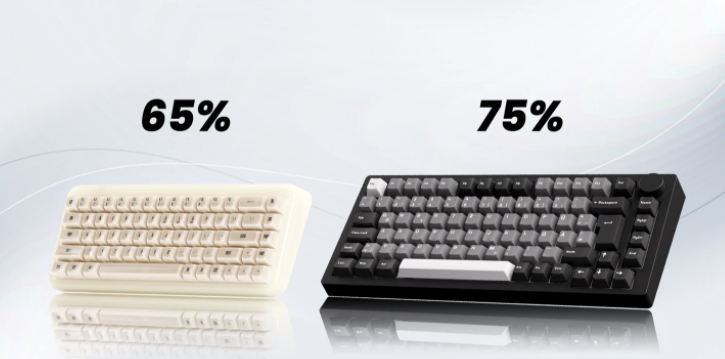
I. Layout Details: A Small Difference Makes a Big Difference in Experience
Both 65% and 75% keyboard layouts are compact designs that omit the numeric keypad compared to full-size keyboards to save desktop space. But there are obvious differences in the retention of key positions between the two:
The 65% keyboard layout is further streamlined, usually omitting the F-row function keys and the editing keys above the arrow keys (such as Home, End, Page Up/Down, etc.), retaining only the main key area, arrow keys, and some commonly used shortcut keys. Its key arrangement is tight, and the overall size is smaller, suitable for users pursuing extreme portability.
The 75% keyboard layout is relatively "complete". On the basis of retaining the main key area and arrow keys, it also retains the F-row function keys and some editing keys, and these keys are usually arranged in a compact way, which saves space while ensuring the integrity of functions. This layout strikes a good balance between compactness and practicality.
II. Applicable Scenarios: Each Has Its Own Strengths, Choose According to Needs
In office scenarios, operations such as word processing, spreadsheet making, and web browsing have different requirements for keyboard functions.
For users who mainly focus on text input and have low dependence on shortcut keys, the 65% keyboard layout is sufficient. Its small size can free up more space on the desktop, making mouse operation more flexible. However, if you need to frequently use the F-row function keys (such as quickly executing operations like saving and printing in office software) or editing keys (such as quickly positioning the cursor in a document), the 75% keyboard layout will be more advantageous, avoiding the cumbersomeness caused by frequent use of key combinations.
In games, the response speed and operational convenience of the keyboard are crucial.
For games such as MOBA and FPS, players mainly rely on the main key area and arrow keys to operate. The compact design of the 65% keyboard layout can reduce the distance of hand movement, improve the operation speed, and at the same time, its small size is convenient for players to place the keyboard and mouse on the desktop, optimizing the operation posture.
For some games that require frequent use of F-row function keys to switch skills or view information (such as some MMORPG games), the F-row keys of the 75% keyboard layout can make the operation more direct, avoiding the impact of key combination operation errors on the game experience.
If you need to carry the keyboard out frequently, such as participating in offline competitions, mobile office, etc., the 65% keyboard layout has more obvious advantages. Its smaller size and lighter weight make it easy to put into a backpack and more convenient to carry. Although the 75% keyboard layout is also more portable than the full-size keyboard, it is slightly inferior in terms of extreme portability.
III. Purchasing Suggestions: Consider Comprehensively Based on Your Own Needs
First of all, you must clarify your main usage scenarios. If you mainly work in an office and frequently use the F-row and editing keys, the 75% keyboard layout is a better choice; if you pay more attention to portability, or mainly use it in scenarios with low dependence on function keys, the 65% keyboard layout is more suitable.
Users who have long used full-size keyboards may need some time to adapt to compact layout keyboards. If it is difficult to change the operating habits of the F-row and editing keys, the 75% keyboard layout can reduce the adaptation cost; if you are willing to try new operating methods and can skillfully use key combinations to replace some functions, the 65% keyboard layout can also bring a good user experience.
No matter which layout you choose, the quality of the keyboard cannot be ignored. Pay attention to the feel of the switch (such as red switches, brown switches, blue switches, etc., each with its own characteristics), the material and craftsmanship of the keycaps (affecting the feel and durability), the connection method of the keyboard (wired, wireless, or dual-mode, wireless connection needs to consider battery life and stability) and other factors.
IV. Summary
The 65% and 75% keyboard layouts have their own advantages and disadvantages. There is no absolute good or bad. The key is whether they meet your own usage needs and operating habits. The 65% keyboard layout wins with its extreme portability and compact design, suitable for users with low dependence on function keys, pursuing a concise desktop, or needing to carry the keyboard frequently; the 75% keyboard layout strikes a balance between compactness and practicality, more suitable for office users or specific game players who need to frequently use the F-row and editing keys.
When purchasing, you may wish to comprehensively consider your own usage scenarios, operating habits, and requirements for keyboard quality. I believe you will definitely find the most suitable keyboard for you, making input and operation more efficient and comfortable.

