

In 2025, the battle between All-in-One (AIO) water cooling and high-performance air cooling reaches new heights as CPU thermal demands intensify. Whether you’re building a gaming PC, a content creation workstation, or a compact office setup, choosing the right cooler is critical for performance, noise levels, and longevity. This guide dissects the latest advancements, performance metrics, and practical considerations to help you decide.
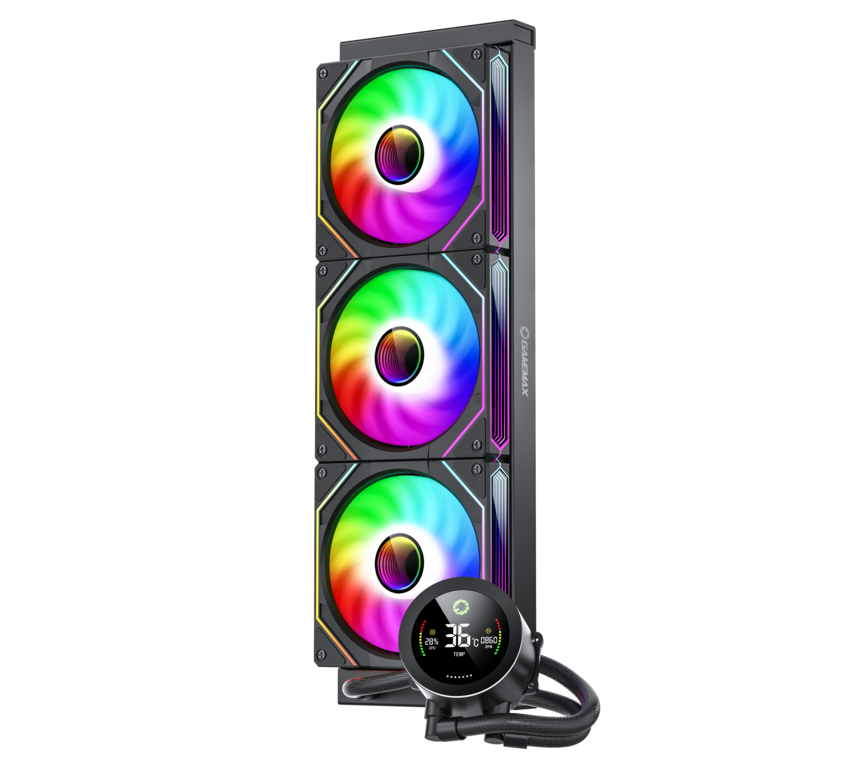
AIO Water Cooling
Advantages:
Superior Cooling Efficiency: AIO water coolers, such as the GAMEMAX ICEBURG 360 DIGITAL , leverage liquid’s high thermal capacity to reduce CPU temperatures by 4–5°C compared to air coolers under extreme loads (e.g., overclocking or 4K rendering). For example, the ID-COOLING HUNTER GDL with dual 360mm radiators claims a 5°C temperature drop over single-radiator designs .
Silent Operation: Water pumps and fans work synergistically to maintain low noise levels, even at full load. The be quiet! Light Loop 360mm , for instance, combines a high-speed pump with PWM fans to achieve whisper-quiet performance.
Limitations:
Environmental Sensitivity: Cooling efficiency declines in hot environments (e.g., rooms without air conditioning), as radiator performance depends on ambient temperature .
Air Cooling
Advantages:
Reliability: No risk of leaks or pump failure. The Noctua NH-D15 G2 , with its upgraded 8-heatpipe design and 20% larger fin surface area, offers rock-solid stability for high-TGP CPUs like the Intel Core i9-14900K (253W Turbo) .
Cost-Effectiveness: Budget-friendly options like the Thermalright Peerless Assassin 120 deliver excellent mid-range performance at half the price of entry-level AIOs.
Limitations:
High-Load Thermal Throttling: In enclosed cases, air coolers struggle to dissipate heat, leading to temperature spikes. The DeepCool AK620 , a premium dual-tower design, handles 200W CPUs but may hit thermal limits under sustained .
AIO Water Cooling:
Dynamic Noise Control: Modern AIOs use AI-driven PWM fans to adjust speeds based on CPU load, minimizing noise during light tasks.
Typical Noise Levels: 25–35 dB(A) under load
Air Cooling:
Fan-Driven Noise: High-RPM fans can exceed 30 dB(A) under stress, though advancements like Sterrox polymer blades reduce turbulence.
Quiet Options: The Noctua NH-U12A , with its low-profile design and SSO2 bearings, maintains ≤25 dB(A) even at full speed.
| Factor | AIO Water Cooling | Air Cooling |
|---|---|---|
| Initial Cost | $150–$600+ (e.g., NZXT Kraken Elite 360 ) | $30–$200+ (e.g., Thermalright PA120 SE ) |
| Maintenance | Annual coolant checks; 5–6-year lifespan | Zero maintenance; 10+ years |
| Upgradability | Limited (radiator size fixed) | Flexible (swap fans/heat sinks) |
Pro Tip: For enthusiasts, AIOs with LCD screens (e.g., GAMEMAX ICEBURG 360 DIGITAL ) add value through real-time temperature monitoring and customizable RGB.
AIO Water Cooling:
Space Requirements: Requires 240mm/360mm radiator mounts (top or front of the case). The Cooler Master MasterLiquid 360 includes pre-applied thermal paste for hassle-free setup.
Compatibility Risks: Thick radiators may clash with RAM or GPU power cables in compact cases (e.g., Fractal Design Define Mini C).
Air Cooling:
Plug-and-Play Simplicity: The Cooler Master Hyper 212 EVO installs in minutes without tools.
Height Restrictions: Tower coolers like the Noctua NH-D15 G2 (165mm) may not fit in slim cases (e.g., SilverStone SG13).
| Scenario | Water Cooling | Air Cooling |
|---|---|---|
| Gaming/Overclocking | Ideal for AMD Ryzen 9 7900X3D (120W) | Adequate for Intel Core i5-14600K (125W) |
| Content Creation | Essential for 8K video rendering or AI training | Suitable for light editing (e.g., 1080p YouTube) |
| Compact Builds | Best for SFF cases (e.g., Lian Li TU150) | Constrained by cooler height limits |
| Aesthetics | Stunning RGB and LCD displays (e.g., Corsair iCUE H170i Elite LCD) | Minimalist designs (e.g., Noctua’s chromax.black) |
Hybrid Cooling Solutions: Brands like Cooler Master are experimenting with air-water hybrid systems, combining a small AIO with auxiliary fans for extreme overclocking.
AI-Powered Cooling: The NZXT Kraken Z73 uses AI to optimize fan and pump speeds based on real-time workload analysis.
Sustainability: Eco-friendly materials (e.g., Cooler Master’s recycled PET tubing) reduce environmental impact.
Budget Builders: Opt for air cooling (e.g., Thermalright PA120 SE ) for cost-effective performance.
Gamers/Enthusiasts: Invest in a 360mm AIO (e.g., Cooler Master IceGiant G360 ) to unlock CPU overclocking potential.
Content Creators: Choose a high-end AIO (e.g., GAMEMAX ICEBURG 360 DIGITAL ) for sustained multi-threaded workloads.
SFF Enthusiasts: Pair a 120mm AIO (e.g., NZXT Kraken X53) with case fans for balanced cooling in compact setups.
By aligning your needs with these factors, you’ll ensure your CPU stays cool, quiet, and reliable in 2025 and beyond. Always check compatibility with your motherboard and case before purchasing!

GameMax IceBurg 360V Digital BK, Liquid CPU Cooler 360mm Addressable ARGB Pump Fans 290W TDP AIO Water Cooler
• All-White Aesthetic Design: Sleek one-piece design for a clean and modern look.
• ARGB Sync Capability: Customizable ARGB lighting syncs seamlessly with your motherboard.
• Intelligent PWM Fan Control: Automatically adjusts fan speed for optimal cooling and low noise.
• Enhanced Cooling Performance: Features an efficient cold plate, copper base, and optimized fans for superior heat dissipation.
• Wide Compatibility: Compatible with various Intel and AMD CPU sockets for versatility.

