

In the era of booming eSports culture, RGB lighting has transcended mere visual decoration, evolving into a pivotal element for gamers to express individuality and pursue ultimate experiences. From motherboards to fans, graphics cards to peripherals, lighting synchronization technologies—under the banner of Divine Light Sync—are reshaping the interaction logic of PC hardware. This article delves into the collaborative principles of RGB motherboards and fans, integrating technical features of leading brands like ASUS, MSI, and GIGABYTE, to present a panoramic view of lighting aesthetics and performance balance.
The core of RGB lighting lies in the matching of signal transmission protocols and power supply interfaces. Mainstream motherboards currently support two lighting control standards:

12V 4-pin RGB: Utilizes analog signals, enabling only monochromatic display or simple blinking effects, as seen in some interfaces of ASUS' early motherboards.
5V 3-pin ARGB (Addressable RGB): Based on digital signal protocols (e.g., WS2812B), it allows independent control of each LED bead, enabling complex effects like dynamic gradients and wave flows—now a standard for high-end motherboards.
Take the ASUS TUF B450M-PRO GAMING as an example: its onboard Aura Sync interface is compatible with both standards. The 12V port suits budget-friendly entry-level fans, while the 5V ARGB port offers vast possibilities for gamers seeking extreme lighting effects. MSI's Mystic Light goes further, using the SMBus bus to enable cross-device linkage, syncing not only motherboards, graphics cards, and RAM but also extending to keyboards, mice, and even smart lighting to create a whole-room lighting ecosystem.
ASUS Aura Sync stands out for its compatibility, supporting over a hundred third-party devices, including Corsair memory and Razer peripherals. Its software interface offers intelligent modes like music rhythm and temperature response—for instance, when CPU temperature rises, fan lighting automatically switches to red as a warning. In the TUF series motherboards, Aura Sync deeply integrates with Fan Xpert 2+ intelligent fan control, achieving dynamic balance between lighting and cooling: when under high load, fan speed increases, and lighting synchronizes with accelerating flow effects.
MSI's Mystic Light pioneered game event triggering—in Cyberpunk 2077, for example, when the character enters combat, case fans flash red and speed up in sync. Its Atmosphere Connect technology breakthroughly extends lighting to monitors and room illumination, real-time mapping game screen colors to physical space by linking with Nanoleaf smart panels. For live streamers, Mystic Light can also sync with Voicemod audio software, enabling dual interaction between voice effects and lighting special effects.
GIGABYTE's RGB Fusion 2.0 adopts a hierarchical control philosophy, allowing users to divide devices into "core components" (motherboard, graphics card) and "extended components" (fans, light strips) for independent lighting settings. Its AORUS water cooling radiators, via the GCC Smart Manager software, can link pump lighting with fan speed—displaying static blue light under low load and switching to dynamic breathing mode under high load. Notably, GIGABYTE motherboards excel in legacy device compatibility; even with non-ARGB fans, basic synchronization can be achieved via adapters.
ARGB fans: Require connection to the motherboard's 5V 3-pin port. Recommended for motherboards like ASUS ROG Strix or MSI MAG series, which support multi-device daisy-chaining (up to 12 fans in sync).
Traditional RGB fans: Connect via 12V 4-pin ports but only enable monochromatic sync, suitable for budget-conscious users.
If motherboard ports are insufficient, an RGB hub (e.g., ASUS Aura Sync Hub) can expand connectivity, with attention to each port's maximum current limit (typically 3A for 5V, 2A for 12V).
Fan performance parameters (e.g., static pressure, airflow) directly impact cooling efficiency. For example, high-static-pressure fans (e.g., 120mm slim models) suit radiator cooling, while high-airflow fans (e.g., 140mm thick models) optimize case airflow. In lighting design, adopt a front-rear echo strategy: set front fans to gradient rainbow colors and rear fans to monochromatic backlight for visual hierarchy.
Cable management: Prioritize braided RGB extension cables to avoid messy wiring affecting airflow.
Software debugging: After installing motherboard drivers, enable "RGB Control" in BIOS; some motherboards (e.g., GIGABYTE AORUS) require manual lighting firmware updates.
Compatibility testing: When powering on for the first time, connect only the motherboard and 1–2 fans to troubleshoot port issues step-by-step.
AI-Driven Adaptive Lighting: Using machine learning to analyze user behavior, such as automatically switching lighting modes based on game types—tactical blue for FPS games, dynamic flow for MOBA titles.
Cross-Device Ecosystem Integration: MSI has already achieved linkage with Philips Hue smart lighting, with future potential for deep integration with smart home platforms (e.g., Mi Home, Alexa) to sync lighting with environmental temperature and music.
Re-balancing Energy Efficiency and Performance: Next-gen ARGB fans use low-power LED chips, reducing power consumption by 30% under full load while supporting breathing effects in sleep mode.
The synchronization of RGB motherboards and fans is not just a technological innovation but a perfect fusion of digital aesthetics and functionalism. From ASUS' open ecosystem to MSI's scenario-driven linkage, from GIGABYTE's modular design to the industry's intelligent trends, this lighting revolution is redefining the interaction boundaries of PC hardware. For both hardcore performance seekers and DIY enthusiasts passionate about personal expression, RGB synchronization technology opens a door to immersive eSports experiences. When fan light patterns resonate with gaming rhythms, and motherboard lighting interacts with creative sparks, this may well be the most moving ensemble of technology and art.
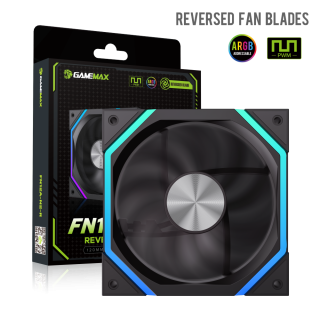
• Quiet Operation: With a hydraulic bearing design, it operates at just 33.7dB(A) for a quiet environment.
• High Air Pressure: Delivers 1.98mm H2O air pressure, ensuring stable temperature control for your components.
• PWM Smart Speed Control: The 4-pin PWM interface enables precise speed adjustment for optimized performance and noise.
• RGB Compatibility: Supports 3-pin Aura RGB lighting synchronization for an enhanced gaming atmosphere.
• Long Lifespan: Offers up to 30,000 hours of reliable use.
• Multiple Interface Compatibility: Includes various connectors for broad motherboard and power system compatibility.
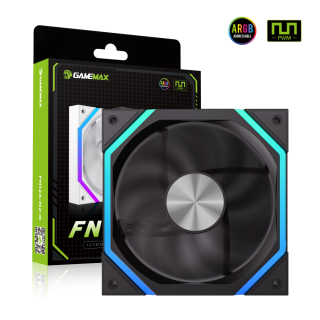
• Flexible Connectivity: Supports both parallel and series connections.
• Premium Aluminum Core: Features a metallic aluminum CD pattern for a sophisticated touch.
• Customizable Options: Available in black or white, with reversible fan blades.
• Silent Performance: Hydraulic bearings ensure noise levels as low as 33.7dB(A), even under heavy loads.
• Optimal Air Pressure: Delivers up to 1.98mm H2O, providing efficient and reliable cooling for stable temperature control.
• Durable Performance: Offers a lifespan of up to 30,000 hours for reliable, long-term use

