

Choosing the right motherboard is key when building or upgrading a PC. EATX and ATX are two prominent options, each with distinct traits. This guide breaks down their differences to help you decide based on your needs and budget.
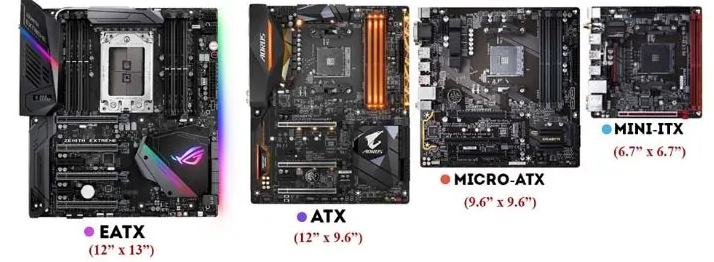
EATX (Extended ATX) is a larger, feature-rich variant, measuring 12 x 13 inches (305 x 330 mm). Its expanded PCB allows for advanced features, making it ideal for high-end gaming setups, professional workstations, and enthusiast builds. It supports multiple GPUs, extensive storage, and enhanced cooling, catering to power users needing top performance and maximum expandability.
ATX (Advanced Technology Extended), introduced by Intel in the mid-1990s, is the industry standard at 12 x 9.6 inches (305 x 244 mm). Widely used in gaming PCs, workstations, and general desktops, it balances size, features, and affordability. It fits most mid-tower cases and offers enough space for essential components, meeting average users' needs without high costs.
EATX motherboards have a larger footprint, requiring full-tower or EATX-specific cases, which are often pricier and less common. ATX motherboards are more compact, fitting mid-tower and full-tower cases, giving more flexibility in case selection.
RAM: ATX boards usually have 4 slots, supporting up to 128 GB—enough for most users. EATX boards may have 6-8 slots, supporting 256 GB or more, ideal for virtualization and memory-heavy tasks.
PCIe Slots: ATX has 3-4 slots, suitable for a single GPU or a few expansion cards. EATX has 4-8 slots, perfect for multiple GPUs in high-end gaming, 3D rendering, or mining, with faster data transfer via extra lanes.
ATX motherboards are more budget-friendly due to smaller size and fewer features. EATX, with advanced features and larger size, costs more, justifiable for those needing top performance and expandability.
ATX boards have 1-2 M.2 sockets, limiting NVMe SSD setups. High-end EATX boards (e.g., ASUS ROG Zenith II Extreme) have 4 M.2 slots, enabling RAID 0 arrays for much faster transfer speeds, boosting overall system performance.
ATX boards have 2-3 PCIe x16 slots, good for dual GPUs. EATX boards (e.g., Gigabyte X399 Aorus Extreme) have 4 slots, enabling quad SLI/CrossFireX. Tests show two GTX 1080 Ti in SLI can improve 4K rendering speeds by 95% in supported titles.
ATX tops out at 128 GB (4 x 32 GB), enough for most tasks. EATX (e.g., ASUS Zenith II Extreme) supports 256 GB (8 x 32 GB), vital for data analytics, machine learning, and HPC simulations, with benchmark-proven performance benefits.
ATX boards (e.g., MSI Pro Z690 - A) have 14 + 1 + 1 phase VRMs, struggling with extreme overclocking of high-end CPUs. EATX boards (e.g., Gigabyte Z690 Aorus Extreme) have 20 + 1 + 2 phase arrays, ensuring stable power for extreme overclocking.
ATX has basic cooling features, sufficient for normal use but not aggressive overclocking. EATX has multiple water cooling sensors, 10 + fan headers, and PCB cutouts for complex cooling, preventing thermal throttling during overclocking.
You’re on a budget.
You need a standard gaming or workstation PC.
You don’t need much expansion.
You’re a power user/enthusiast needing top performance.
You want future-proofing for upgrades.
You have high-end gaming or professional workloads (3D rendering, data analysis).
In short, EATX and ATX serve different users. Your choice depends on needs, budget, and future plans. Consider these factors to pick the right foundation for your PC.

