

Choosing the right motherboard size directly affects your PC’s performance and expandability. Extended ATX (E-ATX) and ATX are two mainstream options, each with distinct strengths. This optimized guide breaks down their core differences to help you decide.

Feature | ATX | E-ATX |
Size | 12×9.6 inches (305×244mm) | 12×13 inches (305×330mm) |
Expansion Slots | 4–7 slots (sufficient for most users) | 8+ slots (ideal for multi-component setups) |
Power Delivery | Basic to mid-range (mainstream use) | Advanced (supports overclocking/high-power components) |
Price | Budget-friendly | Premium (30–50% higher than ATX) |
Case Compatibility | Most standard PC cases | Requires E-ATX/XL-ATX specific cases |
Best For | Mainstream gaming, home/office use | High-end workstations, multi-GPU setups |
ATX: The industry standard for over 25 years. Its compact size fits 90% of PC cases, making it the go-to for most builds.
E-ATX: Larger by 3.4 inches in width, this form factor prioritizes extra space for components—critical for power-hungry setups.
E-ATX excels here: With 8+ expansion slots, it supports multi-GPU configurations (SLI/CrossFire), multiple high-speed storage drives, or specialized cards (e.g., 10Gbps network adapters).
ATX works for most users: 4–7 slots handle a single GPU, a few storage drives, and basic upgrades (e.g., a Wi-Fi card). Only power users will hit its limits.
E-ATX: Built with more power phases and robust cooling to handle overclocked CPUs, high-end GPUs, or workstation-grade hardware (e.g., for 3D rendering or video editing).
ATX: Delivers stable power for mainstream tasks—gaming, office work, or light content creation. It’s not designed for extreme overclocking or multi-component setups.
Price: E-ATX motherboards cost 30–50% more than ATX due to their advanced features. ATX offers the best value for casual users.
Cases: E-ATX requires a large case explicitly marked as E-ATX compatible. ATX fits in almost all mid-tower and full-tower cases, offering far more flexibility.
Choose ATX if you need a balanced, budget-friendly build for gaming, home use, or light content creation.
Choose E-ATX if you’re building a high-end workstation, multi-GPU gaming rig, or server—and you’re willing to invest in a larger case and higher costs.
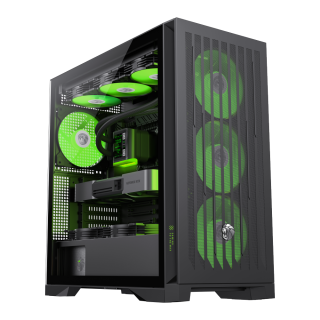
• Comprehensive Compatibility: Supports E-ATX motherboards, 425mm GPUs, 420mm radiators, 245mm PSUs, and 185mm air coolers for versatile hardware configurations.
• Advanced Cooling Matrix: Offers 9×120mm or 8×140mm fan mounts with 4 pre-installed 140mm ARGB PWM fans and a dedicated controller.
• Future-Proof Connectivity: Features Type-C Gen 2, dual USB 3.0 ports, and BTF motherboard compatibility for modern cable management.
• Effortless Building: Incorporates a tool-free design, vertical GPU support, and hidden cable routing with a detachable cover.
• Lion-Inspired Design: Showcases bold claw-mark mesh panels, a tempered glass side panel, and customizable ARGB lighting.
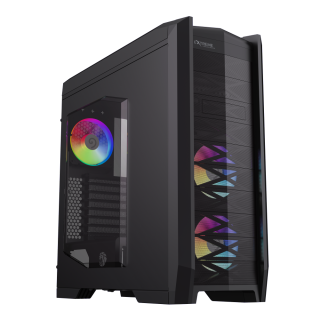
• Full Tower Chassis: EATX (CEB), ATX, M-ATX, and ITX motherboards supported
• Stylishly designed front panel and top panel
• Performance warehouse: 8 PCIe slots, 3.5 HDD* 8 + 2.5 SSD * 2; or 2.5 SSD * 10
• Efficient cooling, 5 ARGB fans included
• Built-in HDD hot-swap and a 3-in-1 card reader
• Powerful I/O Panel

