

In the vast realm of computer hardware, the motherboard, as a core component, serves as a solid foundation, supporting the operation of the entire system. Among them, ATX and Micro ATX motherboards have occupied important positions in the market with their unique charms. For computer enthusiasts and PC builders, a deep understanding of the differences between them is the key to making an informed choice. Next, let's unveil the mysteries of ATX and Micro ATX motherboards and embark on a comprehensive comparative journey.
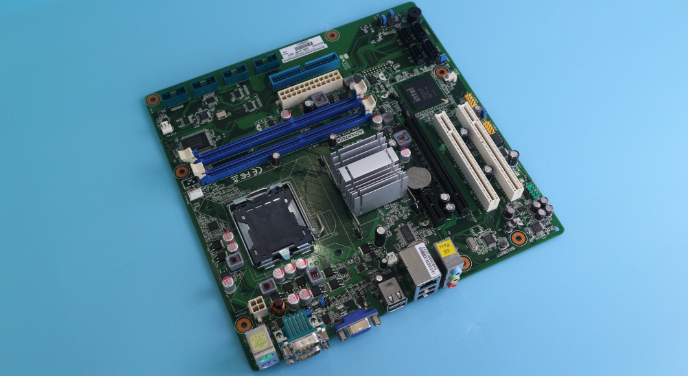
ATX, which stands for "Advanced Technology Extended", was introduced by Intel in 1995. Its emergence brought new vitality and transformation to the field of computer motherboards, much like a refreshing breeze. Since its inception, ATX has quickly won the favor of the market with its excellent performance and expandability, becoming the mainstream choice for desktop PC motherboards among consumers. After years of development, it has maintained strong vitality.
Size: The standard size of an ATX motherboard is 305mm×244mm. The larger size provides it with ample layout space, allowing it to accommodate more electronic components and interfaces, laying a solid physical foundation for the high-performance operation of the system.
Slots: In terms of expansion slots, ATX motherboards demonstrate powerful capabilities. They are usually equipped with up to 7 expansion slots, including PCI, PCIe x1, PCIe x4, and PCIe x16 slots. The rich variety and quantity of slots enable users to easily add multiple high-end graphics cards, professional sound cards, high-speed network adapters, and other expansion cards, meeting various complex application requirements. It is especially suitable for gamers who pursue ultimate performance and professional workstation users.
Heat Dissipation: Thanks to its size advantage, ATX motherboards offer greater flexibility in heat dissipation design. Larger heat sinks and more fans can be installed on the motherboard, providing a more efficient heat dissipation solution for heat - generating components such as processors and graphics cards. This effectively reduces the system temperature and ensures stability and reliability during high-load operation.
Power Interface: ATX motherboards typically use a 24-pin main power interface and an 8-pin (or 4+4-pin) CPU auxiliary power interface, which can provide sufficient and stable power supply for high-performance hardware, meeting the stringent power requirements of the system during overclocking or when running large-scale software.
High-End Gaming: For gamers who pursue the ultimate gaming experience, ATX motherboards are the ideal choice. Their abundant expansion slots can easily support multi-GPU technologies such as SLI, significantly enhancing graphics processing capabilities and making game graphics smoother, more detailed, and with more realistic special effects. At the same time, good heat dissipation performance and powerful power supply ensure that the system can run stably during long hours of intense gaming, without 卡顿 or crashes due to overheating or insufficient power supply.
Professional Workstations: ATX motherboards also perform exceptionally well in the field of professional workstations. They can meet the needs of professionals for multi-core processors, large-capacity memory, high-speed storage devices, and various professional expansion cards, providing strong support for highly demanding tasks such as 3D modeling, video editing, and data analysis. For example, in the film and television production industry, workstations built with ATX motherboards can smoothly handle 4K or even 8K video materials, greatly improving work efficiency.
Micro ATX, also known as MATX, was officially introduced in 1997. It is a compact motherboard developed based on the ATX motherboard, aiming to provide more flexible options for users who have certain requirements for computer space while also expecting good performance. Compared with ATX motherboards, Micro ATX motherboards have gradually emerged in the market with their small size and excellent cost-effectiveness.
Size: The size of a Micro ATX motherboard is 244mm×244mm, which is significantly smaller than that of an ATX motherboard. This compact design makes it more flexible in chassis selection, especially suitable for building small chassis and compact computer hosts. It can effectively save desktop space and meet modern users' pursuit of a small and exquisite computer appearance.
Slots: Although Micro ATX motherboards have relatively fewer expansion slots, usually with a maximum of 4 expansion slots, including PCI, PCIe x1, and PCIe x16 slots, they can still meet the daily usage needs of most ordinary users. For example, users can add a discrete graphics card through these slots to enhance graphics performance or install a sound card to improve audio effects.
Heat Dissipation: Due to the smaller size of the motherboard, Micro ATX motherboards are relatively limited in heat dissipation. They are usually equipped with smaller heat sinks and fewer fan interfaces. However, with the continuous advancement of hardware technology, the power consumption of modern processors and graphics cards has gradually decreased. Coupled with efficient heat dissipation designs, Micro ATX motherboards can also ensure good heat dissipation effects under normal use, ensuring stable system operation.
Power Interface: Micro ATX motherboards also use a 24-pin main power interface and an 8-pin (or 4+4-pin) CPU auxiliary power interface, which are the same as the power interface specifications of ATX motherboards. This gives them high versatility in power supply selection, allowing users to choose suitable power supplies according to their actual needs.
Home and Office Use: Micro ATX motherboards are very suitable for ordinary home users and office scenarios. They can meet the basic needs of running daily office software, web browsing, and multimedia entertainment. At the same time, their small size can be easily placed on a desk or in a narrow space without taking up too much room. In addition, the relatively affordable price of Micro ATX motherboards offers high cost-effectiveness, enabling users to save certain costs.
Small Gaming Consoles: For some gamers who have certain requirements for gaming performance but also want a small-sized computer host, Micro ATX motherboards can also deliver good results. By reasonably matching mid-to-high-end processors, discrete graphics cards, and an appropriate amount of memory, Micro ATX motherboards can build a small gaming console with good performance. It can meet gaming needs while maintaining the small and delicate appearance of the chassis, combining beauty and practicality.
ATX: The larger size of ATX motherboards provides more spacious layout space, with a relatively large distance between components, which is conducive to heat dissipation and air circulation. At the same time, the abundant expansion slots and interfaces make hardware installation more convenient, and users can upgrade or replace hardware more easily. However, the larger size also means that a larger chassis is required for installation, which may not be very friendly to users with limited space.
Micro ATX: The small size is a major advantage of Micro ATX motherboards. They can adapt to various small chassis, providing users with more chassis options. In some scenarios with high space requirements, such as living room HTPCs (Home Theater Personal Computers) or small office environments, Micro ATX motherboards can give full play to their space utilization advantages. However, due to the smaller size, the component layout on the motherboard is relatively compact, and there may be certain limitations when installing some large heat sinks or multiple expansion cards.
ATX: As mentioned above, ATX motherboards have rich expansion slots, which can easily support multi-GPU configurations, multi-disk arrays, and various professional expansion cards, providing users with great expansion space. Whether it is upgrading hardware in the future or meeting special application requirements, ATX motherboards can handle them easily. In addition, ATX motherboards usually support more memory slots, with a maximum of 4 memory slots, which can meet users' needs for large-capacity memory and further enhance system performance.
Micro ATX: Although the number of expansion slots of Micro ATX motherboards is limited, it is sufficient for the daily use and general upgrade needs of most ordinary users. They usually support two memory slots, which can meet the memory capacity requirements of most users. However, if users have more complex expansion needs, such as installing multiple professional expansion cards or building a multi-GPU system, Micro ATX motherboards may not be able to meet these requirements.
ATX: The larger size gives ATX motherboards a greater advantage in heat dissipation design. Larger heat sinks and more fans can be installed on the motherboard to form a more complete heat dissipation air duct, effectively reducing the system temperature. In addition, the larger distance between components on ATX motherboards is conducive to air circulation, further improving heat dissipation efficiency. During high-load operation, good heat dissipation performance can ensure the stability of the system and reduce problems such as crashes and blue screens caused by overheating.
Micro ATX: Due to the smaller size, the heat dissipation space of Micro ATX motherboards is relatively limited, and usually only smaller heat sinks and fewer fans can be installed. When dealing with high-load tasks, there may be a situation of insufficient heat dissipation, resulting in an increase in system temperature and affecting performance. However, for general daily use and light gaming scenarios, the heat dissipation performance of Micro ATX motherboards can still meet the requirements. To improve the heat dissipation effect, users can choose Micro ATX motherboards with efficient heat dissipation designs or add auxiliary heat dissipation devices, such as chassis fans, by themselves.
ATX: Due to their powerful performance and expandability, ATX motherboards usually use higher-end chipsets and better materials, so the price is relatively high. Especially for some ATX motherboards designed for high-end gaming and professional workstations, the price may be quite expensive. However, for users who pursue ultimate performance and expansion capabilities, the high price of ATX motherboards is well worth it.
Micro ATX: Micro ATX motherboards are relatively more affordable because of their smaller size, less material usage, and positioning mainly for ordinary home and office users. In the market, the price range of Micro ATX motherboards is wide, and users can choose suitable products according to their budgets. For users with limited budgets, Micro ATX motherboards are a cost-effective choice.
ATX: As a mainstream motherboard specification, ATX motherboards have extensive compatibility. Almost all chassis, power supplies, processors, memory, graphics cards, and other hardware can be compatible with ATX motherboards, and users have no worries when choosing hardware. At the same time, due to the large number of ATX motherboards on the market, users can choose products of different brands and models according to their needs and preferences, with a high degree of selectivity.
Micro ATX: Micro ATX motherboards also have good compatibility. They can be compatible with most standard ATX chassis and power supplies, but there may be more restrictions when choosing some small chassis. In terms of hardware compatibility, Micro ATX motherboards are basically the same as ATX motherboards and can support mainstream processors, memory, graphics cards, and other hardware on the market. However, due to their smaller size, it may be necessary to confirm compatibility in advance when installing some large heat sinks or special specification expansion cards.
Performance Requirements: If you are a gamer who pursues ultimate gaming performance or need to use a computer for professional graphic design, video editing, data analysis, and other tasks with extremely high performance requirements, then ATX motherboards, with their powerful expandability and excellent heat dissipation performance, can better meet your needs. They can support multi-core processors, multi-GPU configurations, and large-capacity memory, providing strong power support for your work and entertainment.
Space Requirements: If your available space is limited or you want to build a small and exquisite computer host, then Micro ATX motherboards will be your best choice. Their small size can adapt to various small chassis, saving space while providing good performance to meet your daily office, study, and entertainment needs.
Budget Constraints: Budget is also an important factor to consider when choosing a motherboard. If your budget is sufficient and you have high requirements for computer performance and expandability, you can choose relatively expensive ATX motherboards. If your budget is limited but you still want to build a cost-effective computer, then Micro ATX motherboards are a good option. They are affordable and can meet the daily usage needs of most users.
ATX: If you plan to upgrade your computer in the future, such as adding more expansion cards, upgrading the processor or memory, etc., then the abundant expansion slots and strong compatibility of ATX motherboards will provide you with more upgrade space. They can easily adapt to the development and changes of future hardware, keeping your computer at a high performance level for a long time.
Micro ATX: Although Micro ATX motherboards have relatively fewer expansion slots, if you plan the hardware configuration reasonably when purchasing and choose products with certain upgrade potential, you can still perform some basic upgrades in the future, such as replacing a higher-performance processor or increasing the memory capacity. However, due to their limited expansion capabilities, if you have more complex upgrade requirements, you may need to consider carefully before purchasing.
ATX: Since ATX motherboards are relatively large in size, you need to choose a mid-tower or full-tower chassis that matches them to ensure that the motherboard can be installed correctly and provide enough space for other hardware. When choosing a chassis, you also need to consider factors such as the chassis' heat dissipation design, internal layout, and appearance to meet your personalized needs.
Micro ATX: Micro ATX motherboards are more flexible in chassis selection. You can choose either a small chassis specifically designed for Micro ATX or some universal chassis that support multiple motherboard specifications. When choosing a chassis, you need to pay attention to whether the chassis size can accommodate the Micro ATX motherboard and whether the internal layout of the chassis is reasonable, which is convenient for hardware installation and heat dissipation.
Micro ATX and ATX motherboards each have their own advantages, and there are significant differences between them in terms of size, expandability, heat dissipation performance, price, and compatibility. ATX motherboards, with their powerful performance and expandability, are suitable for high-end users and professionals who pursue ultimate performance. Micro ATX motherboards, on the other hand, have become the first choice for ordinary home users and office workers with their small size and excellent cost-effectiveness. When choosing a motherboard, you need to comprehensively consider factors such as your actual needs, budget, and future upgrade plans, weigh the pros and cons, and select the motherboard that best suits you. Only in this way can you build a computer system with excellent performance, stability, and reliability that meets your needs, bringing more convenience and fun to your work and life.

