

In esports games, a 0.1-second delay can determine the success or failure of a headshot. As a core input device, the hidden parameter of "polling rate" in keyboards subtly influences players' operational experience. This article will deeply analyze the internal connection between keyboard polling rate and latency, from technical principles to practical applications, providing professional guidance for gamers seeking the ultimate performance.
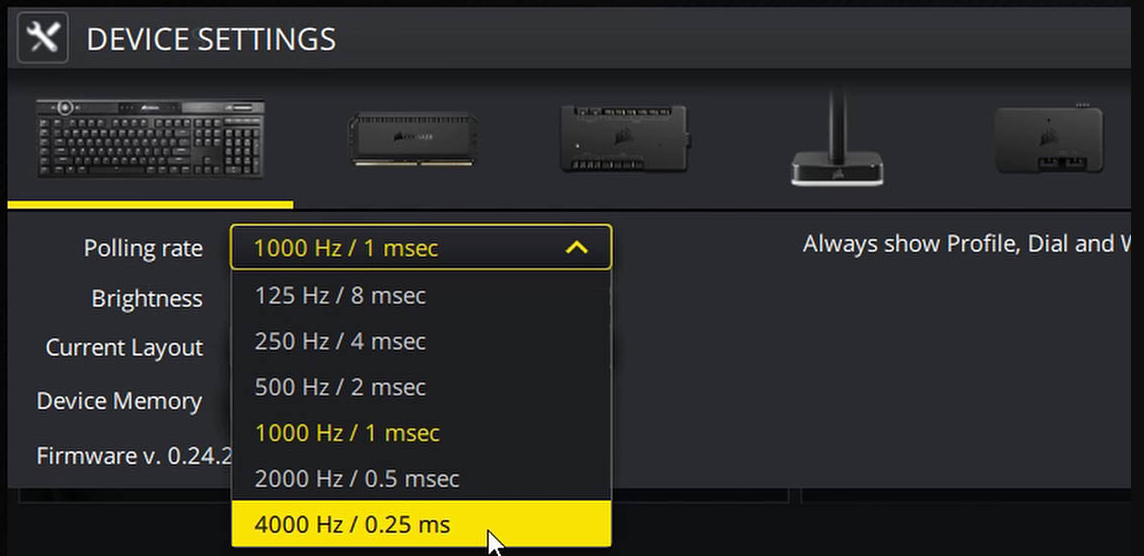
The keyboard polling rate refers to the number of times a keyboard sends input signals to the host per second, measured in Hertz (Hz). Common parameters include 125Hz, 250Hz, 500Hz, and 1000Hz, corresponding to data transmission intervals of 8ms, 4ms, 2ms, and 1ms, respectively. This process is similar to the frame rate of a movie: a higher polling rate means that the keyboard status is updated more frequently, allowing the host to obtain key information more quickly.
Technologically, it is implemented based on the interrupt transfer mechanism of the USB protocol. When the keyboard detects a key press, it sends a data packet containing the state of the key matrix through the USB interface within a preset cycle. For example, at a polling rate of 1000Hz, the keyboard generates a 64-byte status report (including the pressed state of over 20 keys) every millisecond.
The latency calculation formula is: Latency Time = 1 / Polling Rate + Transmission Delay + Processing Delay
Basic Latency: 1ms for 1000Hz, 2ms for 500Hz, and 8ms for 125Hz
Transmission Delay: Approximately 0.2 - 0.5ms in USB 2.0 full-speed mode, which can be reduced to less than 0.1ms in USB 3.0
System Processing Delay: By default, around 2 - 5ms in Windows, which can be reduced to 1ms or less through driver optimization
Actual measurement data shows that in the strafe operation of CS:GO, a 1000Hz polling rate is 7ms faster in key response speed compared to 125Hz. In the control of a firearm with a firing rate of 10 rounds per second, this can reduce the bullet deviation by 0.07 rounds. In the input of combo moves in Street Fighter 6, a higher polling rate can increase the command input success rate by 15%.
In a configuration with a 144Hz monitor and 144FPS game, a 1000Hz polling rate can achieve one input update per frame, while 125Hz can only update once every 7 frames. This is likely to cause a mismatch between key commands and screen rendering, resulting in the visual illusion of "unresponsive keys."
Some esports-level anti-cheat systems (such as EAC, VAC) detect the stability of input device polling rates. A constant 1000Hz input can avoid misjudgment risks caused by polling rate fluctuations, which is particularly important in strict anti-cheat environments like Apex Legends.
The parry system in Sekiro: Shadows Die Twice requires key intervals of less than 5ms. A 1000Hz polling rate can accurately capture a rapid key sequence with a 3ms interval, while a 500Hz device may miss consecutive inputs with a 4ms interval, leading to failure in crucial parry operations.
When multiple devices share a USB controller, multiple 1000Hz devices may exceed the theoretical bandwidth of USB 2.0 (12Mbps). Recommendations:
Use a dedicated USB 3.0 interface (with a bandwidth of up to 5Gbps)
Disable unnecessary USB devices (such as external hard drives, RGB light strips)
Choose keyboards that support USB interrupt coalescing technology (such as Logitech G Pro X)
The Windows system uses the default "Human Interface Device" generic driver. It is recommended to install the manufacturer's dedicated driver (such as Razer Synapse, Corsair iCUE):
Disable the "USB Selective Suspend" function in Device Manager
Enable the "Fast Write" mode when setting the polling rate
Optimize the registry for Win10/11 (adjust relevant latency parameters under HKEY_LOCAL_MACHINE\SYSTEM\CurrentControlSet\Enum\USB)
Regularly update the keyboard firmware:
Solve the data packet loss problem in the early 1000Hz mode (common in models before 2018)
Optimize the power management strategy to avoid a sharp drop in battery life caused by a high polling rate (for example, Logitech's LIGHTSPEED technology has achieved a 50-hour battery life at 1000Hz)
| Core Parameter | Entry-Level (300 - 500 yuan) | Professional-Level (500 - 1000 yuan) | Flagship-Level (over 1000 yuan) |
|---|---|---|---|
| Polling Rate Support | 125/250/500Hz | 125/500/1000Hz | 125/500/1000Hz + Polling Rate Adjustment |
| Key Debounce Time | 10ms | 5ms | 2ms (customizable) |
| Anti-Ghosting Technology | 6-Key Rollover | Full-Key Rollover | N-Key Rollover |
| Connection Method | USB Wired | 2.4G Wireless / Wired | 2.4G Wireless (1000Hz) / Wired |
FPS/TPS Games: 1000Hz polling rate + 2ms debounce (enable Windows Game Mode)
MOBA/MMORPG Games: 500Hz polling rate + 5ms debounce (balance battery life and operation)
Office / Word Processing: 125Hz polling rate + 10ms debounce (reduce CPU usage)
If "the key latency increases instead at a high polling rate," possible reasons are:
Poor-quality USB hub (replace with a native motherboard interface)
Outdated motherboard drivers (install the latest chipset drivers)
Power management setting conflicts (turn off power-saving mode)
Aging key springs (replace the key switches or the keyboard)
According to the ESL Pro League equipment survey:
87% of CS:GO players use a 1000Hz polling rate
92% of DOTA2 players switch to 1000Hz during laning phases and revert to 500Hz during team fights
Korean StarCraft 2 teams commonly use the "dynamic polling rate adjustment" technology (automatically switch through macro commands in different game scenarios)
Esports keyboards from top peripheral brands (such as HyperX Alloy Elite 2, ROG Strix Scope NX) already have built-in hardware-level polling rate adjustment chips, enabling latency control at the 0.5ms level. With dedicated driver software, users can create configuration files for different games.
The keyboard polling rate is not simply "the higher, the better." Instead, it requires systematic adjustment based on hardware configurations, game types, and operating habits. For gamers aiming for professional-level performance, it is recommended to follow these three steps:
Test the actual latency of the current device (use professional software such as InputLatency)
Set a personalized polling rate scheme according to the main game type
Unleash the device's potential through firmware upgrades and driver optimizations
When a 1ms latency difference can determine the outcome of a match, a deep understanding of the keyboard polling rate will become a crucial technical reserve for breaking through operational bottlenecks. Remember: The true esports advantage lies in every optimized millisecond.
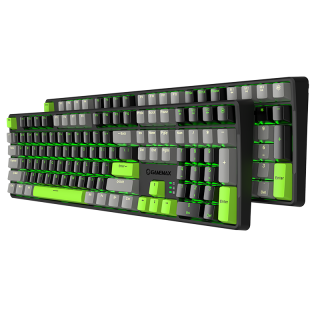
The keycap adopts a two-color injection molding process, which is durable and durable, and is not easy to fade, X1 model Black/Gray and X2 Gray/Black color combination
• Sensitive key response, trigger stroke 2.0mm
• durable and excellent handle
• Adopt mechanical green shaft switch design, with 60 million times of key life
• Support 6-key and N-key mode selection, and the Num Pad function is not affected
• Intelligent sleep mode, The backlight is off once the PC standby and resumes the previous mode after starting
• PBT key cap, gap backlight, uniform color
• The humanized design of the keyboard adds a series of common shortcut function keys in cooperation with Fn
• Dual mode (game mode) and (office mode) can be switched freely according to personal needs
• Independent 4 multimedia keys
• Independent 3 indicators: NUM, CAP, WIN (lock WIN) indicator

