
Choosing the right power connector for your GPU is critical for stability, performance, and safety. With high-end GPUs like the NVIDIA RTX 4090 and AMD Radeon RX 7900 XTX demanding upwards of 450W, understanding the differences between individual 8-pin connectors and pigtail connectors is essential. This guide explores their design, pros and cons, and practical applications to help you make an informed decision.
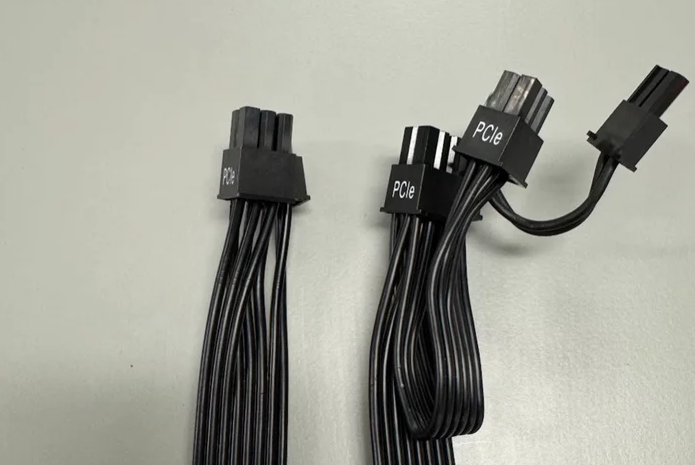
Design: Directly connected to the PSU, each 8-pin connector (also known as 6+2-pin) delivers up to 150W of power .
Structure: Features six 12V pins and two ground pins, ensuring robust power delivery.
Use Case: Ideal for GPUs requiring multiple 8-pin connectors (e.g., RTX 4090 with three 8-pin inputs).
Design: A single cable splits into two 6+2-pin connectors (e.g., one PSU port to two GPU ports).
Purpose: Maximizes PSU port usage and simplifies cable management.
Limitations: May share power between connectors, posing risks under high load.
| Factor | Individual 8-Pin | Pigtail Connectors |
|---|---|---|
| Power Delivery | Each connector provides dedicated 150W, reducing strain. | Splits power between two ports (e.g., 150W shared between two 8-pin connectors). |
| Safety | Lower risk of overheating or voltage drops . | Potential for uneven current distribution, especially with older PSUs . |
| Cable Management | Requires more cables, potentially cluttering the case. | Reduces cable count, improving airflow and aesthetics. |
| Compatibility | Works with all modern GPUs and PSUs. | May not be recommended for GPUs exceeding 300W (e.g., RTX 4090) . |
Pigtail Risks: Reddit users reported melting cables and GPU instability when using pigtail connectors with high-end GPUs like the RTX 4090 . This is often due to older PSUs with thin wires unable to handle peak loads.
Individual 8-Pin Advantages: Independent cables ensure consistent power delivery, minimizing thermal throttling.
Overclocking increases power draw, making individual 8-pin connectors safer. For example, a heavily overclocked RTX 4090 may require 600W, exceeding the capacity of a single pigtail cable .
Corsair: Advises using individual 8-pin cables for GPUs with high TDP (e.g., 450W+).
NVIDIA: While not explicitly banning pigtail connectors, recommends using high-quality PSUs and avoiding adapters .
Use Cases:
High-end GPUs (RTX 4090, RX 7900 XTX).
Overclocking or mining setups.
Systems with a premium PSU (e.g., 80+ Titanium).
Benefits:
Enhanced stability under heavy loads.
Future-proofing for next-gen GPUs.
Use Cases:
Mid-range GPUs (RTX 4070, RX 7600).
Budget builds with limited PSU ports.
Cases with tight cable management.
Benefits:
Cost-effective and space-saving.
Reduces cable clutter.
Check PSU Specs: Ensure your PSU has enough 8-pin connectors and supports the GPU’s TDP.
Avoid Overloading: Never daisy-chain pigtail connectors (e.g., using a pigtail from another pigtail).
Invest in Quality Cables: Use PSU-certified cables or premium third-party options (e.g., CableMod) .
Monitor Temperatures: Use tools like HWMonitor to track GPU and cable temperatures.
Tom’s Hardware: Pigtail connectors are safe for mid-range GPUs but risky for high-end models .
Linus Tech Tips: While individual 8-pin cables are theoretically better, modern PSUs with thick wires make pigtail connectors acceptable for most users .
Future of Connectors: NVIDIA’s 12V-2×6 connector (RTX 50 series) improves safety but still prioritizes proper installation .
For high-end GPUs and demanding workloads, individual 8-pin connectors are the safer choice, offering dedicated power and stability. Pigtail connectors are suitable for mid-range systems or builds focused on cable management, provided you use a quality PSU and avoid overloading. Always follow manufacturer guidelines and monitor your system’s health to prevent costly failures.

