

When it comes to choosing a keyboard, size and layout are two of the most critical factors that can significantly impact your typing experience, workspace efficiency, and overall comfort. With a wide range of options available—from full-sized behemoths to compact 40% boards—navigating the world of keyboard sizes can be overwhelming. This guide breaks down the most common keyboard sizes and layouts, highlighting their key features, pros, cons, and ideal use cases to help you find the perfect fit.
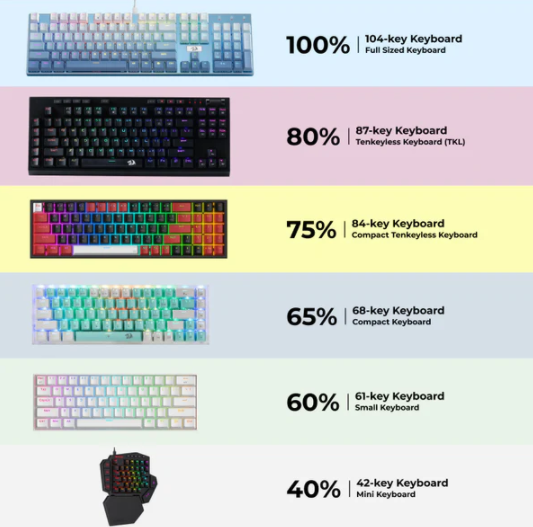
Full-size keyboards are the most traditional and recognizable option, featuring all the keys you’d expect on a standard desktop keyboard. This includes the alphanumeric section, a full function row (F1-F12), a dedicated number pad (numpad), and a complete set of navigation keys (arrow keys, Home, End, Page Up, Page Down, etc.).
Typically 18-22 inches wide, making them the largest keyboard size.
Includes every key you might need for general computing, data entry, or gaming.
The numpad is positioned to the right of the alphanumeric keys, which can create a wider footprint.
No compromises on functionality: Perfect for users who frequently work with numbers (accountants, data analysts) or need quick access to function keys and navigation controls.
Familiar layout: Ideal for those transitioning from a standard office keyboard, as there’s no learning curve for key placement.
Takes up significant desk space, which can be a drawback in small workspaces or for users who prefer a minimalist setup.
The wide design may force users to position their mouse further from the keyboard, potentially causing wrist strain over time.
Professionals who rely on the numpad daily (e.g., finance workers, spreadsheet users).
Gamers who need quick access to function keys for macros or in-game commands.
Users who prefer a traditional typing experience without sacrificing any keys.
Tenkeyless keyboards, often abbreviated as TKL, are full-size keyboards minus the numpad. This reduction in size makes them a popular choice for both office work and gaming.
Approximately 14-16 inches wide, saving 30-40% of desk space compared to full-size keyboards.
Retains the function row, alphanumeric keys, and navigation cluster (arrow keys, Home, End, etc.).
Space-efficient: Frees up desk space for the mouse, reducing arm strain during extended use.
Balanced functionality: Still includes all essential keys for most tasks, making it versatile for work and play.
Not ideal for users who regularly input numbers, as they’ll need to use the number keys above the letters or invest in a separate numpad.
Gamers who prioritize mouse movement and desk space.
Office workers who don’t need a numpad but want easy access to function and navigation keys.
Anyone looking for a balance between size and functionality.
75% keyboards are a step smaller than TKL models, stripping away some of the navigation cluster’s spacing and combining keys to save space. They’re known for their compact design while retaining most essential functions.
Around 12-14 inches wide, even more space-saving than TKL keyboards.
Remove the gaps between the alphanumeric keys and the navigation cluster, integrating arrow keys and other navigation functions into a more condensed layout.
Typically retain the function row.
Ultra-compact without losing too much functionality: Arrow keys are still present, though they’re often smaller or positioned closer to the alphanumeric keys.
Great for users who want a sleek, minimalist look without sacrificing core navigation keys.
The condensed layout can take some getting used to, as keys like Delete, Home, and End may require using a modifier (e.g., Fn key) or have shifted positions.
Users with limited desk space (e.g., laptop users transitioning to a mechanical keyboard).
Typists who value portability and a clean aesthetic.
Gamers who want a compact board without giving up arrow keys for in-game movement.
60% keyboards are among the most popular compact options, ditching the function row, navigation cluster, and numpad entirely. They rely heavily on modifier keys (like Fn) to access secondary functions.
Just 10-12 inches wide, making them highly portable and space-efficient.
Include only the alphanumeric keys, with no function row, arrow keys, or navigation keys.
Secondary functions (e.g., F1-F12, arrow keys) are accessed via a combination of the Fn key and other keys.
Extremely portable: Easy to carry in a bag, making them ideal for travel or use with laptops.
Minimalist design: Appeals to users who prefer a clutter-free desk and a focused typing experience.
Forces efficient typing habits, as users learn to use shortcuts for navigation.
No dedicated arrow keys or function row, which can be a dealbreaker for some users.
Requires memorizing Fn key combinations, which can slow down typing initially.
Touch typists who can rely on muscle memory for shortcuts.
Gamers who use custom keybinds and don’t need arrow keys (e.g., PC gamers who use WASD for movement).
Anyone prioritizing portability and desk space over convenience.
40% keyboards are the smallest mainstream option, taking compactness to the extreme. They remove even more keys than 60% models, often eliminating the number row above the letters.
As narrow as 8-10 inches, making them tiny enough to fit in a backpack or even a large pocket.
Typically include only the QWERTY (or equivalent) letter keys, with all other functions accessed via layers and modifier keys.
The ultimate in portability and minimalism: Perfect for users with extremely limited space or who need a keyboard on the go.
Unique and customizable: Popular among keyboard enthusiasts who enjoy programming custom layers for personalized functionality.
Steep learning curve: Almost all non-letter keys require complex Fn combinations or custom layers.
Not practical for most everyday tasks, such as data entry, gaming, or office work.
Keyboard enthusiasts and tinkerers who enjoy customizing their setup.
Users with extremely limited desk space (e.g., students in small dorm rooms).
Those who prioritize form and portability over function.
Assess your workflow: If you regularly use a numpad (e.g., for accounting), a full-size keyboard is a must. If you rarely use it, a TKL or smaller model will save space.
Consider desk space: Measure your desk and determine how much room you can allocate to a keyboard. Compact models are ideal for small spaces.
Think about portability: If you travel frequently or use your keyboard with a laptop, a 60% or 75% model is more convenient than a full-size one.
Test the layout: Spend time typing on different sizes if possible. Some users adapt quickly to compact layouts, while others find them frustrating.
The "best" keyboard size depends entirely on your needs and preferences. Full-size keyboards offer unbeatable functionality, while compact models like 60% or 75% boards excel in portability and space efficiency. By evaluating your workflow, desk space, and typing habits, you can find the perfect keyboard size to enhance your productivity and comfort.


