

A mechanical keyboard delivers the feel and feedback that ordinary keyboards lack. Here's how to buy the right one, plus our top tested picks.
By definition, a "mechanical keyboard" has individual springs and mechanical switches under each key. Older users may fondly recall the classic buckling-spring switches on their IBM Model M warhorses, but today’s mechanical keyboards come in dozens of different flavors. You can get key switches to suit almost any taste, whether for a frenetic FPS, writing a novel, or simple spreadsheet jockeying. The common denominator is the springiness, the satisfying "click clack" with every key press. We've tested more than 100 keyboards since 2020, the majority of them mechanical, evaluating them on the basis of ergonomics, feature set, software, and, of course, value. Our current best mechanical keyboard overall for most users is Razer's BlackWidow V4 75% Pro, but we've included more choices tailored to gaming, office use, budget buyers, ergonomics, and more. Below our picks, you'll find a deep-dive guide to choosing the right board for you.
Razer BlackWidow V4 75% Pro

Price: $299.99 at Amazon
The Razer BlackWidow V4 75% was one of our favorite gaming keyboards in 2023, and the "Pro" revision makes it even better. The immaculate typing feel, plush wrist rest, and compact design of the previous model returns, but the inclusion of wireless capabilities, an OLED screen, and improved build quality helps the Pro stand above both its predecessor and its competitors. But the real draw of the BlackWidow V4 75% is its hot-swappable design, and that remains true here. Even if you have no interest in tinkering, the default tactile switches are great for gaming or general productivity. The only downside is the Razer's whopper of a price, but in our minds, it's well worth the asking price.

Keychron C3 Pro
Price: $99.99
The Keychron C3 Pro is a fantastic option for those on a budget who still want a high-quality mechanical keyboard. It offers a solid build, a variety of switch options, and a clean, minimalist design. The keyboard is also compatible with both Windows and Mac, making it a versatile choice for different users. While it may not have all the bells and whistles of more expensive models, it delivers a great typing experience at an affordable price.
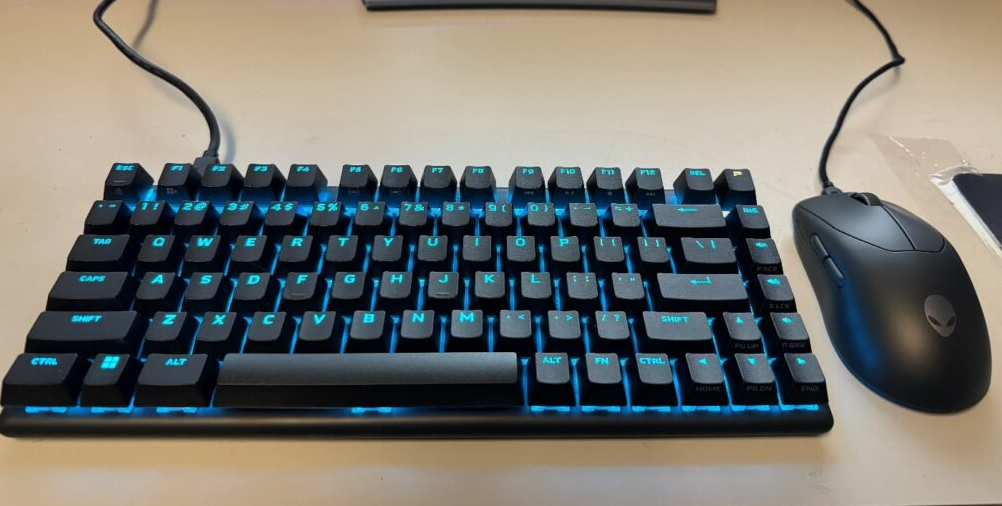
Alienware Pro Wireless Gaming Keyboard
Price: $199.99
Alienware's Pro Wireless Gaming Keyboard is a top pick for gamers. It features low-latency wireless connectivity, customizable RGB lighting, and a durable build. The keyboard also has dedicated macro keys and media controls, which are convenient for gaming and multitasking. The switches are designed for fast and accurate responses, making it a great choice for competitive gaming.

Corsair K70 RGB Pro
Price: $129.99
The Corsair K70 RGB Pro is a popular choice among esports professionals. It offers a high-quality build, Cherry MX switches, and customizable RGB lighting. The keyboard also has a detachable wrist rest for added comfort during long gaming sessions. The K70 RGB Pro is known for its excellent typing feel and fast response times, making it a great option for esports players.

Razer Pro Type Ultra
Price: $179.99
The Razer Pro Type Ultra is designed for office use, offering a quiet and comfortable typing experience. It features Razer's own linear switches, which are smooth and responsive. The keyboard also has a sleek, minimalist design and a long battery life. It's compatible with both Windows and Mac, and it has a built-in USB-C hub for added convenience.

Satechi SM1 Slim Mechanical Backlit Bluetooth Keyboard
Price: $79.99
The Satechi SM1 is a great mechanical keyboard for Mac users. It has a slim, compact design that looks great on a Mac desk. The keyboard features Bluetooth connectivity, making it easy to pair with your Mac. It also has backlit keys for typing in low-light conditions. The switches are designed to be quiet and comfortable, making it a good choice for office or home use.

ASUS ROG Azoth
Price: $249.99
The ASUS ROG Azoth is a highly customizable mechanical keyboard. It features hot-swappable switches, allowing you to easily change the switches to your preferred type. The keyboard also has a detachable numpad, which is convenient for users who don't always need the numpad. It has customizable RGB lighting and a durable build. The ROG Azoth is a great choice for users who want to customize their keyboard to their exact preferences.
OnePlus Keyboard 81 Pro
Price: $149.99
The OnePlus Keyboard 81 Pro is a tenkeyless mechanical keyboard that offers a compact and portable design. It has a high-quality build and a variety of switch options. The keyboard also has customizable RGB lighting and a long battery life. It's compatible with both Windows and Mac, making it a versatile choice for different users. The tenkeyless design is great for users who want to save desk space without sacrificing functionality.
Fnatic Streak65 Gaming Keyboard
Price: $129.99
The Fnatic Streak65 is a 65% mechanical keyboard that offers a compact and lightweight design. It's perfect for users who want a portable keyboard for gaming or travel. The keyboard features hot-swappable switches and customizable RGB lighting. It also has a built-in battery that provides long hours of use. The Streak65 is a great choice for users who want a small but powerful mechanical keyboard.
Keychron Q11
Price: $199.99
The Keychron Q11 is an ergonomic mechanical keyboard that offers a comfortable typing experience. It has a split design that helps to reduce wrist strain, and it also has adjustable tenting feet for added comfort. The keyboard features high-quality switches and a durable build. It's compatible with both Windows and Mac, and it has customizable RGB lighting. The Q11 is a great choice for users who spend long hours typing and want a more comfortable keyboard.
When choosing a mechanical keyboard, there are several factors to consider:
There are three main types of mechanical switches: linear, tactile, and clicky. Linear switches offer a smooth, consistent feel with no tactile bump or click. Tactile switches have a tactile bump when the key is pressed, providing feedback to the user. Clicky switches have a tactile bump and a distinct click sound when the key is pressed. Each type of switch has its own advantages and disadvantages, and the best type for you will depend on your personal preferences and how you use the keyboard.
Mechanical keyboards come in a variety of layouts, including full-size, tenkeyless (TKL), 65%, and 40%. Full-size keyboards have all the keys, including the numpad. Tenkeyless keyboards are smaller and don't have the numpad, which can save desk space. 65% keyboards are even smaller and typically don't have the function row or the numpad. 40% keyboards are the smallest and only have the essential keys. The layout you choose will depend on your needs and how much desk space you have.
A good mechanical keyboard should have a solid build quality. Look for keyboards with a durable case, high-quality switches, and a stable base. The keyboard should also feel comfortable to type on and not flex or wobble when you press the keys.
Many mechanical keyboards come with RGB lighting, which allows you to customize the color and lighting effects of the keys. RGB lighting can be a fun and useful feature, especially for gamers. However, it's not essential, and if you don't care about lighting, you can save money by choosing a keyboard without it.
Some mechanical keyboards come with software that allows you to customize the keyboard's settings, such as the key mappings, lighting effects, and macros. If you plan to customize your keyboard, make sure it comes with software that is easy to use and has the features you need.
Mechanical keyboards can range in price from under \(50 to over \)300. The price you pay will depend on the features and quality of the keyboard. If you're on a budget, you can still find a good mechanical keyboard for under $100. However, if you want a high-end keyboard with all the bells and whistles, you may need to spend more.
Choosing the best mechanical keyboard for you depends on your specific needs and preferences. Whether you're a gamer, a writer, an office worker, or just someone who wants a better typing experience, there's a mechanical keyboard out there for you. Consider the factors we've discussed, such as switch type, layout, build quality, lighting, software, and budget, and choose the keyboard that best meets your requirements. With the right mechanical keyboard, you can enjoy a more comfortable, efficient, and satisfying typing experience.

