

In the realm of digital displays, resolution stands as a cornerstone factor that directly impacts visual experience. From monitors and laptops to TVs and smartphones, the choice between FHD, QHD 2K, and UHD 4K can significantly influence how we perceive content, whether it’s watching a movie, editing photos, or simply browsing the web. But with each resolution boasting its own set of advantages, how do you determine which one aligns with your needs? Let’s delve into the details.
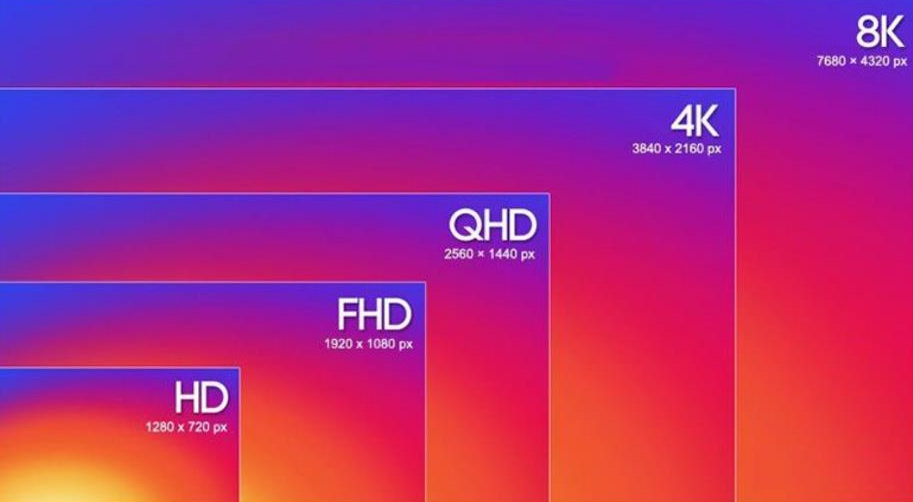
FHD (Full High Definition): Also known as 1080p, FHD refers to a resolution of 1920 x 1080 pixels. This has long been the standard for many displays, offering a balance between clarity and performance. With over 2 million pixels, it provides sharp enough visuals for most everyday tasks.
QHD 2K (Quad High Definition): Often referred to as 2K, QHD has a resolution of 2560 x 1440 pixels. Boasting approximately 3.7 million pixels, it delivers a noticeable upgrade in detail compared to FHD, making it a popular choice for those seeking more immersive visuals without the high demands of 4K.
UHD 4K (Ultra High Definition): 4K, or UHD, comes in at 3840 x 2160 pixels, packing a whopping 8.3 million pixels – four times that of FHD. This resolution offers exceptional sharpness and detail, making it ideal for large screens and content that demands precision.
For casual web browsing, social media, word processing, and streaming standard-definition or HD content, FHD is more than sufficient. It provides clear text and images, and most devices handle FHD with ease, consuming less power and putting less strain on hardware. If you’re using a laptop or monitor smaller than 27 inches, the difference between FHD and higher resolutions might not be immediately obvious to the naked eye, making FHD a cost-effective and practical choice.
If you’re involved in photo editing, video production, graphic design, or other professional creative work, QHD 2K or UHD 4K could be game-changers. QHD 2K offers more screen real estate than FHD, allowing you to fit multiple windows side by side without compromising on detail – a boon for editing timelines or adjusting design elements. UHD 4K takes this a step further, with unparalleled sharpness that lets you zoom in on images or videos without losing clarity, ensuring precise edits and accurate color representation.
For gaming enthusiasts and movie buffs, the choice of resolution depends on both your hardware and the content you consume. Many modern games are optimized for QHD 2K, delivering stunning visuals with smooth frame rates on mid-to-high-end graphics cards. UHD 4K provides the ultimate cinematic experience, making movies and games feel incredibly lifelike – but it requires a powerful GPU to handle the high pixel count without lag. Additionally, you’ll need 4K content (such as 4K movies or games) to fully appreciate the benefits of UHD 4K; otherwise, the difference from lower resolutions may be minimal.
Screen Size: The impact of resolution is closely tied to screen size. On a 24-inch monitor, FHD looks crisp, while QHD 2K might make text too small without scaling. On a 32-inch or larger screen, FHD can appear pixelated, and UHD 4K becomes more necessary to maintain sharpness.
Hardware Requirements: Higher resolutions demand more from your device. UHD 4K, in particular, requires a strong processor, sufficient RAM, and a powerful graphics card to run smoothly. This can mean higher costs for both the display and the supporting hardware.
Power Consumption: Devices with higher resolution displays often consume more power, which is a crucial consideration for laptops and portable devices where battery life is a priority. FHD displays typically offer better battery efficiency compared to QHD 2K or UHD 4K.
There’s no one-size-fits-all answer to the question of which resolution you need. FHD is ideal for everyday use, small screens, and those on a budget, offering reliable performance and clarity. QHD 2K strikes a balance between detail and practicality, making it great for content creators and gamers with mid-range hardware. UHD 4K is the top choice for large screens, professional work, and those seeking the highest possible visual fidelity, provided you have the hardware to support it.
Ultimately, assess your primary usage, screen size, and hardware capabilities to make an informed decision. By aligning your resolution choice with your needs, you can ensure a visual experience that’s both satisfying and efficient.

