

ATX motherboards measure 12×9.6 inches (305×244mm), offering ample space. MATX (Micro ATX) is compact at 9.6×9.6 inches (244×244mm), saving space but limiting component layout.
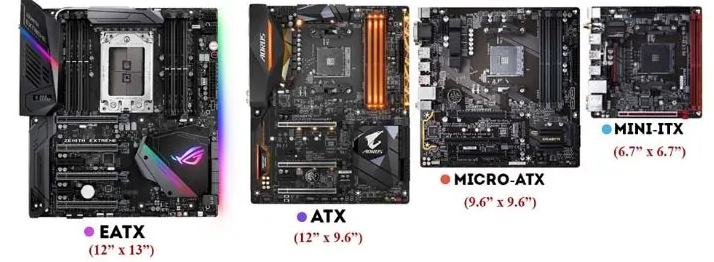
ATX boards have 7-8 expansion slots, including 2-3 PCI-E x16 and 1-2 PCI-E x1 slots. This makes them perfect for multi-GPU setups, extra sound/network cards, or high-end capture cards.
MATX has 4-6 slots, usually 1-2 PCI-E x16 and 1 PCI-E x1. It works for single GPUs and basic expansion needs.
ATX provides 4-8 memory slots, ideal for memory-heavy tasks like virtualization or 3D modeling, allowing high-capacity RAM setups.
MATX offers 2-4 slots, enough for web browsing and light gaming but limiting future memory upgrades.
ATX has 6-8 storage connections (SATA + M.2), great for multiple NVMe SSDs—critical for video editors needing fast access to large files.
MATX has 2-4 connections, sufficient for basic storage (documents, games) but restrictive for extensive storage setups.
ATX features robust power delivery, supporting overclocked CPUs and multi-GPU systems—essential for hardcore gaming or power-hungry hardware.
MATX has simpler power systems, suitable for mainstream CPUs and single GPUs but not ideal for high-performance components.
MATX motherboards are more affordable, fitting budgets for everyday use (web browsing, office work).
ATX costs more but justifies the price for users needing expansion, power, and upgrade headroom.
MATX fits in both ATX and MATX cases, offering flexibility. ATX only works in ATX cases—critical if you have a compact case.
ATX’s larger size allows better heatsink/fan placement, aiding heat dissipation for long gaming or server sessions.
MATX’s compact design limits cooling options, potentially causing higher temps in small cases.
Casual gamers: MATX suffices for mid-range CPUs, single GPUs, and mainstream games at a lower cost.
Hardcore gamers: ATX is needed for overclocking, multi-GPU setups, and handling demanding titles.
ATX is better for video editing, 3D modeling, or photography—supporting extra GPUs, capture cards, and large memory/storage. MATX works only for entry-level, small-scale projects.
MATX is adequate for web browsing, office work, and light media. Choose ATX if you plan future upgrades (e.g., virtual machines, gaming).
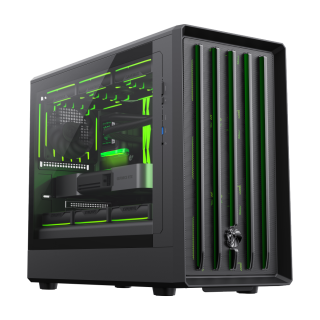
• GAMEMAX's all-new design language features a lion's claw front panel and exclusive GAMEMAX ventilation holes on the side panels.
• Exceptional Hardware Support – Compatible with M-ATX motherboards, 420mm GPUs (ready for Nvidia 50 Series), 240mm ATX PSUs, 175mm air coolers, and 360mm radiators for ultimate versatility.
• Powerful cooling performance with front MESH steel mesh and vertical airflow design.
• Comprehensive Cooling Options – Supports up to 12x 120mm fans, including 4 pre-installed 120mm ARGB/PWM fans and an ARGB/PWM controller for optimal airflow and stunning lighting effects.
• Modern I/O Panel – Equipped with a TYPE-C Gen 2 port and USB 3.0 for high-speed connectivity and future-ready functionality.
• Standard adjustable-height graphics card support bracket to protect the GPU.
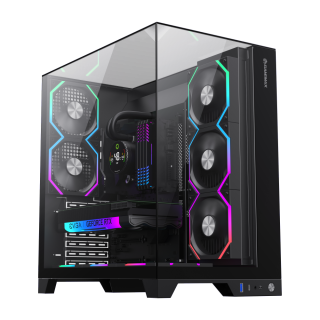
Infinity Pro Black Panoramic Tempered Glass Mid-Tower Gaming PC Case
• Full-View DesignThe three sides feature tempered glass panels, allowing clear visibility of the RGB lighting and components inside the case, enhancing the overall aesthetics and creating a cool gaming environment.
• Superior Cooling PerformanceThe case supports up to 8 RGB fan installation positions (including 2x 120mm fans) and can accommodate various water cooling configurations, ensuring the system maintains optimal temperatures under high load, thus enhancing gaming performance.
• Strong CompatibilitySupports ATX, M-ATX, and ITX motherboards, making it suitable for various types of hardware, allowing players to flexibly configure their gaming setups to meet different needs.
• Smart I/O Interface DesignEquipped with multiple USB ports (including USB 3.0 and TYPE-C) for convenient device connections, along with audio support to ensure users enjoy the best sound experience during gaming.
• Excellent ExpandabilityThe case offers multiple internal storage bays, including 1x 3.5-inch hard drive bay and 3x 2.5-inch SSD bays, making it easy for players to expand their storage space to meet the growing demands of gaming.

