

When the right mouse button suddenly stops working, it can be very troublesome whether you are browsing the web, managing files, or performing daily operations. But don't worry, in most cases, this problem can be solved within 2 minutes. The following are verified quick solutions. We will troubleshoot step by step from simple to complex to help you efficiently restore the right - click function of the mouse.

Hardware connection problems are a common cause of the right mouse button failure. Let's start checking from here:
For wired mice: Unplug the USB interface, wait for 5 seconds, and then plug it back in. Try to plug it into the USB interface at the back of the computer host (for desktop computers) to avoid problems caused by insufficient power supply or poor contact of the front interface.
For wireless mice: Open the battery compartment at the bottom of the mouse, take out the battery and reinstall it, making sure the positive and negative poles of the battery are installed correctly. At the same time, check if the USB receiver is loose and can be unplugged and reinserted.
Clean the mouse buttons: If the mouse has been used for a long time, dust or debris may accumulate under the right - click button, preventing the button from triggering normally. Gently wipe the gap of the right - click button with a clean cotton swab to remove the dust before trying to use it again.
If there is no problem with the hardware connection, you can troubleshoot through simple system operations:
Restart the computer: Press the "Ctrl + Alt + Delete" key combination on the keyboard and select "Restart". During the restart process, the system will reload the mouse - related drivers and configurations, and many temporary faults will be solved as a result.
Test other interfaces: Try right - clicking on different interfaces such as the blank desktop, inside folders, and in browsers. If it only fails in a specific software, it may be a problem with that software, not the mouse itself.
If the above methods don't work, you can check the mouse settings and drivers:
Check mouse settings: Press "Win + I" to open the settings interface, click "Devices", and select "Mouse". Make sure that "Primary Mouse Button" is set to "Left" (default state), and check if there are any special settings that affect the right - click function. If so, restore the default settings.
Update mouse drivers: Press "Win + X" and select "Device Manager". Expand "Mice and other pointing devices", find your mouse model, right - click and select "Update Driver", then select "Search automatically for updated driver software". The system will automatically find and install the appropriate driver.
If the problem cannot be solved temporarily, you can use the following methods for emergency:
Keyboard shortcut alternative: When managing files, select the file and press the "Menu" key on the keyboard (usually next to the right Alt key) to achieve the right - click function. You can also use shortcuts to complete some operations on the desktop or in folders.
By following the above steps, most of the right mouse button failure problems can be solved quickly. If it still doesn't work after trying all the methods, it may be due to hardware damage to the mouse. It is recommended to replace the mouse or contact professional maintenance personnel for testing.
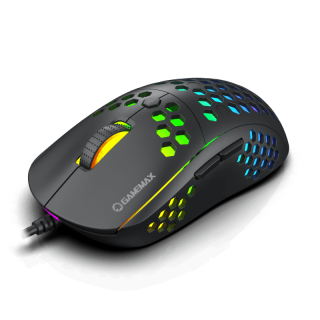
GameMax MG8 Gaming Mouse with Lightweight Honeycomb Shell, Ultralight Ultraweave Cable, 6400 DPI Optical Sensor
• Lightweight honeycomb shell: New perforated housing is engineered to be supremely durable and lightweight, meaning you can play longer without fatigue
• Ultralight ultra weave cable: innovative ultra weave cable significantly reduces weight and cable pull while swiping; Fight against your enemies, not cable pull
• Superior mouse feet: PTFE Material provides smooth control with low friction, consistent glide
• Gaming grade optical sensor; adjustable up to 6400 DPI for greater control, precision, and future-proofing
• Ergonomic, ambidextrous shape: optimized for the buttons for added convenience
• High-grade quality switches for left and right clicks are graded for 10 million presses that remain accurate and true till the end

