

The CPU temperature is a critical indicator affecting computer stability and hardware lifespan. Excessive temperatures may cause system crashes or shorten CPU life. Among all temperature-checking methods, using a CPU cooler with temperature detection is widely recognized as the most accurate.

A CPU cooler with temperature detection has its sensor embedded near the CPU contact area, directly sensing real-time core and surface temperatures. This avoids the drawbacks of other methods:
Motherboard BIOS readings rely on distant sensors, affected by the motherboard’s environment and prone to deviation.
Software detection may have delayed or inaccurate data due to algorithms or system resource usage.
The cooler’s sensor, in close contact with the CPU, minimizes external interference, ensuring first-hand and accurate temperature data.
Prioritize coolers with reliable heat dissipation, high-precision sensors, and CPU compatibility. Opt for well-known brands, as their high-end models often feature built-in precision sensors for real-time temperature transmission.
Ensure tight contact between the cooler and CPU (no gaps). Apply an appropriate amount of thermal paste to enhance heat conductivity, making the sensor more responsive to CPU temperature changes.
Most such coolers come with display devices or connect to the system:
Some have external screens showing real-time temperatures.
Others work with supporting software, allowing you to view real-time data, maximum temperatures over time, and temperature curves on the desktop.
To confirm accuracy, combine with other methods:
Motherboard BIOS: Enter during startup, check CPU temperature in hardware monitoring, and compare it with the cooler’s reading.
Professional software: Tools like AIDA64 (with mature algorithms) detect temperatures via multiple channels. Compare their data with the cooler’s to verify.
Using a CPU cooler with temperature detection is the most reliable way to check CPU temperature, thanks to its direct CPU contact and precision sensor. By choosing, installing, and using it properly—along with supplementary verification—you can accurately monitor CPU status and take timely cooling measures to protect hardware.
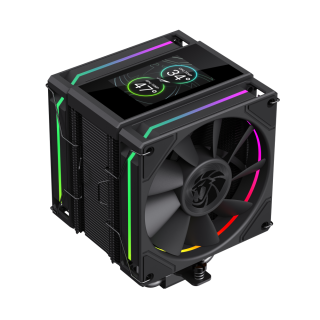
SIGMA 620 High-Performance CPU Cooler: Dual 120mm Fans + Six Heatpipes for Powerful Cooling, 245W TDP Support, Equipped with 2.8inch Customizable LCD Screen and ARGB Lighting
• 2.8inch Customizable LCD Display -Personalize real-time system stats or DIY thematic images and video content for a unique build experience.
• High-Performance Dual Fan Tower-Equipped with 6 x 6mm heatpipes and dual 120mm fans for powerful, efficient heat dissipation.
• Copper-based nickel coated-Maximizes thermal conductivity for faster heat transfer and superior cooling performance.
• Stunning ARGB Lighting-Elegant ring-style ARGB fan lighting with full motherboard sync support for personalized effects.
• High Airflow, High Pressure PWM Fans-Delivers strong airflow and static pressure for optimal thermal performance.
• Supports TDP up to 245W-Engineered to handle high-performance CPUs with confidence.
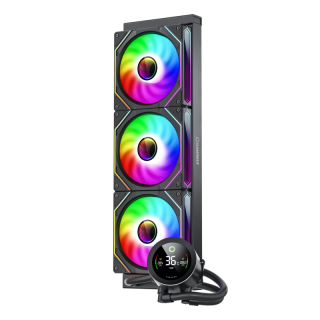
GameMax IceBurg 360V Digital BK, Liquid CPU Cooler 360mm Addressable ARGB Pump Fans 290W TDP AIO Water Cooler
• All-White Aesthetic Design: Sleek one-piece design for a clean and modern look.
• ARGB Sync Capability: Customizable ARGB lighting syncs seamlessly with your motherboard.
• Intelligent PWM Fan Control: Automatically adjusts fan speed for optimal cooling and low noise.
• Enhanced Cooling Performance: Features an efficient cold plate, copper base, and optimized fans for superior heat dissipation.
• Wide Compatibility: Compatible with various Intel and AMD CPU sockets for versatility.

