

Vertical GPU mounting transforms the spatial orientation of the graphics card, restructuring the heat exchange pathway inside the chassis. In traditional horizontal mounting, GPU fans typically exhaust air toward the interior or side panel, causing heat to accumulate in the limited space. When mounted vertically, the fans face directly toward the chassis exterior or side vents, theoretically creating a more efficient convection cycle—warm air rises and exits via the "chimney effect," while cool air is drawn in from below or the sides. In controlled tests, this can lower GPU core temperatures by 5–10°C.

However, real-world performance depends on multiple factors:
Chassis Airflow Design: Insufficient top/bottom vents in non-ventilated chassis may trap hot air. For example, in cases with fully enclosed glass side panels, temperature differences between vertical and horizontal mounting can shrink to less than 2°C.
GPU Cooling Design:
Turbo Fans: Their directional exhaust makes vertical mounting more effective for heat dissipation.
Open-Air Coolers: Reliant on internal airflow, these may underperform if fin orientation mismatches the vertical airflow.
Heatpipe Limitations: Some GPUs have horizontally optimized heatpipes; vertical mounting may hinder condensate 回流 (reflux) due to gravity, reducing efficiency by 5–8% when heat sources sit above the heatsink.
Vertical mounting shows nuanced thermal performance under stress:
High-Load Scenarios: Games like Cyberpunk 2077 see stable GPU temperature drops of 8–10°C, with CPU temps falling 2–3°C due to improved overall chassis cooling.
Dual-Torture Tests: Under AIDA64 FPU + FurMark loads, temperature gaps between vertical and horizontal mounting usually stay below 3°C, but bottom fans can further reduce temps by 2–4°C.
SSD Temperature Impact: GPU exhaust may blow directly onto M.2 drives, but 实测 (measured) SSD temp fluctuations remain within 1–3°C, well below thermal thresholds.
These variations stem from environmental factors:
Chassis Type: Open-frame "showcase" chassis amplify vertical mounting benefits, while closed traditional chassis offer minimal gains.
Fan Configuration: Bottom intake fans can lower internal chassis temps by 5–8°C, maximizing vertical mounting potential.
Establish a 3D Airflow Path:
Bottom Intake: Install 1–2 120mm fans for upward vertical airflow.
Top Exhaust: Use 2–3 140mm fans to enhance hot air expulsion.
Side Clearance: Leave 5–10mm gaps beside the GPU to prevent side panel obstruction.
Airflow Guidance:
Use air guides or custom ducts to direct cool air to the GPU heatsink first.
Eliminate obstructions like HDD cages or cables blocking airflow paths.
GPU Selection:
Prioritize turbo-cooled or water-cooled GPUs for their directional exhaust compatibility.
Ensure GPU thickness allows ≥30mm clearance from the side panel to avoid thermal dead zones.
Cooling Enhancement:
Replace thermal paste with high-conductivity options (e.g., Shin-Etsu 7921) to improve core-to-heatsink heat transfer.
Add auxiliary fans (e.g., GPU support brackets with fans) for open-air coolers to boost fin airflow.
Fan Curve Optimization:
Set GPU fans to full speed above 60°C via tools like SpeedFan; configure chassis fans for PWM dynamic 调速 (speed control).
Bracket Selection:
Use metal PCIe riser brackets with ≥3kg load capacity to prevent GPU sag and PCIe slot damage.
Choose adjustable-angle brackets for perfect vertical alignment with the motherboard.
Stress Relief:
Install elastic support pillars between the GPU top and chassis top to distribute PCB weight.
Use ≤30cm PCIe riser cables to minimize signal loss and mechanical vibration.
Reality: Effective only with proper chassis airflow and compatible GPU cooling. Tests show closed chassis may see 2–5°C temperature increases due to airflow chaos.
Solution: Use smoke tests to evaluate airflow; add fans or modify side panels as needed.
Reality: Turbo GPUs’ exhaust efficiency can drop 10–15% if blocked by cables/HDDs in vertical mounting.
Solution: Keep 30mm clearance around the exhaust; reposition PSU/HDDs if necessary.
Reality: Cables themselves don’t impact thermals, but poor-quality ones cause signal instability, leading to throttling.
Solution: Choose PCIe 4.0-certified risers with tinned copper cores and ≥3-layer shielding (e.g., 16Gbps bandwidth models).
For extreme cooling, consider purpose-built vertical airflow chassis:
Structure: Motherboard mounted vertically, GPU hung at the top, creating a "bottom intake, top exhaust" natural airflow.
Thermal Advantages:
Shorter exhaust path reduces heat retention by 30%.
Bottom fans cool both CPU and GPU, lowering overall temps by 5–8°C.
Caveats:
Requires back-panel I/O motherboards to avoid GPU obstruction.
GPU length limit typically ≤370mm; verify compatibility beforehand.
Optimizing vertical GPU mounting is a systematic process involving chassis structure, GPU design, and fan configuration. With proper airflow modification and hardware tuning, it can achieve 5–10°C temperature reductions while enabling personalized builds. Start with fan setup and chassis airflow, then incrementally refine based on your hardware. The key lies in balancing thermal efficiency with mechanical stability, ensuring both performance and aesthetics in modern PC builds.
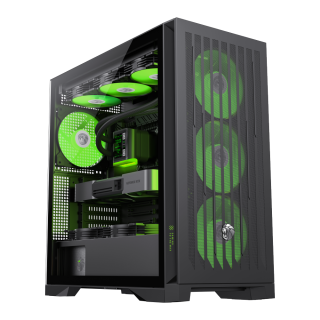
• Comprehensive Compatibility: Supports E-ATX motherboards, 425mm GPUs, 420mm radiators, 245mm PSUs, and 185mm air coolers for versatile hardware configurations.
• Advanced Cooling Matrix: Offers 9×120mm or 8×140mm fan mounts with 4 pre-installed 140mm ARGB PWM fans and a dedicated controller.
• Future-Proof Connectivity: Features Type-C Gen 2, dual USB 3.0 ports, and BTF motherboard compatibility for modern cable management.
• Effortless Building: Incorporates a tool-free design, vertical GPU support, and hidden cable routing with a detachable cover.
• Lion-Inspired Design: Showcases bold claw-mark mesh panels, a tempered glass side panel, and customizable ARGB lighting.

