

Driven by the dual pursuits of PC hardware personalization and performance enhancement, vertical GPU (Graphics Processing Unit) installation has become an increasingly popular choice among enthusiasts. This mounting method not only transforms the GPU into the visual centerpiece inside the case but may also optimize heat dissipation. However, vertical installation has specific requirements for cases. How can you scientifically choose a suitable case? This article will provide a comprehensive analysis, covering technical principles, key parameters, and practical advice.

Aesthetic Upgrade: Vertically mounted, the GPU is prominently displayed behind the side glass panel, fully showcasing its design, RGB lighting, and industrial aesthetic, especially ideal for high - end non - reference - design graphics cards.
Enhanced Heat Dissipation: In traditional horizontal installation, the GPU fans blow hot air directly into the case. When installed vertically, the GPU's cooling fins face the side panel, allowing hot air to be expelled directly through the side panel vents, reducing thermal interference with the CPU area.
Physical Protection: This installation method prevents the PCIe slot from being damaged due to the sagging of long graphics cards caused by gravity. Using a support bracket can further enhance stability.
Compatibility Constraints: Sufficient vertical installation space in the case, a suitable PCIe extension cable (Riser Cable), and a reasonable hardware layout are required.
Airflow Design Requirements: If the distance between the side panel and the GPU is too close (less than 2 cm, for example), it may create a heat - trapped area, causing the GPU temperature to rise by 5 - 10℃.
Installation Complexity: Cases with native vertical installation support can simplify the process. However, for retrofitting, additional brackets need to be purchased, and cable management must be carefully planned.
GPU Length Limitation: Measure the length of the GPU PCB (including the bracket) and ensure that the vertical installation area in the case has at least 5 - 10 mm of extra space. Typical ATX cases can accommodate GPUs up to 330 - 400 mm in length, while Mini - ITX cases generally limit the length to 300 mm or less.
GPU Thickness Compatibility: Confirm whether the vertical installation position of the case supports 2.5 - slot/3 - slot GPUs (approximately 18 mm per slot). Some entry - level cases only support 2 - slot GPUs, while high - end models can accommodate GPUs with a thickness of more than 3 slots (such as the 3.5 - slot NVIDIA RTX 4090 reference design) through adjustable brackets.
Motherboard and Case Structure: For ATX motherboards, pay attention to the horizontal distance between the PCIe slot position and the vertical installation position of the case to avoid bending stress caused by an overly short or long extension cable (the ideal distance is 15 - 20 cm).
Version Compatibility: Ensure that the extension cable supports the PCIe version of the motherboard (such as PCIe 4.0 or 5.0) to avoid performance degradation. Actual tests show that the performance loss of high - quality PCIe 4.0 x16 extension cables can be controlled within 1%, while low - quality cables may cause a 3 - 5% reduction in bandwidth.
Cable Specifications: Prioritize active extension cables with a metal shielding layer and a wire gauge of 28AWG or higher (which require additional power supply). These can reduce signal attenuation, especially suitable for high - frequency signal transmission of PCIe 5.0.
Installation Method: Cases with native vertical installation support usually come with custom - made extension cables. For retrofitting, choose straight - plug, 90 - degree elbow, or rotatable - joint extension cables according to the case structure.
Side Panel Ventilation Structure: Opt for cases with large - area perforations (hole diameter ≥ 5 mm) or Mesh - type side panels. The open - hole area should cover more than 70% of the GPU's cooling fin area to ensure an air intake of 0.5 - 1 CFM per watt of power consumption.
Fan Layout Compatibility: A 120/140 mm fan installation position should be reserved below the vertical installation position. The fan can be set to intake air for the GPU (blowing forward) or exhaust air from the case (drawing air backward). It is recommended to form a through - flow air duct in combination with the front and rear fans of the case.
Water Cooling Support: If planning to install a water - cooling block for the GPU, confirm whether the top/front of the case supports a 360 mm radiator (common in mid - tower cases). Also, ensure that there is at least a 20 mm spacing between the vertical installation position and the radiator tubing to avoid interference.
Native Vertical Installation Position: High - end cases often come with PCIe brackets that support switchable installation modes (such as horizontal/vertical/multi - angle adjustment). Some models offer pre - drilled holes and tool - free installation designs, reducing the installation time to within 15 minutes.
Retrofitting Compatibility: For cases without native support, confirm that the cable management space at the back is sufficient to accommodate the extension cable (a depth of 20 - 30 mm is recommended). Also, check whether the PCIe bracket position can be replaced with a vertical installation bracket (usually requiring a width of 3 - 4 PCIe slots).
Weight Support Design: For heavy - duty GPUs weighing more than 3 kg (such as non - reference - design RTX 4090 models), the case should provide additional support structures, such as metal trays or installation holes for GPU support brackets, to prevent PCB bending caused by long - term gravitational stress.
Plug - and - Play: There is no need to purchase additional brackets or extension cables. The manufacturer has completed compatibility testing, avoiding signal problems caused by mismatched cables.
Optimized Design: The vertical installation position is deeply integrated with the case's air duct. For example, the side panel may have a pre - recessed design (reserving a 25 mm heat - dissipation space) and dedicated cable management slots, balancing aesthetics and heat dissipation.
Budget - Conscious: Transform an old case with third - party brackets (such as universal PCIe vertical brackets, priced at around 50 - 150 yuan), suitable for users who do not want to replace the case.
Personalized Requirements: Support unconventional installation angles (such as 45 - degree tilt) or vertical arrangement of multiple GPUs, which requires custom brackets and extension cables.
Signal Stability: Prioritize extension cables certified by PCI - SIG (such as brands like Delock and CableMod), and avoid using uncertified, low - cost cables.
Warranty Impact: Vertical installation of some brand - name graphics cards may void the warranty (such as the risk of the cooling module displacement in non - reference - design graphics cards). Check the manufacturer's instructions in advance.
Solution: Install side - panel spacer screws (raising the spacing by 5 - 10 mm) or replace the side panel with a custom - made one with a ventilation interlayer. Actual tests show that this can reduce the GPU temperature by 3 - 5℃.
Problem Cause: Low - quality extension cables without electromagnetic shielding interfere with the GPU's lighting signal.
Solution: Choose a shielded extension cable or connect the GPU's RGB control cable separately (bypassing the extension cable).
Technical Points: The case needs to provide at least two vertical installation positions (with a spacing of ≥ 50 mm) and be equipped with dual - slot brackets. Also, pay attention to the PCIe slot allocation on the motherboard (such as x16 + x8 mode).
The core logic of selecting a case suitable for vertical GPU installation is to strike a balance among space compatibility, heat dissipation efficiency, and installation convenience:
Clarify Your Priorities: For those emphasizing aesthetics, prioritize cases with native support and glass side panels. For performance - oriented users, focus on the ventilation structure and GPU thickness compatibility.
Accurately Measure Your Hardware: Record the three - dimensional dimensions of the GPU, the position of the motherboard's PCIe slot, and the planned cooling solution (air - cooled/water - cooled).
Pay Attention to Design Details: Consider implicit parameters such as the PCIe extension cable version, side - panel ventilation rate, and bracket load - bearing capacity to avoid the situation of "installable but poorly functional".
Vertical GPU installation is not just a change in the hardware installation method but also a reconstruction of the internal ecosystem of the case. By scientifically choosing a suitable case, you can achieve an ideal balance between visual enjoyment and hardware performance, making the GPU the true "soul component" of your PC.
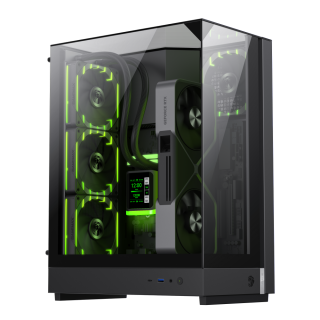
• Three-sided tempered glass offers a full, unobstructed view of your hardware.
• 90° rotated motherboard layout enhances airflow using the natural Stack Effect.
• Supports vertical GPU installation without a riser cable; compatible with NV50 series.
• Optimized for Back-to-Front (BTF) motherboards for clean, organized cable management.
• Space-efficient design supports 360mm liquid cooling, M-ATX motherboards, and SFX PSUs.
• Includes two ARGB PWM fans for dynamic, synchronized lighting effects.
• Metal nano nameplate adds a premium texture and sleek finish.

