

When building or customizing a PC, one of the aesthetic and functional decisions you might face is whether to mount your GPU vertically or horizontally. Both orientations have their pros and cons, and your choice can impact not just the look of your setup but also its performance. Here's a quick comparison to help you decide which mounting style is right for you.
Horizontal GPU mounting is the standard configuration for most cases and motherboards. It's the default option that has been around for years, and for good reason. Installing a GPU horizontally is straightforward. You simply align the card's edge connector with the PCI - Express (PCI - e) slot on the motherboard and gently push it in until it clicks into place. Then, you secure the card to the case using a screw at the back of the case. This process usually requires no additional components, making it a hassle - free installation method, especially for novice PC builders.
In a horizontal setup, the GPU is typically positioned in a way that allows for good airflow around it. The cooling fans on the GPU are often designed to direct air towards the bottom of the case. In a well - designed case, this can create a natural convection current where hot air rises and escapes out of the case through the top or rear exhaust fans, while cool air is drawn in from the front or bottom intake fans. This natural airflow pattern helps keep the GPU temperatures in check, which is crucial for maintaining stable performance, especially during long gaming sessions or when running graphics - intensive applications. For example, in air - cooled systems, horizontal mounting can provide an efficient cooling solution without the need for complex additional cooling measures.
Since horizontal mounting is the standard, it is compatible with almost all PC cases and motherboards on the market. There's no need to worry about whether your case has special provisions for vertical mounting or if your motherboard's PCI - e slots are suitable for non - standard orientations. This compatibility extends to other components as well. The horizontal orientation of the GPU usually doesn't interfere with the placement of other parts like the CPU cooler, power supply, or storage drives, making it easier to build a well - organized and functional PC system.
However, horizontal mounting does have some drawbacks. One of the main aesthetic drawbacks is that it often hides the cooler design and any RGB lighting features that the GPU may have. Since the GPU is usually installed with the cooler and lights facing downwards or towards the bottom of the case, they are not easily visible, especially if you have a case with a side - panel window. Another potential issue is that over time, the weight of the GPU can cause it to sag slightly. This is more common with larger and heavier high - end GPUs. The sagging can put stress on the PCI - e slot, potentially leading to connection issues or even damage to the slot or the GPU's connector over the long term.
Vertical GPU mounting has gained popularity in recent years, primarily for its aesthetic value. When you mount a GPU vertically, it becomes a focal point of your PC build, especially if you have a case with a clear side panel. The cooler, RGB lighting, and the overall design of the GPU are fully on display, creating a visually stunning effect. This is particularly appealing to gamers and PC enthusiasts who want to show off their high - end hardware. For example, if you have a GPU with an elaborate custom - painted cooler or dynamic RGB lighting that can be synchronized with other components in your system, vertical mounting allows you to showcase these features to their fullest extent.
In certain situations, vertical mounting can also be beneficial for space management. In smaller cases or custom builds where space is at a premium, vertical mounting can free up horizontal space that would otherwise be occupied by the GPU. This can make it easier to fit other components, such as larger CPU coolers or additional storage drives. Additionally, vertical mounting can prevent GPU sag, which is a common issue with horizontal mounting, especially for heavier GPUs. By mounting the GPU vertically, the weight is distributed more evenly, reducing the stress on the PCI - e slot.
However, vertical GPU mounting is not without its challenges. It typically requires additional components. You will need a PCI - e riser cable to connect the GPU to the motherboard's PCI - e slot since the card is no longer directly inserted into the slot in the traditional way. These riser cables can vary in quality, and a low - quality cable may cause issues such as signal degradation or reduced performance. Moreover, not all cases support vertical mounting out - of - the - box. Some cases may require modifications, such as removing or adding brackets, to accommodate a vertically mounted GPU. This can add to the complexity and time required for the PC build.
Airflow can be a concern with vertical GPU mounting. If the GPU is mounted too close to the side panel of the case, it can restrict the airflow to the cooling fans on the GPU. This can lead to higher temperatures, especially during heavy - load operations. The hot air exhausted by the GPU may not be able to escape the case efficiently, and the cool air intake may be limited. To mitigate this issue, some cases designed for vertical GPU mounting have special airflow features, such as additional intake or exhaust fans in the vicinity of the GPU, or optimized internal layouts to ensure proper air circulation. However, in cases without such optimizations, vertical mounting may result in a slight increase in GPU temperatures compared to horizontal mounting.
In terms of gaming performance, the difference between vertical and horizontal GPU mounting is generally minimal. In most cases, the GPU's performance is determined by its hardware specifications, such as the number of CUDA cores, the amount of VRAM, and the clock speeds. However, if the vertical mounting causes a significant increase in GPU temperature, it could potentially lead to thermal throttling. Thermal throttling occurs when the GPU reduces its clock speeds to prevent overheating, which can result in a decrease in gaming performance. But in well - designed systems with proper cooling and ventilation, this is usually not a major issue. For example, in a high - end PC with a powerful GPU and an efficient cooling system, the performance difference between vertical and horizontal mounting may be negligible, with both orientations providing smooth and high - frame - rate gaming experiences.
Overclocking involves pushing the GPU beyond its factory - set clock speeds to achieve higher performance. When it comes to overclocking, horizontal mounting may have a slight advantage due to better airflow and lower temperatures in most cases. With better cooling, the GPU is more likely to maintain stable performance at higher clock speeds. In vertical mounting, if the temperatures rise too much during overclocking, it can increase the risk of instability and crashes. However, with proper cooling modifications and high - quality components, it is still possible to overclock a vertically mounted GPU successfully. Some enthusiasts may even use additional cooling methods, such as liquid cooling for the GPU, to counteract the potential heat issues associated with vertical mounting during overclocking.
If you choose to mount your GPU vertically, there are additional costs to consider. As mentioned earlier, you will need a PCI - e riser cable, which can range in price depending on its quality and the PCI - e version it supports. High - quality riser cables with features like better signal shielding and support for the latest PCI - e standards can be relatively expensive. Additionally, if your case does not support vertical mounting natively, you may need to purchase additional mounting brackets or modify your case, which can also add to the cost. In contrast, horizontal mounting requires no such additional components, making it a more cost - effective option in terms of the mounting process itself.
In the long term, the cost of maintaining the PC can also be affected by the mounting orientation. If a horizontally mounted GPU sags over time and causes damage to the PCI - e slot or the GPU connector, it may require costly repairs or component replacements. On the other hand, if a vertically mounted GPU experiences overheating issues due to poor airflow, it could potentially shorten the lifespan of the GPU, also resulting in additional costs down the line. However, if proper precautions are taken in both cases, such as using GPU support brackets for horizontal mounting to prevent sag and ensuring good airflow for vertical mounting, these long - term costs can be minimized.

Ultimately, the decision between vertical and horizontal GPU mounting comes down to your priorities. If you are primarily concerned with performance, simplicity of installation, and compatibility, horizontal mounting is likely the best choice. It offers reliable cooling, easy installation, and works with a wide range of components. However, if aesthetics are your top priority, and you want to showcase your GPU's design and lighting features, or if you are dealing with space constraints in a smaller case, vertical mounting may be more appealing. You should also consider your budget, as vertical mounting may require additional expenses for components like riser cables and mounting brackets.
Before making a decision, it's crucial to check the compatibility of your case and components. Ensure that your case can support the mounting orientation you choose. If you're considering vertical mounting, make sure your case has the necessary provisions or can be easily modified to accommodate it. Also, check the length and weight of your GPU, as some very large or heavy GPUs may require additional support regardless of the mounting orientation. Additionally, consider the impact on other components in your system, such as the CPU cooler or storage drives, to ensure that there are no interference issues.
When building a PC, it's also a good idea to think about future - proofing. If you plan to upgrade your GPU in the future, make sure that the mounting orientation you choose will still be suitable for the new card. For example, if you choose a case with a non - standard vertical mounting setup that is only compatible with certain GPUs, you may face challenges when upgrading to a different model. By choosing a more flexible and widely - compatible mounting solution, you can make it easier to upgrade your components in the future without having to make major changes to your PC's hardware.
In conclusion, both vertical and horizontal GPU mounting have their own unique advantages and disadvantages. By carefully considering your needs, preferences, and the specific requirements of your PC build, you can make an informed decision that will result in a system that not only performs well but also looks great. Whether you opt for the traditional horizontal approach or the more visually - striking vertical mounting, the key is to ensure that your GPU is installed in a way that maximizes its potential and provides a satisfying computing experience.
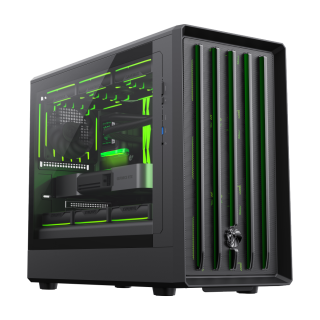
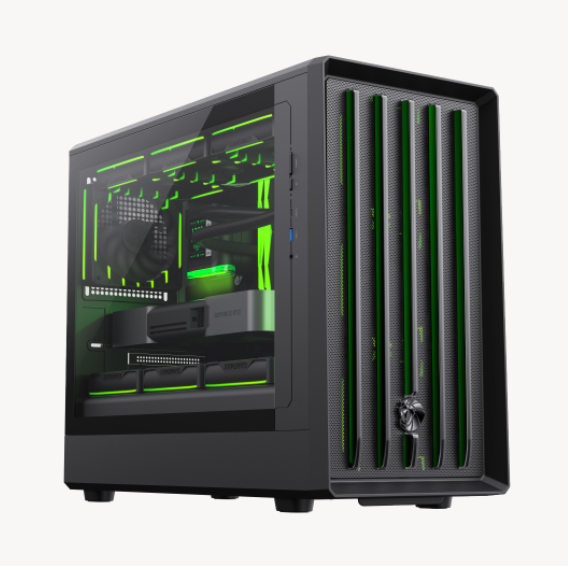
• GAMEMAX's all-new design language features a lion's claw front panel and exclusive GAMEMAX ventilation holes on the side panels.
• Exceptional Hardware Support – Compatible with M-ATX motherboards, 420mm GPUs (ready for Nvidia 50 Series), 240mm ATX PSUs, 175mm air coolers, and 360mm radiators for ultimate versatility.
• Powerful cooling performance with front MESH steel mesh and vertical airflow design.
• Comprehensive Cooling Options – Supports up to 12x 120mm fans, including 4 pre-installed 120mm ARGB/PWM fans and an ARGB/PWM controller for optimal airflow and stunning lighting effects.
• Modern I/O Panel – Equipped with a TYPE-C Gen 2 port and USB 3.0 for high-speed connectivity and future-ready functionality.
• Standard adjustable-height graphics card support bracket to protect the GPU.
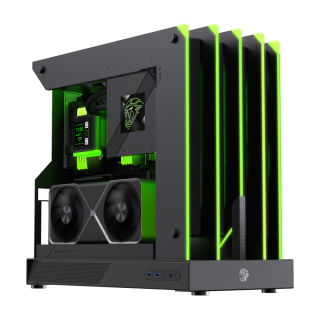
• Limited MOD edition fusing industrial aesthetics with bold gaming design to give your build a distinctive edge.
• Open-Air design ensures maximum airflow and zero blind spots, brilliantly showcasing your build from every angle.
• Claw-style RGB lighting featuring dynamic, claw mark-inspired illumination with 277 LEDs.
• A case engineered with all-metal CNC precision processing, laser cutting, and high-precision molding for a stunning, refined quality.
• NV50 series GPU ready, supporting vertical GPU mounting with an included PCIe 4.0 riser cable for versatile setups.
• Modern I/O Panel with 2x USB 3.1 and 1x Type-C (Gen2), featuring a symmetrical, swappable design.
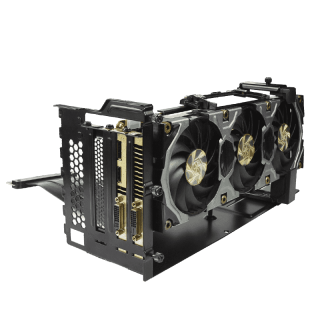
GameMax VGPUKIT, A universal vertical GPU bracket , The Kit included the Verfical GPU bracket and a 220mm flat high quality PCIe 16x Riser cable, and addtional 2x Up/Down adjustable holder for make GPU card is stafy during transportation
•
Compatiable with chassis by "OPEN" PCI slot design, Modding might be required.

