

In the world of computing, even the most overlooked components play a critical role—and computer power cords are no exception. A power cord is the unsung hero that bridges your device to the electrical grid, ensuring a steady flow of energy to keep your laptop, desktop, or server running smoothly. But with a dizzying array of shapes, sizes, and standards, choosing the right one can feel overwhelming. Whether you’re replacing a lost cord, upgrading your setup, or traveling internationally, understanding the different types of computer power cords is essential to avoid damage to your equipment, ensure safety, and maintain optimal performance. Let’s demystify the world of computer power cords, breaking down the key types, their uses, and how to pick the perfect one for your needs.
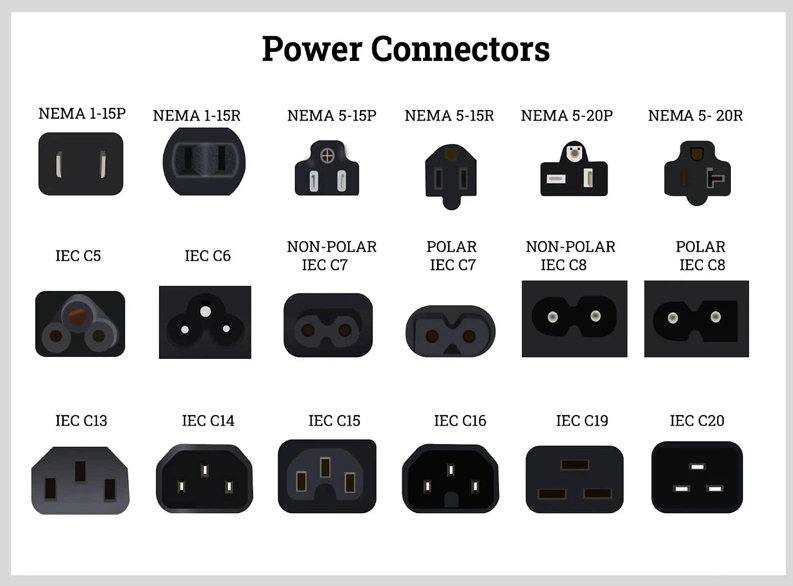
Before diving into specifics, it’s important to understand why choosing the correct power cord matters. Using the wrong cord can lead to:
Device damage: Mismatched voltage or current ratings can fry internal components.
Safety hazards: Poorly made or incompatible cords may overheat, spark, or cause electrical fires.
Performance issues: An undersized cord might not deliver enough power, leading to unexpected shutdowns or reduced efficiency.
With that in mind, let’s explore the most common computer power cord types and their applications.
Most modern computers and electronic devices rely on power cords standardized by the International Electrotechnical Commission (IEC). These cords consist of two main parts: a plug (connecting to the wall outlet) and a connector (attaching to the device). The IEC assigns codes to these connectors to simplify identification. Here are the most prevalent types:
The C13 connector (often called a “Mickey Mouse” plug for its rounded shape) is the most common type for desktop computers, monitors, printers, and power strips. It features three prongs in a rectangular arrangement. The matching plug, C14, is built into the device itself (e.g., the back of your desktop tower or monitor).
Specs: Rated for 10A/250V AC, making it suitable for most mid-power devices.
Use case: Desktop PCs, monitors, external hard drives, and office equipment.
If you own a laptop, you’re likely familiar with the C5 connector (nicknamed the “cloverleaf” or “Mickey Mouse” plug for its three rounded prongs). It pairs with the C6 inlet found on many laptop power adapters.
Specs: Rated for 2.5A/250V, designed for low-power devices.
Use case: Laptops, small printers, and compact electronics like gaming consoles.
The C7 connector is a two-pronged, figure-8 shaped plug, while the C8 inlet is its counterpart on devices. This slim design is common in devices where space is a priority.
Specs: Rated for 2.5A/250V, ideal for low-power gadgets.
Use case: Laptops (older models), DVD players, and small audio equipment.
For high-performance devices that demand more power, the C19 connector (with a squared-off shape) and C20 inlet are standard. These cords handle higher currents, making them essential for servers and data centers.
Specs: Rated for 16A/250V, suitable for high-power equipment.
Use case: Servers, large monitors, and industrial-grade computers.
While IEC connectors standardize the device end of the cord, the plug that connects to the wall outlet varies by region. This is due to differences in voltage (110-120V in North America vs. 220-240V in Europe, for example) and safety regulations. Here are the most common regional plugs you’ll encounter:
Type A: Two flat parallel prongs, no ground. Used for small devices like lamps but rarely for computers.
Type B: Two flat prongs plus a round ground pin. Common in the U.S., Canada, and Japan for desktop PCs and monitors.
Voltage: 110-120V.
Type C: Two round prongs (no ground), widely used across Europe, the Middle East, and parts of Asia.
Type E/F: Two round prongs with an additional ground pin (Type E) or clips (Type F, “Schuko”). Common in Germany, France, and Eastern Europe.
Voltage: 220-240V.
A three rectangular-prong plug with a fuse built into the plug. Used in the UK, Ireland, Australia, and Singapore.
Voltage: 220-240V.
Two flat prongs in a V-shape plus a ground pin. Used in Australia, New Zealand, and China.
Voltage: 220-240V.
Three round prongs in a triangular arrangement. Unique to Switzerland and Liechtenstein.
Voltage: 230V.
With so many options, selecting the correct power cord boils down to three key steps:
Look at the power port on your computer or adapter. It will match one of the IEC codes (e.g., C14 for a desktop, C6 for a laptop). The inlet’s shape and number of prongs will guide you to the corresponding connector (e.g., C13 for a C14 inlet).
Ensure the wall plug matches the outlets in your country. If you’re traveling, you may need a travel adapter to convert between regional plug types (e.g., a Type A to Type C adapter for use in Europe). Note: Adapters change the plug shape but not the voltage—check if your device is dual-voltage (110-240V) before using it abroad.
Check the label on your device or original cord for ratings like “10A 250V” or “2.5A 125V.” Your new cord must meet or exceed these specs to avoid overloads. For example, a 10A cord is safe for a device rated 5A, but a 5A cord will fail with a 10A device.
Can I use a longer power cord than the original?
Yes, but ensure it’s rated for the same or higher current. Longer cords (over 10 feet) may require thicker gauge wiring to prevent voltage drops.
Are all C13 cords the same?
No—they vary by gauge (thickness) and insulation. Heavy-duty cords (14AWG) work for high-power devices, while lighter cords (18AWG) suit low-power gear.
Do I need a grounded cord?
Grounded cords (with three prongs) add a layer of safety, redirecting excess electricity to prevent shocks. Use them for metal-cased devices like desktops.
Understanding computer power cord types ensures you keep your devices safe, functional, and compatible with global power grids. Whether you’re replacing a worn cord, setting up a home office, or traveling internationally, start by identifying your device’s IEC inlet, matching it to the right connector, and confirming regional plug and voltage requirements. With these steps, you’ll never be stuck with the wrong cord again—keeping your tech powered up and ready to go.

