

The debate between tempered glass and mesh front panels has divided the PC building community for years, and nowhere is this divide more pronounced than in the full tower segment, where both design philosophies compete at their highest expression. On one side: the tempered glass enthusiasts who want their $2000 gaming rig to serve as a centerpiece — a work of art visible from across the room. On the other: the mesh advocates who prioritize thermal performance above all else, building machines that are as efficient as they are powerful. Both sides have legitimate arguments, and the answer is not as simple as mesh is better for cooling or glass is better for aesthetics. The real answer depends on your workload, your environment, and what you value most in a PC chassis.
The core difference between tempered glass and mesh front panels comes down to air permeability. A solid tempered glass panel allows zero direct airflow — all cooling air must enter through other openings like the bottom, side vents, or top panel. A mesh front panel, by contrast, allows maximum airflow through the entire front surface. This is not a minor difference: in controlled testing, a mesh-fronted full tower case can achieve 15-30% lower component temperatures compared to an otherwise identical glass-fronted case, depending on fan configuration and ambient temperature.
However, this thermal advantage comes with trade-offs. Mesh cases tend to accumulate visible dust faster on the front panel, as the open structure draws in air — and with it, airborne particles. Glass panels, by contrast, keep the interior visually clean longer because the solid front panel filters large dust particles before air enters. The tempered glass also provides a degree of sound dampening that mesh cannot match, reducing the high-frequency noise generated by spinning fans. For builders in quiet environments — recording studios, home offices, bedroom gaming setups — the acoustic benefits of tempered glass can be as valuable as the thermal benefits of mesh.
Tempered glass front panels transformed PC building when they became mainstream around 2015. Before then, cases were predominantly metal and mesh, with interior aesthetics visible only through small side window cutouts. Glass panels democratized the showcase aesthetic, allowing builders to display RGB lighting, custom water cooling loops, and premium components as the primary visual feature of the system. In a full tower chassis, a tempered glass front panel typically spans the entire front surface, providing an unobstructed view of the primary intake fans and any RGB strips mounted behind them.
But not all tempered glass panels are equal. The thickness of the glass affects both durability and visual quality — 4mm tempered glass (standard in most premium cases) provides excellent impact resistance and optical clarity, while thinner 3mm glass may flex slightly under pressure and introduce subtle optical distortion at the edges. The GameMax Precision 2 BK uses 4mm tempered glass on its side panel, providing a distortion-free view of the interior components and RGB lighting. The Vega Pro Grey takes this further with dual tempered glass side panels — one on each side — allowing a 360-degree view of the internal hardware from either angle of the room.
Mesh front panels have experienced a renaissance in recent years, driven by the demands of high-TDP CPUs and GPUs that require serious cooling. Modern fine-mesh panels use a honeycomb or diamond perforation pattern that achieves near-maximum theoretical airflow while maintaining a visually clean appearance. The key metric is free area — the percentage of the front panel surface that is open to airflow. Premium mesh panels achieve 60-70% free area, approaching the airflow of a fully open front while maintaining some visual filtering of the interior.
The GameMax Siege BK exemplifies the mesh approach: its front panel combines ABS plastic with a full metal mesh layer, creating a structure that is visually opaque enough to hide interior cables and drive bays while providing maximum airflow penetration. The mesh is backed by a dust filter layer, so while the visual presence is mesh, the actual cooling air passes through two layers of filtration — the mesh itself and the dust filter. This dual-layer approach maintains airflow performance while keeping internal components cleaner than a pure open-mesh design would allow.
While the front panel gets most of the attention, the side panel material also significantly affects both aesthetics and thermal performance. Tempered glass side panels have become the default for gaming cases because they allow you to showcase your internal components and RGB ecosystem without compromising structural integrity. A 4mm tempered glass panel can withstand significant impact without shattering, and the thermal expansion coefficient is well-understood, making it a reliable material for long-term use.
Metal side panels provide superior sound dampening and structural rigidity. For builders prioritizing quiet operation, a metal side panel with sound-dampening material can reduce overall system noise by 3-5dB compared to a tempered glass equivalent. The trade-off is that you lose the visual showcase, but for systems that sit on the floor under a desk or in a dedicated server room, the acoustic benefits may outweigh the aesthetic ones.
The table below compares the cooling-relevant specifications across the three tempered glass and three mesh-focused full tower cases discussed in this article:
| Feature | Precision 2 BK (Glass) | Vega Pro Grey (Glass) | Siege BK (Mesh) |
|---|---|---|---|
| Front Panel Material | ABS + Mesh + Metal | Metal Cover | ABS + Mesh |
| Side Panel Material | Tempered Glass | Tempered Glass (Both Sides) | Tempered Glass |
| Airflow Approach | Hybrid (Mesh + Glass) | Metal Front, Dual Glass Sides | Maximum Mesh Front |
| Included Fans | None (3x120mm optional) | None (2x120mm optional) | 3x120mm ARGB (Included) |
| Radiator Support (Front) | 120/140/240/280mm | 120/240mm | 120/140/240/280/360mm |
| Radiator Support (Top) | 120/240mm | 120/140/240/280/360mm | 120/140/240/280/360mm |
| GPU Max Length | 360mm | 360mm | 410mm |
| Motherboard Support | E-ATX/ATX/M-ATX/ITX | E-ATX/ATX/M-ATX/ITX | E-ATX/ATX/M-ATX/ITX |
| Dust Filters | Bottom and Top | Bottom and Top | Bottom, Top, and Front |
| Primary Strength | Type-C Ready, Upgradeable | 360-Degree RGB Showcase | Maximum Cooling Capacity |
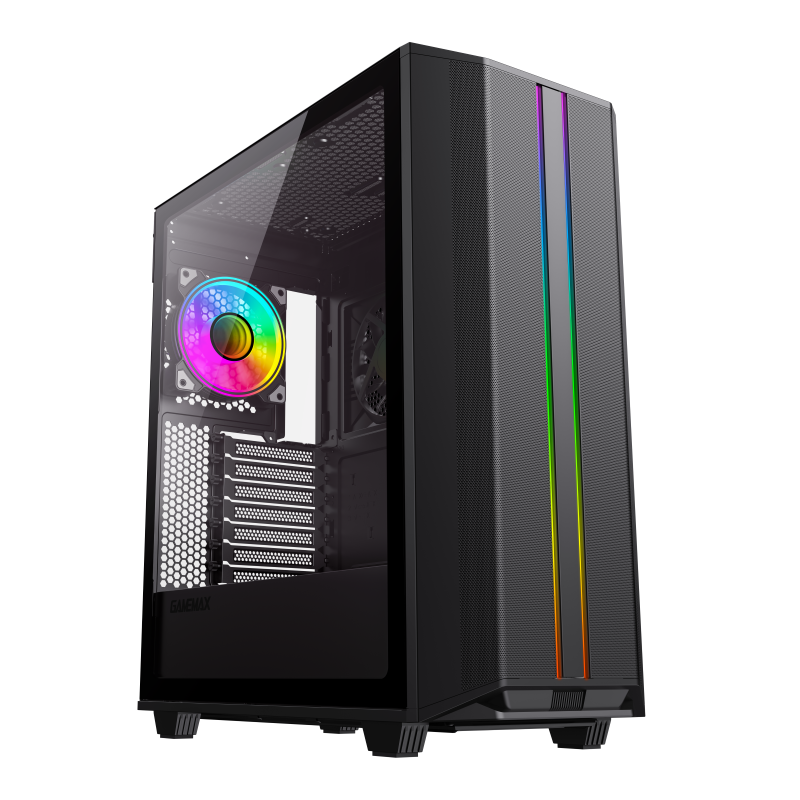
The Precision 2 BK takes a hybrid approach that acknowledges the real-world compromise most builders face: they want both cooling performance and visual appeal. Its front panel combines ABS plastic, mesh, and metal in a layered design that provides both airflow through the mesh areas and aesthetic interest through the metal frame. The 4mm tempered glass side panel showcases your internal components and any RGB lighting, while the mesh sections of the front panel allow unrestricted intake airflow. The detachable top plate — a design innovation that GameMax specifically developed to solve the common problem of difficult top-panel maintenance — makes cleaning dust filters and upgrading cooling components straightforward.
The Precision 2 BK supports E-ATX (up to 282x305mm), ATX, M-ATX, and ITX motherboards, with GPU clearance up to 360mm and CPU cooler height up to 170mm. Its water cooling support includes 120mm, 140mm, 240mm, and 280mm radiators, providing flexibility for both air and liquid cooling builds. The Type-C (GEN1) port on the front panel brings modern connectivity to a chassis that is designed for longevity, ensuring compatibility with next-generation peripherals and devices.
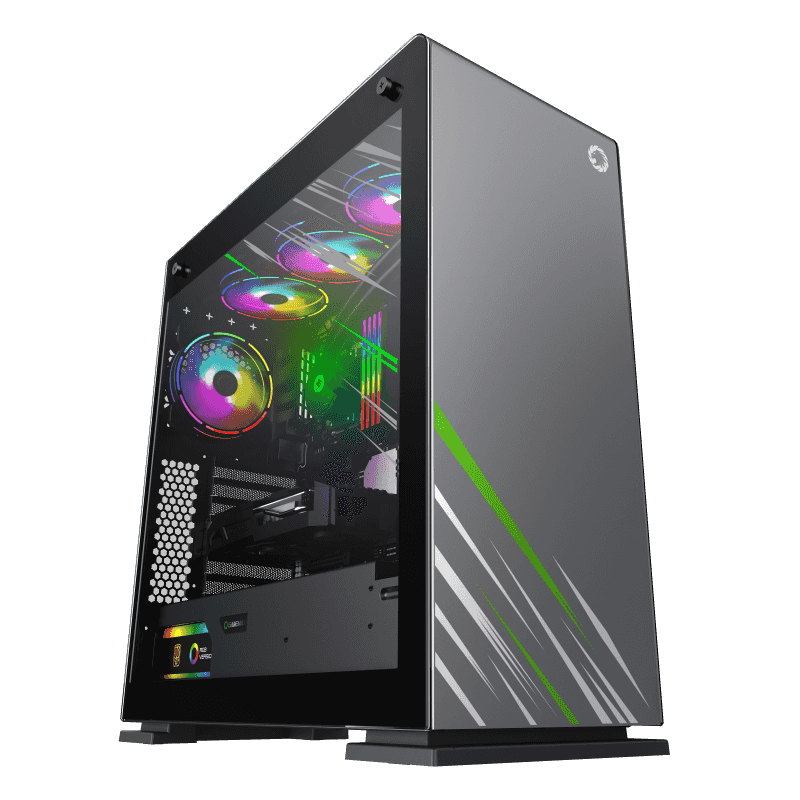
The Vega Pro Grey is GameMax statement piece for builders who prioritize aesthetics above all else. Its full metal front and top panels are constructed from 1.2mm steel — unusually thick for a consumer case — giving it a substantial, premium feel that lighter mesh cases cannot match. The dual tempered glass side panels on each side create a 360-degree viewing experience, allowing the internal RGB lighting, custom cable management, and premium components to be visible from any angle. This makes the Vega Pro Grey ideal for symmetrical desk setups where the PC is positioned in the center of the room, visible from multiple angles.
Despite its aesthetic focus, the Vega Pro Grey does not completely sacrifice cooling performance. The top panel supports up to 360mm radiators, and the rear supports 120mm — meaning you can install a 360mm AIO at the top for the CPU while relying on the GPU own cooler for graphics processing. The full metal construction also provides superior sound dampening compared to mesh cases, reducing fan noise by reflecting and absorbing high-frequency sound waves. The chassis supports E-ATX (330x305mm), ATX, M-ATX, and ITX motherboards, with GPU clearance up to 360mm and CPU cooler height up to 170mm. The 6-port Rainbow ARGB controller provides synchronized lighting control across all compatible components.
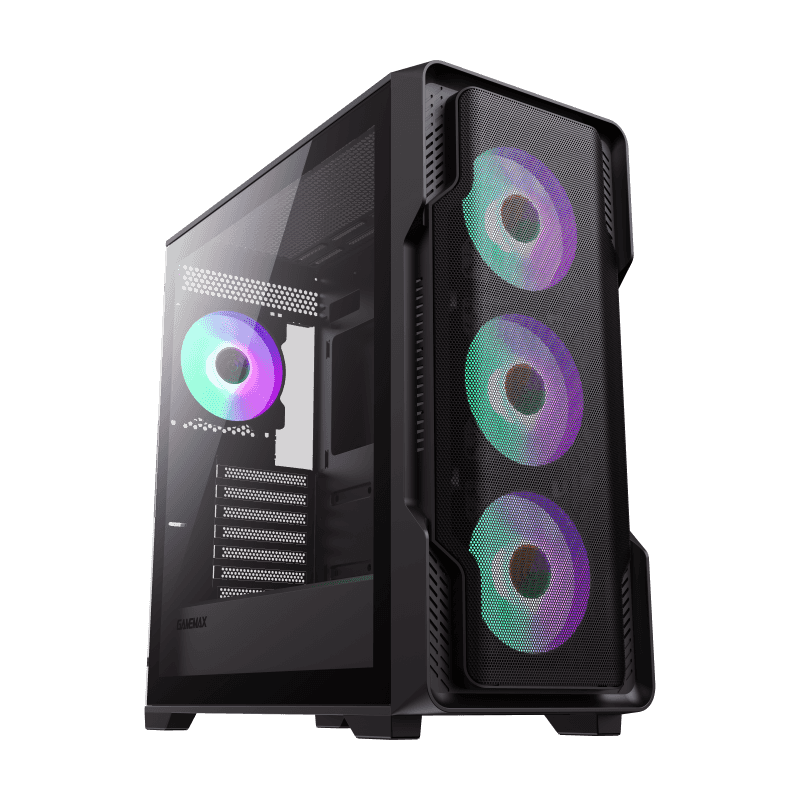
The Siege BK is GameMax answer to builders who demand maximum cooling capacity without stepping up to specialized server chassis. Its ABS and mesh front panel provides the highest airflow penetration of any GameMax full tower, with the mesh backed by a removable dust filter that catches particles before they reach internal components. The 4x120mm ARGB fans included at the front draw cool air from outside the case and push it directly across the GPU, creating a focused airflow path that is ideal for multi-GPU workstations or systems running high-TDP graphics cards like the RTX 4090.
The Siege BK water cooling support is the most comprehensive of the three cases: front radiators up to 360mm, top radiators up to 360mm, and rear radiators up to 120mm. This means you can run a 360mm AIO at the front for the CPU while simultaneously running a 120mm exhaust at the rear — or, for extreme builds, mount dual 360mm radiators for a dual-AIO configuration that is rare in consumer cases. The 8-port ARGB PWM hub ensures all fans and RGB strips work in concert, with the fan speed controller allowing real-time adjustment without entering BIOS. With GPU clearance up to 410mm and CPU cooler height up to 165mm, the Siege BK accommodates virtually any consumer hardware configuration available today.
Choose tempered glass when: you prioritize visual aesthetics and want your PC to be a centerpiece; you work in a quiet environment where acoustic performance matters; you primarily run single-GPU configurations where front-panel airflow is less critical; and you value the premium feel of thick steel and glass construction.
Choose mesh when: you run high-TDP components (RTX 4090, Ryzen 9 9950X) that demand maximum cooling; you operate in warm environments where every degree of cooling margin matters; you prefer function-over-form aesthetics and do not need the RGB showcase; and you want to minimize dust accumulation inside the case with front-panel filtration.
Choose hybrid (mesh + glass) when: you want the best of both worlds but can tolerate compromise; your build combines a powerful CPU with a powerful GPU that both need cooling; and you value case versatility over specialization.
The tempered glass vs. mesh debate in full tower cases does not have a universal winner — it has a right answer for your specific build. The GameMax Vega Pro Grey and Precision 2 BK represent the glass and hybrid approaches respectively, offering excellent cooling for their aesthetics-forward designs. The Siege BK takes the mesh approach to its logical conclusion, delivering maximum airflow and the most comprehensive radiator support in the GameMax lineup. Understanding the trade-offs between these design philosophies — and choosing the case that aligns with your priorities — is what separates a good build from a great one. Invest the time to match your case to your workload, and you will be rewarded with a system that is both thermally efficient and visually satisfying.

