

As one of the widely used CPU sockets in Intel's history, LGA 1151 has long been a source of confusion for many users regarding compatibility issues. Although the physical structure of the socket is the same, the differences in electrical protocols between the two generations of platforms have led to significant compatibility barriers. This article will systematically explain the CPU models supported by LGA 1151 motherboards, memory selection standards, and compatibility pitfalls.
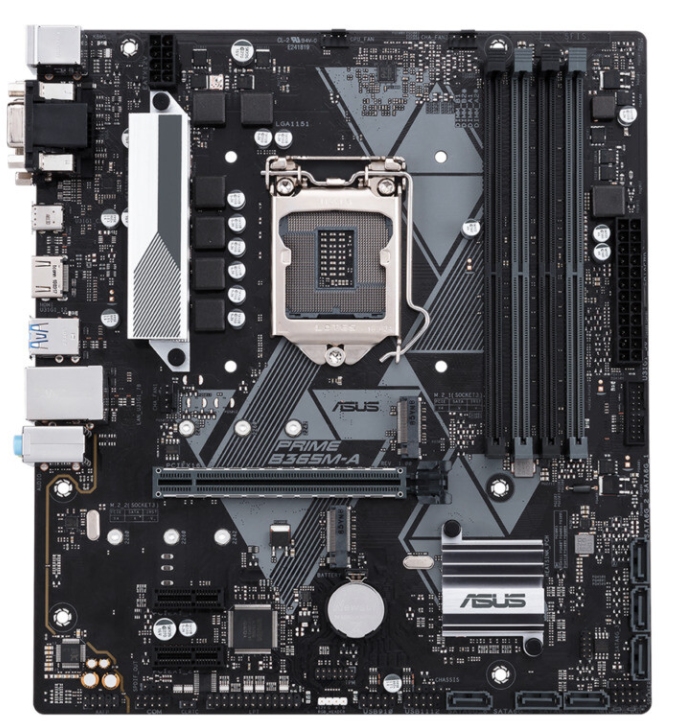
The LGA 1151 interface has two incompatible hardware platforms:
First-generation platform (100-series chipsets): Released in 2015, it supports 6th-generation (Skylake) and 7th-generation (Kaby Lake) Core processors.
Second-generation platform (300-series chipsets): Released in 2017, it supports 8th-generation (Coffee Lake-S) and 9th-generation (Coffee Lake-R) Core processors.
This differentiation stems from implicit modifications to pin definitions. Even though the physical sockets are the same, cross-generational mixing (such as installing an i9-9900 into a Z170 motherboard) will result in failure to boot.
Supported CPU series:
6th-generation Core (Skylake): i3-6100, i5-6500, i7-6700K, etc.
7th-generation Core (Kaby Lake): i3-7100, i5-7500, i7-7700K, etc.
Xeon E3 v5/v6 series: E3-1230 v5, E3-1240 v6, etc.
Corresponding chipsets:
High-end overclocking: Z170, Z270 (support CPU and memory overclocking)
Mainstream: B150, B250 (suitable for office work and gaming)
Entry-level: H110, H210 (only support basic functions)
Note: Some 100-series motherboards need to update the BIOS to support 7th-generation CPUs. When purchasing a second-hand motherboard, it is necessary to confirm the BIOS version.
Supported CPU series:
8th-generation Core: i3-8100, i5-8400, i7-8700K, etc.
9th-generation Core: i3-9100, i5-9400F, i7-9700K, i9-9900K, etc.
Pentium/Celeron: G5400, G4900, etc.
Corresponding chipsets:
High-end overclocking: Z370, Z390 (support overclocking of 95W processors)
Mainstream: B360, B365 (support USB 3.1 and M.2 interfaces)
Entry-level: H310 (suitable for low-cost PC builds)
Industrial motherboards such as North China Industrial Control BPC-7993 also explicitly support 8th/9th-generation Core processors, verifying the compatibility range of 300-series chipsets.
The LGA 1151 platform only supports DDR4 memory but has strict hardware limitations:
First-generation platform (100/200-series):
H110 chipset supports up to 2133MHz (even if high-frequency memory is inserted, it will downclock)
Z170/Z270 can reach above 3200MHz through overclocking (requires high-quality memory)
Second-generation platform (300-series):
H310 chipset supports 2666MHz memory
Z390 can stably overclock to 4000MHz with 9th-generation Core
The maximum capacity of a single memory module is 16GB, and the total capacity upper limit is 64GB (some H310 motherboards are limited to 32GB)
All chipsets support dual-channel memory. It is recommended to choose memory kits of the same brand and specification to avoid compatibility issues.
Non-Z series chipsets (such as B360, H310) lock the memory overclocking function and can only run at the default frequency
Memory voltage exceeding 1.35V may cause overheating of the motherboard's power supply module
The memory controller of 8th/9th-generation Core is enhanced, and its compatibility with high-frequency memory is better than that of 6th/7th-generation.
New CPU installed in old motherboard has no response
Cause: The default BIOS of 100-series motherboards does not recognize 8th/9th-generation CPUs, and it cannot be solved by BIOS update (hardware-level incompatibility)
Solution: Must replace with a 300-series motherboard
Memory frequency does not meet the marked value
Cause: Limited by both the CPU memory controller (e.g., 6th-generation Core max 2133MHz) and the chipset
Solution: Enable XMP mode in the BIOS, or choose memory that matches the platform's upper limit
Xeon processor compatibility
E3 v5/v6 only supports 100/200-series chipsets; 300-series motherboards cannot recognize them. Special attention should be paid when purchasing.
The core of LGA 1151 platform compatibility lies in distinguishing between the two generations of chipsets: 100/200-series motherboards are suitable for 6th/7th-generation Core and E3 v5/v6, while 300-series motherboards are optimized for 8th/9th-generation Core. Memory selection must match the frequency limit of the chipset, and Z-series chipsets provide more flexible overclocking space. Before purchasing, be sure to check the CPU support list on the motherboard manufacturer's official website to avoid hardware damage due to implicit compatibility issues.

