

Vertical GPU installation, an emerging hardware setup method, has garnered significant attention in the DIY PC building community in recent years. This approach uses a PCIe riser cable to mount the graphics card perpendicular to the motherboard, contrasting sharply with the traditional horizontal installation. Below, we analyze its advantages and challenges from a technical and practical standpoint, helping users make informed decisions.

Vertical installation optimizes heat dissipation by altering the airflow path. In traditional horizontal setups, GPU fans typically draw air from the bottom of the case, an area prone to dust accumulation and restricted airflow. When installed vertically, the GPU can directly intake cool air from the front or side of the case, creating a three-dimensional airflow pattern with top-mounted radiators. Real-world testing shows that in "tempered glass cases" with bottom fan support, vertical installation can lower GPU temperatures by 3–5°C and CPU temperatures by 2–3°C. For high-power GPUs exceeding 300W (e.g., RTX 4090, RX 7900 XT), this reduces the risk of thermal throttling significantly.
As GPUs grow in size and weight (e.g., RTX 4090 measures over 330mm in length and weighs 1.3kg), horizontal mounting subjects PCIe slots to gravitational stress, potentially causing deformation. Vertical installation eliminates this strain by securing the GPU to the case frame via a riser cable, protecting the motherboard’s interface. Data from ASUS, MSI, and other manufacturers indicates that vertical mounting reduces slot stress by over 80%, extending the motherboard’s lifespan.
Vertical installation fully showcases the GPU’s front face, enhancing visual appeal when paired with RGB lighting and transparent side panels. For example, the GALAX RTX 4070 Ti Star OC’s Starlight III cooling system with ARGB lighting becomes a centerpiece in the build. This design caters to enthusiasts seeking personalized, showpiece builds.
Vertical mounting imposes strict requirements on cases and motherboards. First, the case must support vertical mounting brackets or have sufficient space for a riser cable (e.g., Phanteks G500A, ASUS ROG Strix Helios). Second, the motherboard’s PCIe slot position must align with the riser cable; compact mATX boards may lack compatibility. Installation requires precise adjustment to avoid clashes with the case side panel or components like CPU coolers, which can be daunting for beginners.
Vertical installation incurs extra costs for riser cables (¥200–500) and compatible cases (typically ¥300–800 more than standard cases). Premium risers like the Corsair Premium PCIe 4.0 x16 feature EMI shielding but come at a higher price. While PCIe 4.0 risers have negligible performance impact (1–2% loss), PCIe 5.0 riser stability is still being validated. Budget-conscious users may find horizontal installation more economical.
Vertical mounting reverses the orientation of HDMI/DP ports, requiring re-routing of display cables and potentially complicating desk cable management. In some cases, power cables (e.g., 12VHPWR) must bend sharply, risking poor connections. Users need flexible, high-quality cables to maintain reliability.
Some manufacturers (e.g., GAMEMAX) exclude damage caused by non-official risers from warranties. The durability of third-party risers varies, with risks of signal degradation or oxidation over time. Choosing reputable brands (Antec, Montech) and regular interface checks are essential.
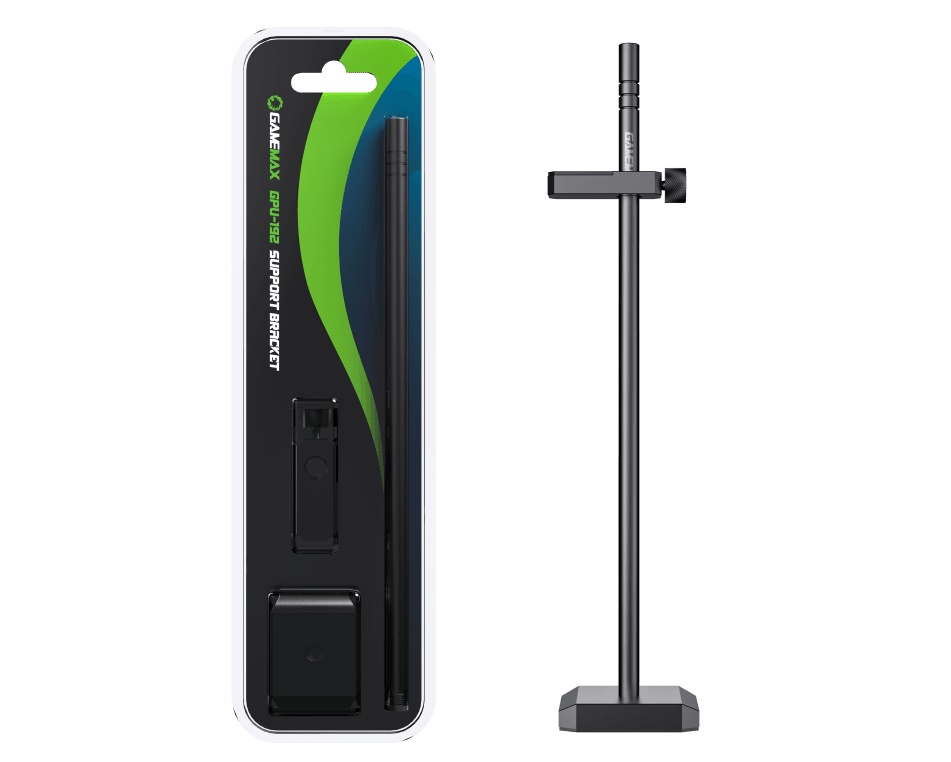
High-End Enthusiasts and Show Builds: Suitable for users prioritizing cooling and aesthetics, especially with ARGB-lit components.
Large GPU Owners: Users with heavy GPUs (RTX 4090, RX 7900 XT) benefit from reduced slot strain.
Thermal Optimization Needs: Improves airflow in enclosed cases or high-load environments.
Budget Builds: Extra costs for risers and cases may exceed budgets.
Legacy Hardware: Older motherboards (B450, H310) may lack PCIe version support or optimal layouts.
Portable Systems: Vertically mounted GPUs are more vulnerable to vibration during transport.
Hardware Selection: Opt for cases (GAMEMAX T20) and motherboards (GAMEMAX LEADER 2) with native vertical mounting support.
Cable Management: Use modular cables or flexible risers (Phanteks FL22) to minimize airflow obstruction.
Cooling Enhancement: Add bottom and top fans to create front-to-back airflow, maximizing thermal benefits.
With PCIe 5.0 adoption, manufacturers are refining vertical solutions. MSI’s new motherboards integrate PCIe 5.0 riser slots to reduce signal loss, while NVIDIA and AMD design next-gen GPUs (RTX 50 series, RX 8000 series) with more vertical compatibility. Modular cases like the Lian Li O11 Dynamic EVO further enable flexible mounting orientations, adapting to user preferences.
Vertical GPU installation represents a fusion of technical innovation and aesthetic design, offering notable cooling and visual advantages. However, its challenges—compatibility, cost, and installation difficulty—require careful consideration. Users should weigh their needs, budget, and hardware configuration: it’s an ideal choice for high-end enthusiasts seeking peak performance and style, while budget or simplicity-focused users may prefer traditional horizontal mounting. As technology advances and costs decrease, vertical installation is poised to become a mainstream trend in PC building.
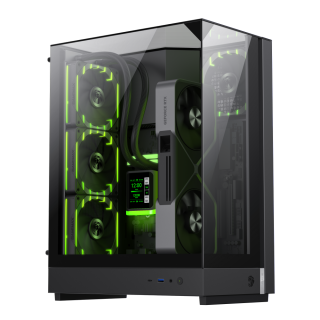
• Three-sided tempered glass offers a full, unobstructed view of your hardware.
• 90° rotated motherboard layout enhances airflow using the natural Stack Effect.
• Supports vertical GPU installation without a riser cable; compatible with NV50 series.
• Optimized for Back-to-Front (BTF) motherboards for clean, organized cable management.
• Space-efficient design supports 360mm liquid cooling, M-ATX motherboards, and SFX PSUs.
• Includes two ARGB PWM fans for dynamic, synchronized lighting effects.
• Metal nano nameplate adds a premium texture and sleek finish.
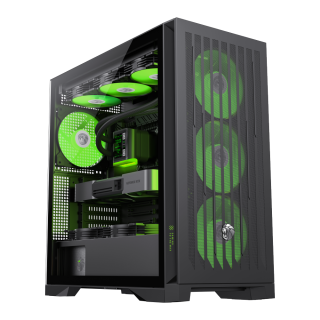
• Comprehensive Compatibility: Supports E-ATX motherboards, 425mm GPUs, 420mm radiators, 245mm PSUs, and 185mm air coolers for versatile hardware configurations.
• Advanced Cooling Matrix: Offers 9×120mm or 8×140mm fan mounts with 4 pre-installed 140mm ARGB PWM fans and a dedicated controller.
• Future-Proof Connectivity: Features Type-C Gen 2, dual USB 3.0 ports, and BTF motherboard compatibility for modern cable management.
• Effortless Building: Incorporates a tool-free design, vertical GPU support, and hidden cable routing with a detachable cover.
• Lion-Inspired Design: Showcases bold claw-mark mesh panels, a tempered glass side panel, and customizable ARGB lighting.

