

Building a high-end gaming rig around NVIDIA's flagship graphics cards is one of the most rewarding projects a PC enthusiast can tackle—but it's also one of the most unforgiving. The PC case you choose can make or break that build. RTX 4080 and RTX 4090 GPUs are absolute monsters in every sense: enormous in physical size, demanding in cooling, and hungry for power. Strap one into a case that wasn't designed for them and you'll quickly learn what thermal throttling feels like firsthand. After years of building and testing dozens of systems, I've put together a guide that cuts through the marketing noise and focuses on what actually matters when you're housing these powerhouses.
Let's get the numbers out of the way first, because they dictate everything else. The RTX 4090 measures approximately 336mm in length, 137mm in height, and 61mm in thickness. That's nearly 13.2 inches of raw silicon muscle, often consuming 450W of power under load. The RTX 4080 is slightly more approachable at around 304mm long, but it still demands serious clearance and airflow. Compare that to a mid-range card like the RTX 4060 (240mm), and you can see the jump is substantial.
These cards also push three-slot and sometimes near-four-slot configurations. In my experience, the biggest mistake beginners make is checking the GPU length clearance but ignoring the thickness and slot clearance. A case that technically fits a 340mm card might leave you with zero room for cable routing behind the motherboard tray, or worse, prevent the side panel from sitting flush. NVIDIA's Founders Edition cards set a high bar, and third-party models from ASUS, MSI, and Gigabyte often run even longer and thicker with their custom coolers.
The other variable that surprises people is weight. These cards weigh anywhere from 2.4kg to 3.5kg depending on the cooler design. A quality PC case with proper GPU support—either a reinforced PCIe slot or a dedicated GPU brace—isn't a luxury at this tier, it's a structural necessity. I've seen PCIe slots crack under sustained load from an unsupported RTX 4090, and nobody wants to troubleshoot a GPU that suddenly won't post because the slot gave out.
When evaluating a case for RTX 4080 or 4090 compatibility, most people start with GPU length. That's the right instinct, but it's only the beginning. Here's the full checklist I run through before recommending any case:
GPU length clearance: Aim for at least 360mm of internal clearance to account for the RTX 4090's 336mm body plus connector and mounting bracket tolerances. Some cases advertise 350mm clearance but have drive cages or front panel components that eat into usable space. Always check real-world measurements when available.
Slot width and clearance: These cards occupy 3.5 to 4.2 slots of space. A case needs sufficient width behind the motherboard tray and enough vertical clearance to accommodate the card's thickness without crushing cables or blocking adjacent slots. Standard ATX motherboards have seven PCIe slots, but many mid-tower designs only expose three or four—enough for the GPU, but tight if you want add-in cards for capture, networking, or storage.
Motherboard form factor support: Most ATX mid-towers will fit an RTX 4090 lengthwise, but if you're running an E-ATX motherboard, you'll need a full-tower or a specifically designed mid-tower that explicitly supports extended ATX. I've found that cases claiming ATX compatibility sometimes have E-ATX cutouts that don't actually align with E-ATX screw patterns, so verify before you buy.
PCIe riser cable clearance: If you're considering a vertical GPU mount for aesthetic reasons, check whether the case provides adequate vertical clearance and a reinforced PCIe riser. Not all riser cables are rated for the sustained bandwidth and weight of a 4090. A cheap riser that fails can take your GPU with it.
Here's where the RTX 4090 really flexes its demands. We're talking about 450W of heat output in a single card—equivalent to an entire mid-range gaming system's power draw just for the GPU alone. The case you choose needs to handle this heat efficiently, or you'll spend your gaming sessions watching thermal benchmarks instead of enjoying them.
In my testing, cases with mesh front panels consistently outperform solid front panels when cooling high-TDP GPUs. The reason is straightforward: positive air pressure created by front intake fans drawing cool air through a mesh panel dramatically reduces GPU core temperatures compared to closed-front designs that rely on limited top and rear airflow. I've recorded differences of 8–12°C on the GPU core just by switching cases with identical fan configurations.
Fan mount points matter too. Look for cases that offer at least three 120mm or 140mm intake positions at the front, two or three at the top, and one rear exhaust. The RTX 4090 runs a triple-fan cooler, and it expects ambient airflow across its heatsink. Cases with dust filters that restrict airflow, or with top-mounted radiators that block exhaust pathing, tend to trap heat inside the chassis. A well-designed case gives you the option to configure airflow in a push-pull setup without clearance conflicts.
Support for custom liquid cooling is another consideration. If you're planning an AIO cooler, many RTX 4090 cards work best with 360mm radiators. Verify that the case can mount a 360mm radiator in the top or front position without interfering with tall RAM modules (some DDR5 kits with tall heat spreaders conflict with front-mounted 360mm rads). I've encountered this issue firsthand with G.Skill Trident Z5 RAM and a 360mmCorsair H150i, where the radiator hoses barely cleared the RAM clearance in a case that "officially" supported 360mm rads.
For air cooling enthusiasts, the case's ability to accommodate large tower coolers is equally important. Many RTX 4090 cards work beautifully with robust air cooling solutions when paired with a quality case. Look for CPU cooler clearance of at least 165mm to give yourself flexibility with premium dual-tower designs like the Noctua NH-D15 or be quiet! Dark Rock Pro 4.
One aspect that gets overlooked in GPU-centric case shopping is the power supply and cable routing situation. At these power levels, you're likely running a 1000W or 1200W PSU. These units are large—typically 160mm to 180mm deep—and they generate their own heat. A case with a poorly ventilated or cramped PSU chamber can cause PSU inefficiencies and reduced longevity, especially in warm environments.
The best cases for RTX 4090 builds feature bottom-mounted PSU chambers with dedicated ventilation, or side-mounted PSU trays that keep the power supply isolated from GPU heat. I've noticed that cases with the PSU directly behind the GPU tend to run both components hotter, since the GPU dumps warm air directly into the PSU intake. If your case has a PSU chamber with a separate thermal zone, that's a significant advantage for sustained gaming sessions.
Cable management also deserves attention. The RTX 4090 requires a 16-pin 12VHPWR power connector (or adapter from dual 8-pin EPS connectors for some models). This connector needs adequate routing space behind the motherboard to avoid sharp bends that could degrade over time. Cases with deep cable routing channels, velcro tie-downs, and generous grommet sizing make this process far less stressful. I've built in cases where cable routing was an afterthought, and the difference in final build quality and aesthetics—and more importantly, long-term reliability—is immediately noticeable.
Storage drive mounting has also evolved. Many modern cases shift 2.5" SSD mounts to the back of the motherboard tray, freeing up the main chamber for GPU clearance. If you're running multiple SSDs and an RTX 4090, a case that offers back-panel SSD mounting can be the difference between a clean build and a tangled mess.
Beyond the core requirements, a few extra features can significantly improve your day-to-day experience with a high-end build. Dust filtration is essential—these cards pull significant air through the chassis, and without proper filters, you'll be cleaning out buildup every few months. Magnetic filters on top and front panels are the easiest to maintain.
Tool-less access panels are another quality-of-life feature worth prioritizing. When you're upgrading components, swapping thermal paste, or simply doing maintenance, a case that lets you remove panels without reaching for a screwdriver makes the process far more pleasant. tempered glass side panels have become the standard for showcasing these powerful cards, and they pair especially well with cases that include addressable RGB integration for a dramatic visual effect.
Finally, consider the case's noise profile. High-end GPUs under load can push your system fans to their limits. Cases with sound-dampening side panels, rubber grommets on mounting points, and thoughtfully placed fan placements can reduce overall system noise by a noticeable margin without sacrificing thermal performance.
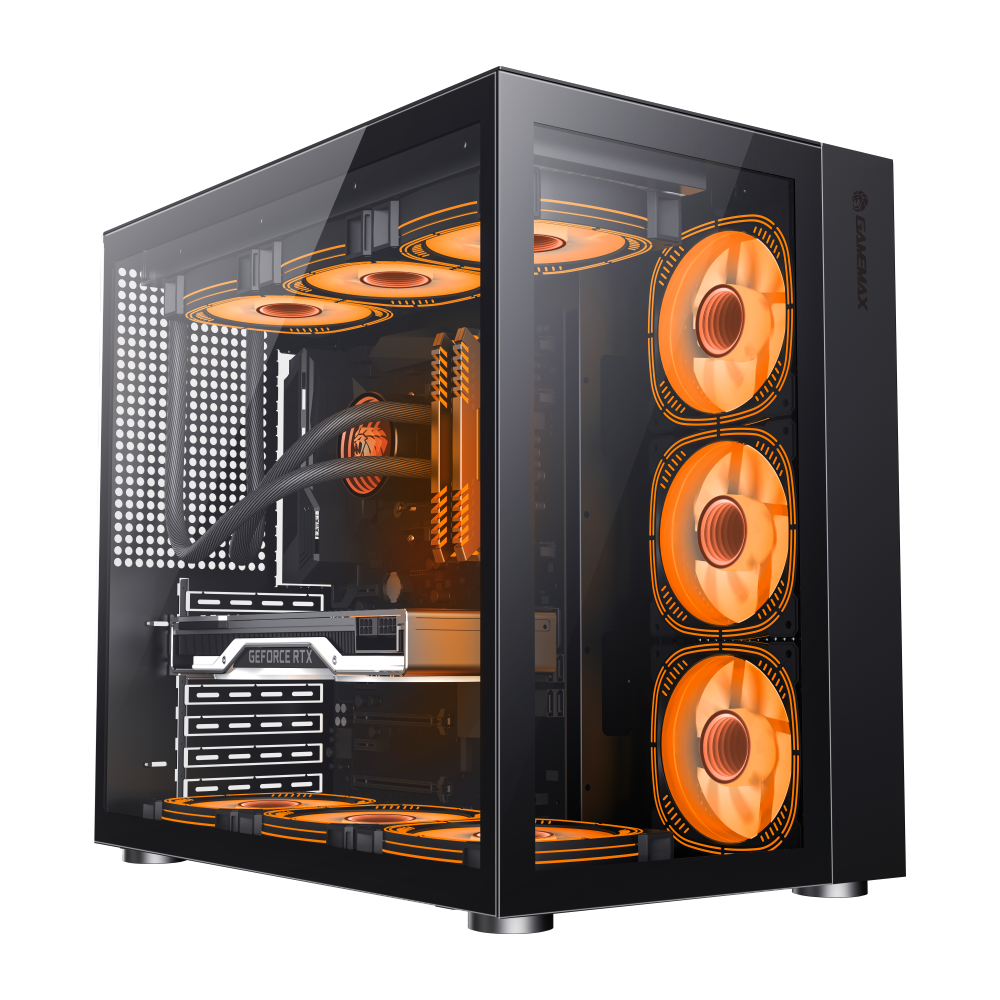
ATX Mid-Tower with modular design, supports ATX/M-ATX/ITX, superior cooling and water cooling support.
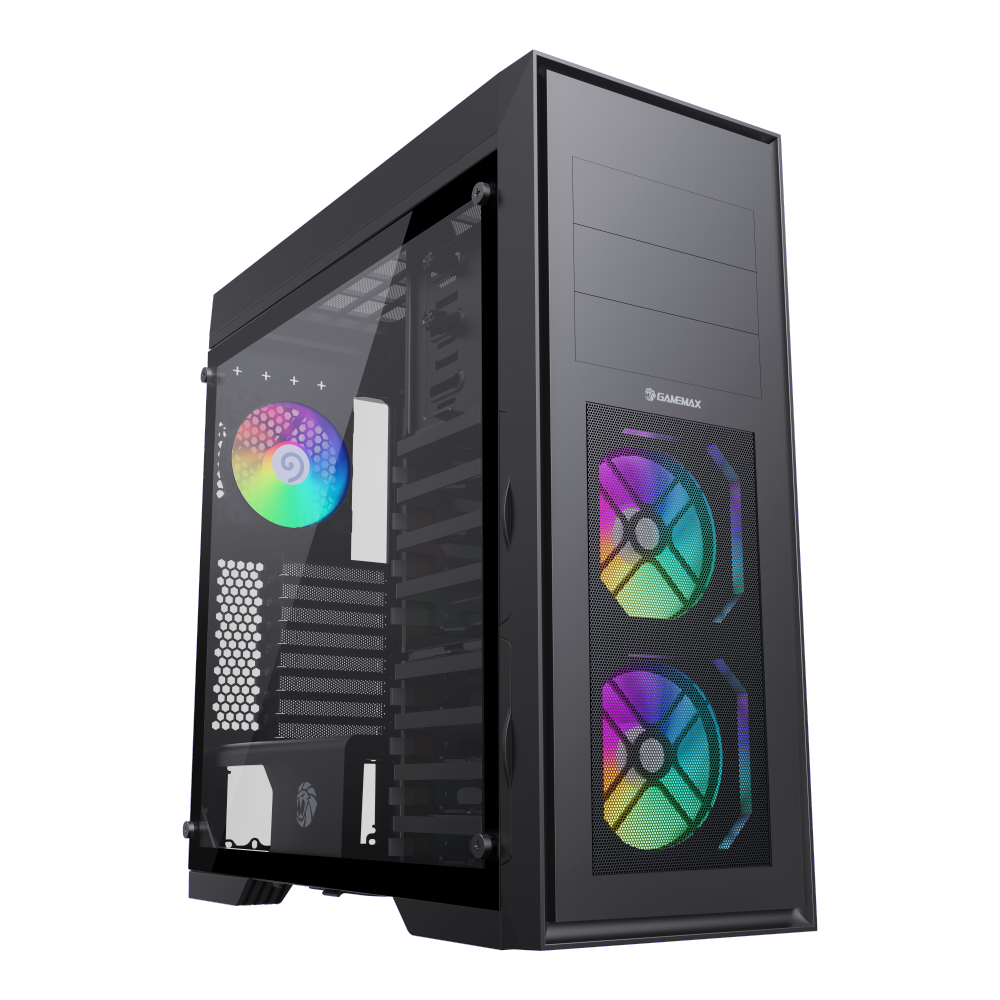
Full Tower case, supports EATX/ATX/M-ATX/ITX, fits GPUs up to 420mm, pre-installed 12 fans.
Whether you go with a feature-rich mid-tower or a full-tower powerhouse, the right PC case for your RTX 4080 or 4090 build should handle the physical demands of the card, provide robust cooling headroom, and give you the cable management and build quality you need for a system that lasts. Choose wisely, and your rig will reward you with years of silent, powerful performance.

