

A full tower PC case represents the largest standard enclosure category available to PC builders. While mid-tower cases dominate the market for their balance of size and functionality, full towers cater to users who need maximum expansion capability, extreme cooling options, or simply prefer the aesthetic of a commanding presence on their desk. Understanding what defines this category and when it makes sense to choose one helps builders make informed decisions for their specific needs.
The distinction between mid-tower and full tower lacks a strict industry standard, but general guidelines exist. Full tower cases typically measure over 550mm in height and exceed 220mm in width. Internal volume generally surpasses 60 liters, compared to 40-55 liters for mid-tower alternatives. This additional space translates directly to practical capabilities unavailable in smaller enclosures.
More important than external dimensions is motherboard support. Full towers accommodate E-ATX and larger form factors, while mid-tower cases often stop at standard ATX. The expansion slot count matters significantly: full towers provide eight or more slots versus seven in mid-towers. This difference enables dual-GPU configurations or systems with multiple add-in cards for capture, networking, or storage expansion.
Not every build requires full tower capacity. Users running single-GPU gaming systems with air cooling typically gain nothing from the extra space. The category shines in specific scenarios:
Water Cooling Enthusiasts: Custom loop configurations with multiple radiators need mounting space. Full towers allow 360mm or larger radiators in front, top, and sometimes bottom positions simultaneously. The internal volume accommodates pumps, reservoirs, and complex tubing runs without cramping components together.
Content Creators and Professionals: Video editors, 3D renderers, and streamers often require multiple capture cards, 10GbE networking adapters, NVMe expansion cards, or dual GPUs for rendering. Full towers provide the expansion slots and physical space these configurations demand.
Storage-Intensive Builds: NAS systems, media servers, and video production workstations need drive capacity. Full towers accommodate eight or more 3.5-inch hard drives while maintaining adequate cooling—something impossible in smaller cases.
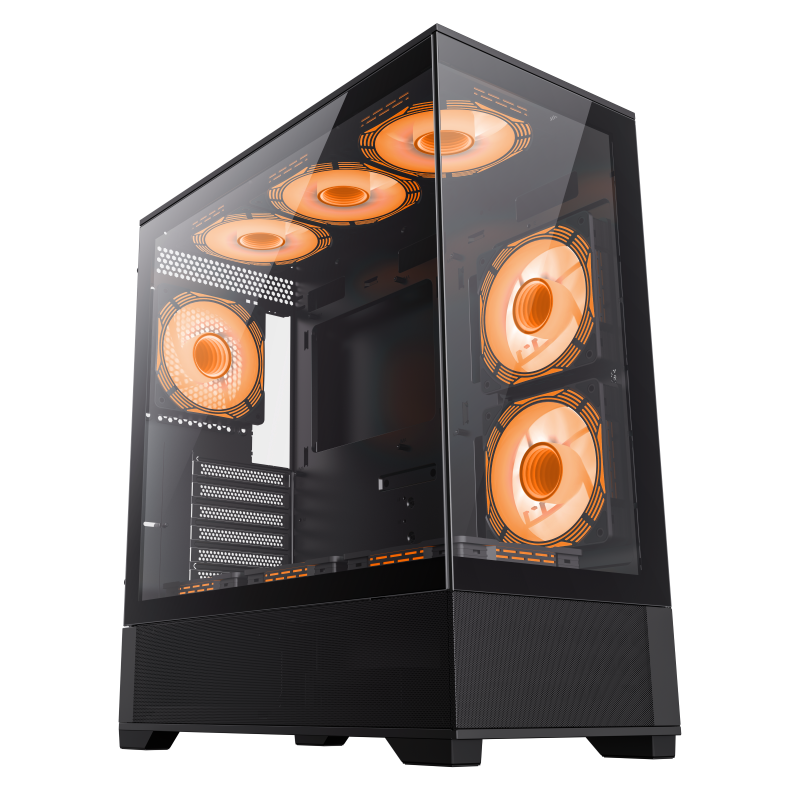
The Vista AB exemplifies modern full tower design philosophy. Its expansive interior supports E-ATX motherboards with comfortable clearance for custom water cooling configurations. Front panel options include mesh for maximum airflow or tempered glass for showcase aesthetics. Multiple 360mm radiator mounts enable comprehensive cooling solutions for CPU and multiple GPUs simultaneously.
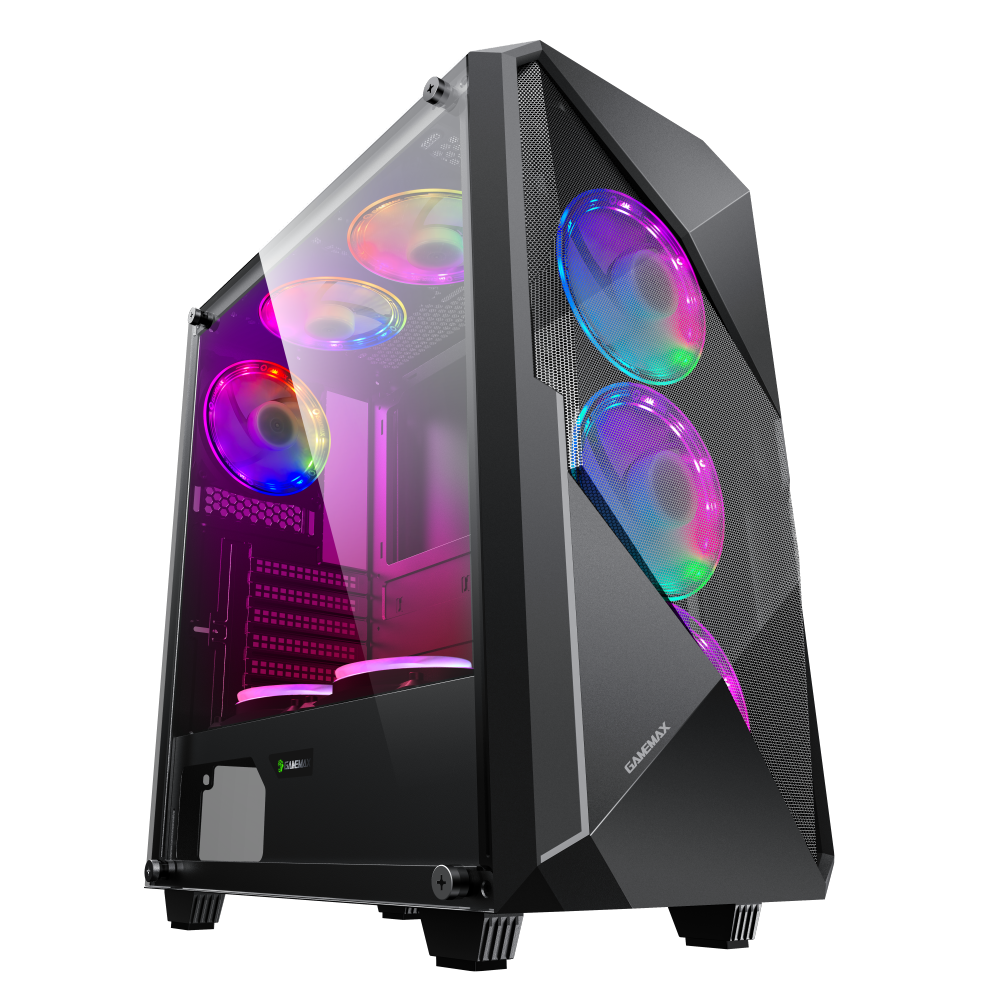
For builders prioritizing gaming aesthetics alongside functionality, the Revolt delivers distinctive styling without compromising capability. The case features dedicated routing channels for custom loop tubing, with pump and reservoir mounts integrated into the chassis design. GPU clearance accommodates any current graphics card, and front panel USB-C ensures modern connectivity standards.
Before purchasing a full tower, measure your available space carefully. These cases demand substantial desk or floor real estate. A typical full tower occupies significantly more volume than a mid-tower, and the weight of a fully populated system can exceed 25kg. Consider whether you'll need to move the system for LAN events or maintenance—full towers are not portable.
Cable management improves with more space behind the motherboard tray, but this space fills quickly with thick sleeved cables and multiple fan headers. Cases with 25mm or greater cable management depth simplify builds and improve airflow. Modular power supplies reduce cable clutter substantially—essential in any build but particularly valuable in systems with many drives or fans.
The larger volume of full towers affects thermal dynamics differently than mid-towers. Components generate the same heat, but the increased air volume provides more buffer before temperatures rise. However, proper airflow configuration remains essential. More fans don't automatically mean better cooling—directed airflow paths matter more than raw fan count.
Front intake fans paired with rear and top exhaust create a directed channel that pulls cool air across components before exhausting it. Side-mounted fans can supplement airflow but often introduce turbulence. Test different configurations with your specific components; every build has unique thermal characteristics.
Positive pressure—more intake than exhaust capacity—prevents dust infiltration through unfiltered gaps. Most quality cases include filters on intake positions, but budget options may omit them. Aftermarket magnetic filters offer an easy upgrade for cases lacking adequate filtration.
Full towers cost more, occupy more space, and offer capabilities many builders never use. If you're running a single GPU, air cooling, and standard ATX motherboard with modest storage needs, a mid-tower serves you better for less money. The extra space becomes useful only when your build requirements genuinely exceed mid-tower capabilities.
Consider your upgrade path as well. A full tower purchased today accommodates components you might add years later. If you anticipate multi-GPU setups, extensive water cooling, or mass storage expansion, the full tower investment pays off over time. If your build will remain relatively standard, save the money and desk space.
Premium full towers use thicker steel (0.8mm SPCC or higher) or aluminum panels. This construction provides better structural integrity, dampens vibration, and simply feels more substantial. Tempered glass side panels should be minimum 4mm thick; thinner glass risks cracking during installation or transport.
Tool-free mechanisms for side panels and drive bays indicate thoughtful design. These features seem minor but significantly improve the building and maintenance experience. Cases that fight you during assembly suggest compromises in other areas as well.
Choose a full tower when your build requirements demand capabilities that mid-towers cannot provide. Water cooling capacity, expansion slots, and drive storage represent the primary advantages. For mainstream gaming builds without these specific needs, mid-tower cases offer better value and take up less space. Evaluate your actual requirements rather than assuming larger is better.

